B2CL or B2CS?
A ₹1,77,000 sale to an unregistered customer in Karnataka belongs in B2CL. In the spreadsheet it went into B2CS.
One wrong table, and the customer's state never sees the sale.

Your month's invoices and credit notes, sorted into B2B, B2CL, B2CS, exports, credit notes, nil-rated, HSN and documents issued, checked for mistakes, and ready to download sheet by sheet for the GST offline tool.
Sign-ups open November 2026 · 14-day free trial · No card needed to start · GST returns are on the Growth plan and above.
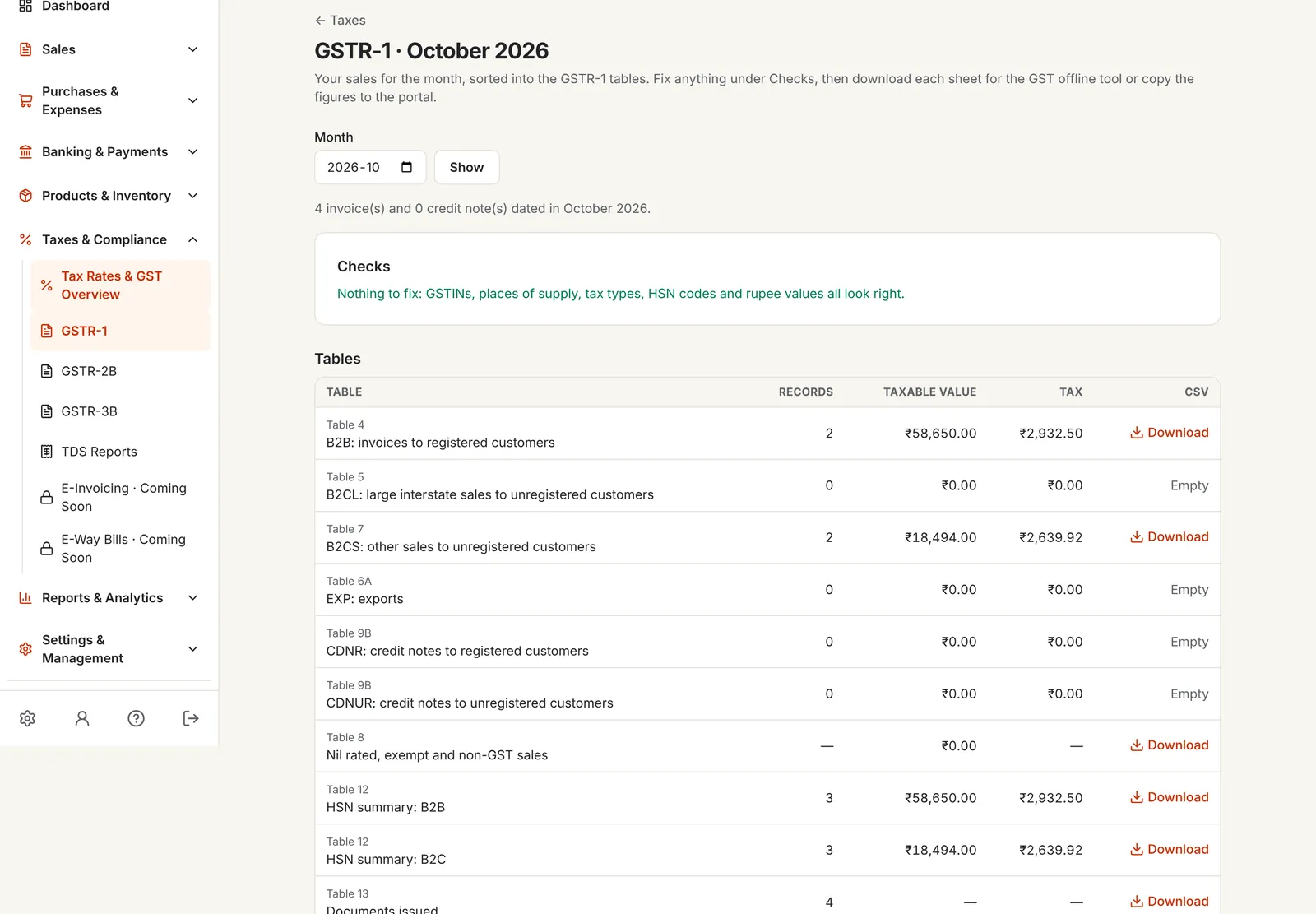
GSTR-1 preparation software sorts the month's sales into the tables of the return, totals them the way the portal expects, and checks them before you file, so the return matches your invoices.
In PikZiy Books, GSTR-1 comes from the same GST invoices you send, alongside GSTR-3B and the other GST reports.
A ₹1,77,000 sale to an unregistered customer in Karnataka belongs in B2CL. In the spreadsheet it went into B2CS.
One wrong table, and the customer's state never sees the sale.
A credit note for a walk-in customer is reported in CDNUR when it should reduce B2CS.
B2C sales overstated for the month.
The customer's GSTIN starts with 29 but the invoice charged CGST and SGST.
Your customer can't claim the credit, and calls.
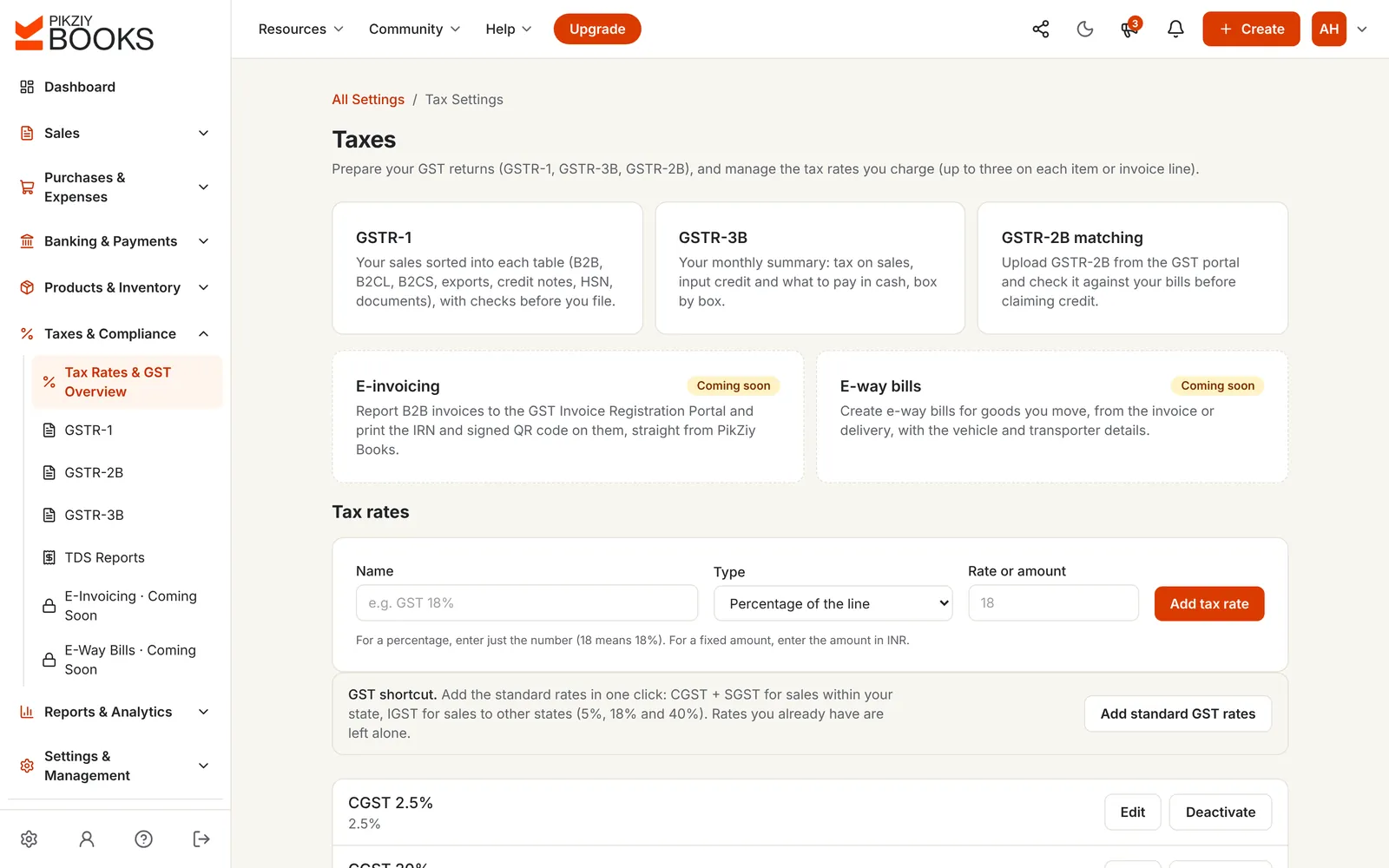
Screenshots of the real app with a sample shop, Anvi Home Store in Pune.
Each month opens with checks on GSTINs, places of supply, tax types, HSN codes and rupee values. Fix what's flagged, and the tables update.
Invoices with a customer GSTIN go to B2B; sales to unregistered customers go to B2CL or B2CS by state and value; exports to EXP.
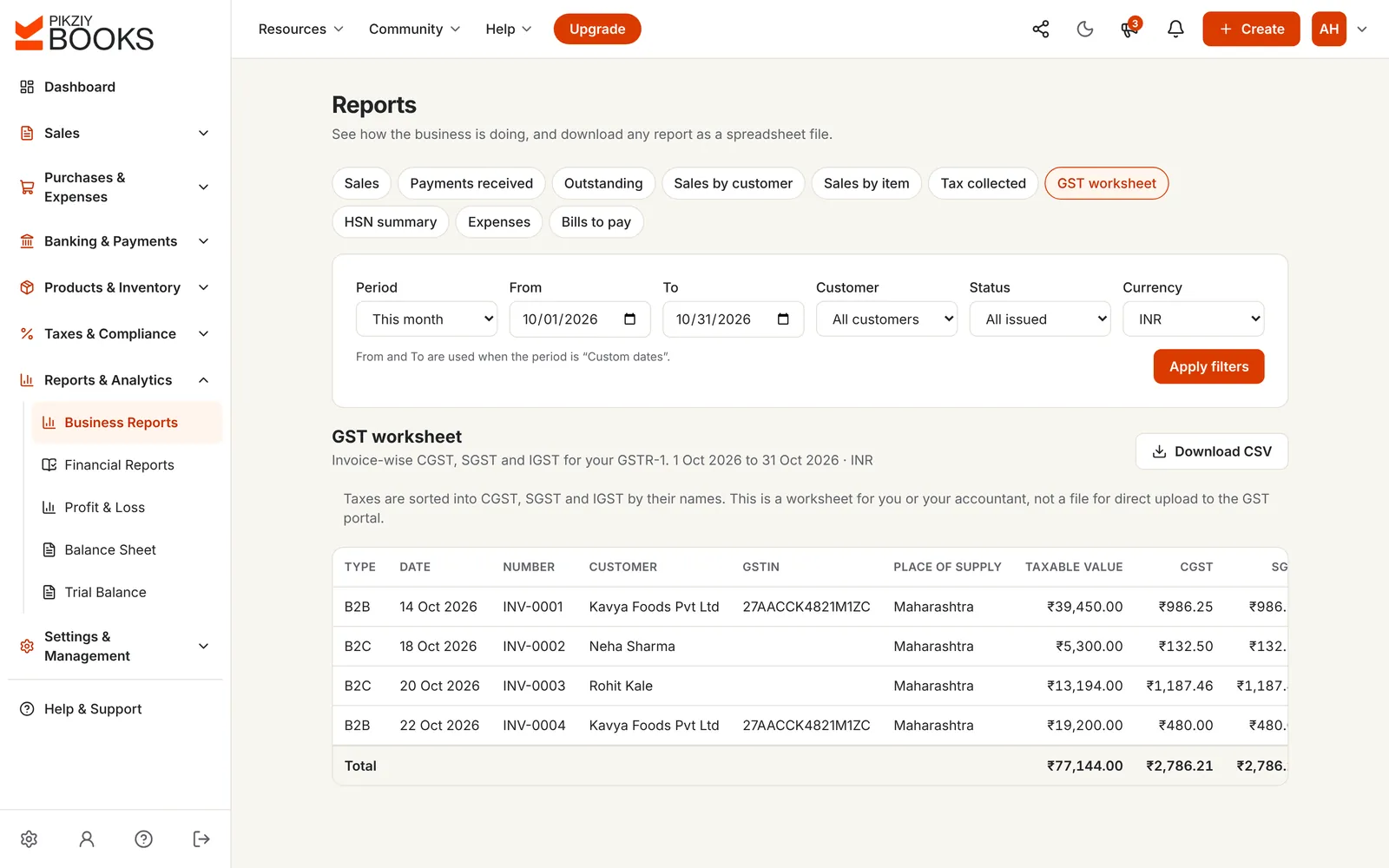
The HSN summary is split into B2B and B2C, with quantities and units, and Table 13 counts the documents issued in each series, including cancelled ones.
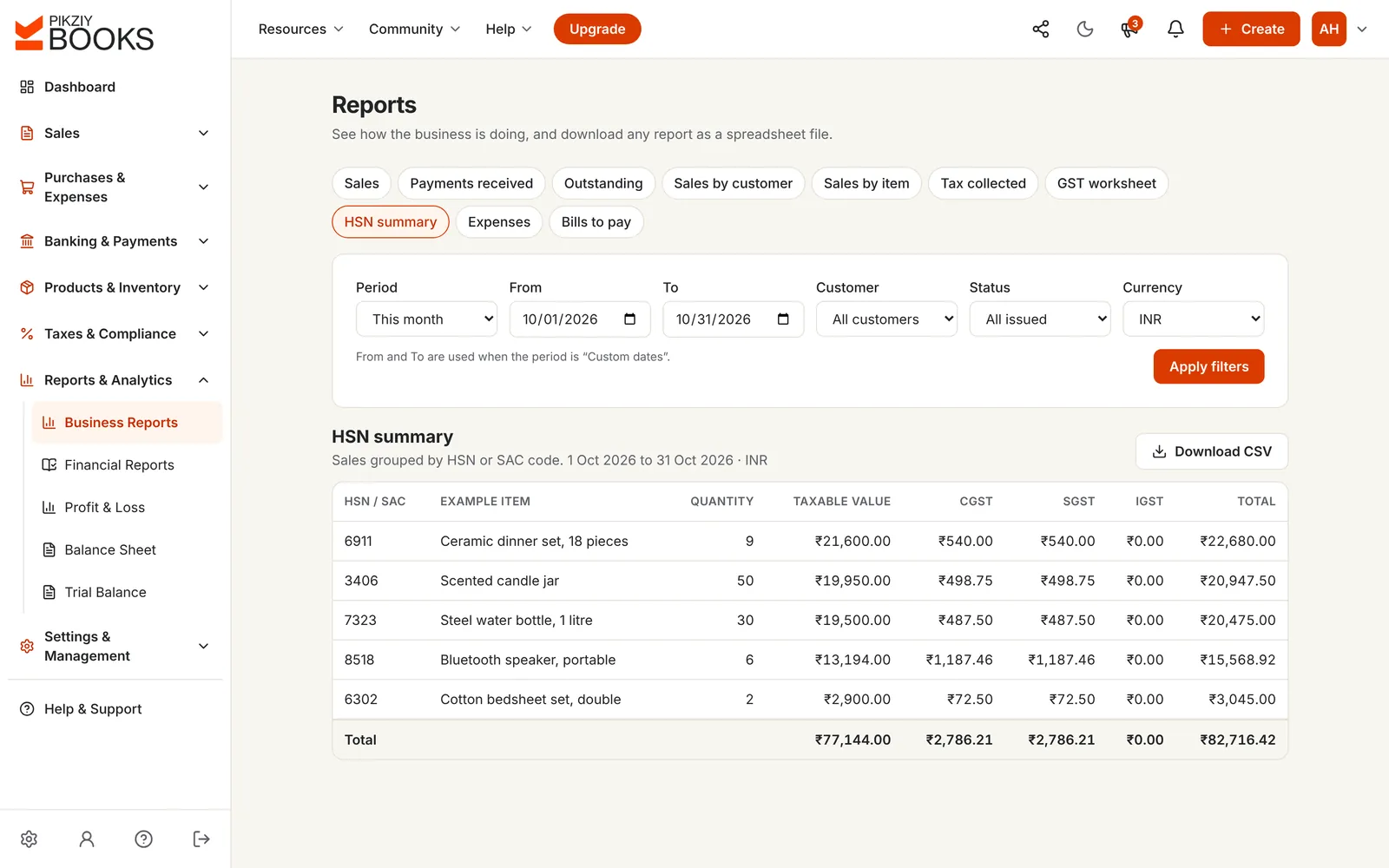
Each table downloads as CSV in the GST offline tool's layout. Import them into the tool, generate the file and upload it to the portal, or copy the figures in.
Add a month's sales, registered, unregistered or abroad, with their value and rate. See them sorted into GSTR-1 tables by the same code PikZiy Books uses, with B2CS totalled by state and rate.
| GSTR-1 table | Invoices | Taxable |
|---|---|---|
| B2BTable 4 | 2 | ₹1,59,450.00 |
| B2CLTable 5 | 1 | ₹1,50,000.00 |
| B2CSTable 7 | 2 | ₹18,494.00 |
| EXPTable 6A | 1 | ₹2,64,000.00 |
Sorted by the same code PikZiy Books uses for your GSTR-1: B2CL above ₹1 lakh an invoice between states, B2CS for the rest, exports in EXP. Nothing you type is saved.
Understand the tables: GSTR-1 explained and CGST, SGST and IGST with examples.
Invoices to customers with a GSTIN, invoice by invoice.
Inter-state invoices to unregistered customers above ₹1 lakh.
Other sales to unregistered customers, totalled by state and rate.
Exports, with or without IGST, and port and shipping bill for goods.
Credit notes to registered customers, and to unregistered ones on B2CL or exports.
Sales by HSN or SAC code, split into B2B and B2C.
| By hand in the offline tool | PikZiy Books | |
|---|---|---|
| Sorting into tables | Decided invoice by invoice | By the rules, automatically |
| B2CS totals | A pivot table | By state and rate |
| Credit notes | Matched to invoices by memory | Follow their invoice |
| HSN summary | Built separately | From the same invoices, B2B and B2C |
| Mistakes | Found by the portal, or later | Checked before you download |
| Time | An evening a month | A few minutes |
Table 4, invoice by invoice.
Growth plan and aboveTables 5 and 7, by value and state.
Growth plan and aboveTable 6A, WPAY or WOPAY.
Growth plan and aboveCDNR and CDNUR, or reducing B2CS.
Growth plan and aboveTable 8, from each item's GST type.
Growth plan and aboveTable 12, split into B2B and B2C.
Growth plan and aboveTable 13, with cancelled numbers.
Growth plan and aboveGSTINs, places of supply, tax types, HSN.
Growth plan and aboveIn the offline tool's layout.
Growth plan and aboveConverted at the rupee rate you enter.
Growth plan and aboveFrom the same month's records.
Growth plan and aboveThe month can't change once filed.
Business plan and aboveGSTR-1 is on Growth and above, with GSTR-3B and GSTR-2B matching.
| Feature | Starter | Growth | Business | Enterprise |
|---|---|---|---|---|
| People who can sign in | 1 | 3 | 10 | 20 |
| GST invoices and credit notes | Included | Included | Included | Included |
| GSTR-1 tables, checks and CSV sheets | Included | Included | Included | Included |
| GST worksheet and HSN summary | Not included | Included | Included | Included |
| Period locks | Not included | Included | Included | Included |
Every plan has unlimited invoices, customers and items, and starts with a 14-day free trial. Prices are on the plans page, paid monthly or yearly. Businesses that sign up from 1 November 2026 to 30 April 2027 and pay for a year get 18 months for the price of 12. Compare every feature
Software that sorts a month's invoices and credit notes into the GSTR-1 tables, B2B, B2CL, B2CS, exports, credit notes, nil-rated, HSN summary and documents issued, checks them, and produces the sheets you upload to the GST portal.
B2B (table 4), B2CL (5), exports (6A), B2CS (7), nil-rated, exempt and non-GST (8), credit notes to registered and unregistered customers (9B), the HSN summary split into B2B and B2C (12) and documents issued (13).
B2CL is for sales to unregistered customers in another state where the invoice is more than ₹1 lakh (₹2.5 lakh before 1 August 2024). Every other sale to an unregistered customer goes to B2CS, as totals by state and rate. The tool on this page shows it with your own numbers.
Credit notes to registered customers go to CDNR. For unregistered customers they follow their invoice: notes on B2CL invoices or exports go to CDNUR, and the rest reduce B2CS.
Download each sheet as CSV. The sheets follow the layout of the GST offline tool, which turns them into the file you upload. Or copy the figures into the portal yourself. PikZiy Books doesn't upload GSTR-1 for you.
GSTINs, places of supply, whether CGST and SGST or IGST fits the states, HSN codes and foreign-currency invoices without a rupee rate, with a link to each record to fix.
Invoices to customers outside India go to EXP, as WPAY with IGST or WOPAY under LUT. Add the port code and shipping bill for goods, and the rupee rate for invoices in other currencies, on the GSTR-1 page.
Businesses with turnover up to ₹5 crore must show at least 4-digit HSN codes on B2B invoices; above ₹5 crore, 6 digits. Since April 2025 the portal asks for the HSN summary split into B2B and B2C, which PikZiy Books does. See HSN vs SAC codes.
Amendments to earlier months (tables 9A, 9C, 10 and 11), advances received (table 11), supplies through e-commerce operators, SEZ supplies and deemed exports. Report these separately with your CA.
GSTR-1, GSTR-3B and GSTR-2B matching are on Growth and above.
PikZiy Books opens for sign-ups in November 2026. Join the waitlist and we will tell you the day you can start.
Join the waitlist