Rebuilt from invoices every month
Someone copies each invoice into the offline tool's sheets, row by row, the night before the due date.
A B2C sale entered as B2B, and a GSTIN typed wrong.

Your invoices, credit notes and bills, sorted into GSTR-1 tables, summed into GSTR-3B, and checked against GSTR-2B, with the HSN summary and an invoice-wise GST worksheet. Checks catch the mistakes before you file; you or your CA file on the portal.
Sign-ups open November 2026 · 14-day free trial · No card needed to start · GST returns are on the Growth plan and above.
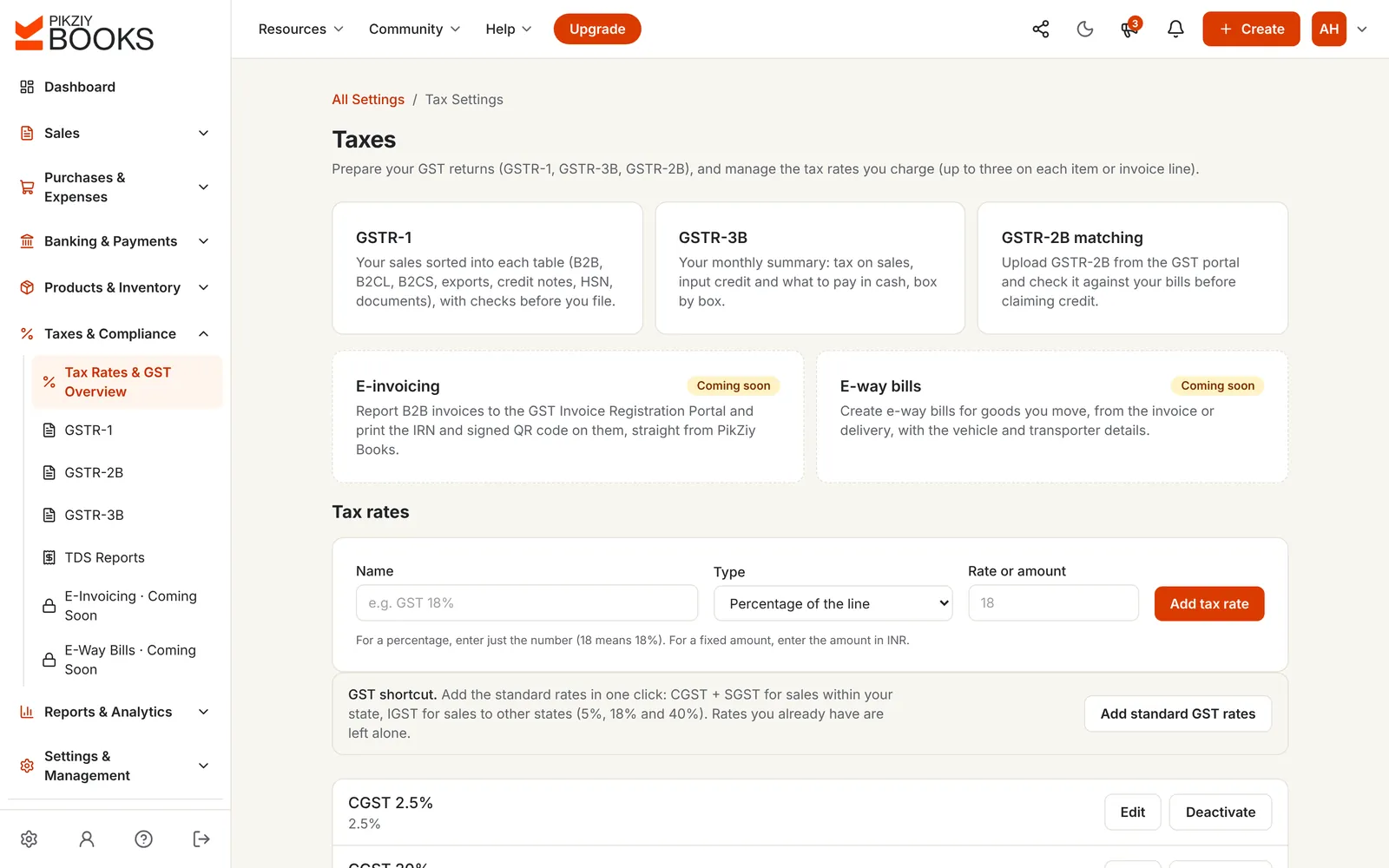
GST reports software turns the invoices and bills you record into the figures your GST returns need, sorted and totalled the way the portal asks for them, with checks before you file.
In PikZiy Books the reports come straight from your GST invoices and supplier bills, so the return always matches the books.
Someone copies each invoice into the offline tool's sheets, row by row, the night before the due date.
A B2C sale entered as B2B, and a GSTIN typed wrong.
The bill is in your books, but the supplier never reported it. The credit is claimed anyway.
₹1,080 of credit with no supplier invoice behind it, found in a notice.
Table 12 is filled with whatever codes come to mind, split into B2B and B2C by guesswork.
Totals that don't match the sales tables.
Screenshots of the real app with a sample shop, Anvi Home Store in Pune.
Sales sorted into B2B, B2CL, B2CS, exports, credit notes, nil-rated, HSN (B2B and B2C) and documents issued, with checks first and a CSV for each sheet.
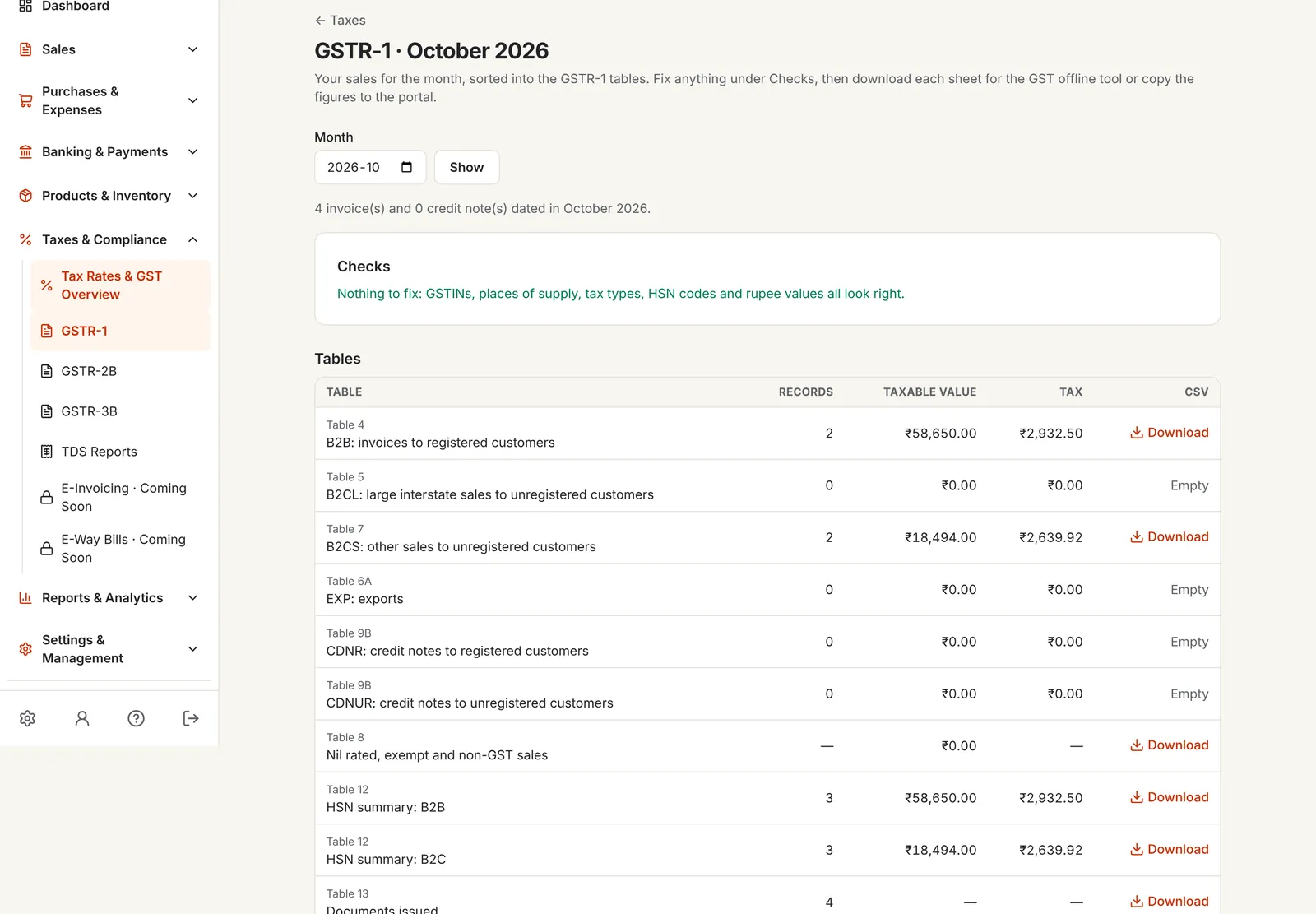
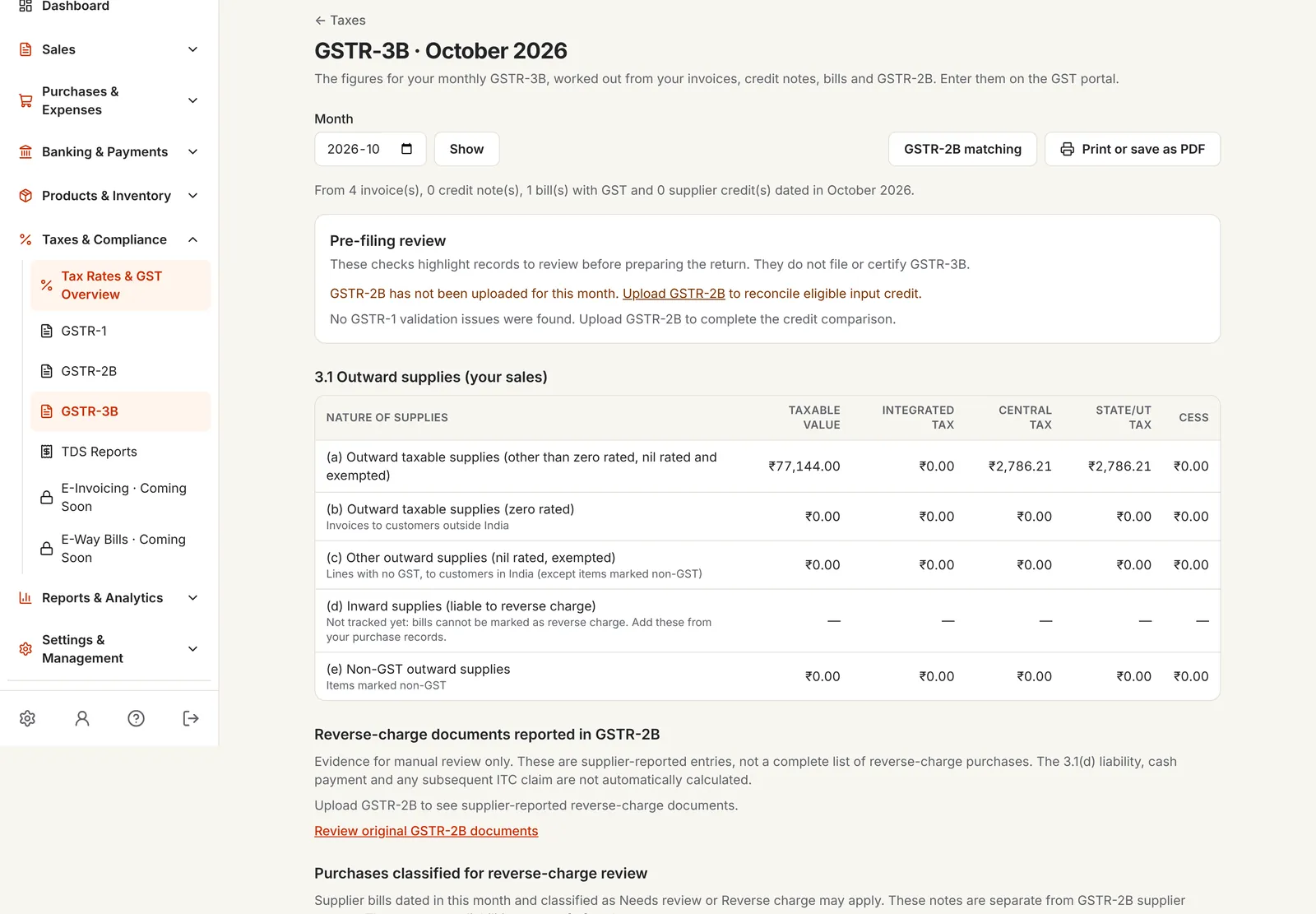
Table 3.1 from your sales, 3.2 for inter-state sales to unregistered customers, 4 for input credit, and 6.1 with the credit set off in the order the law sets.
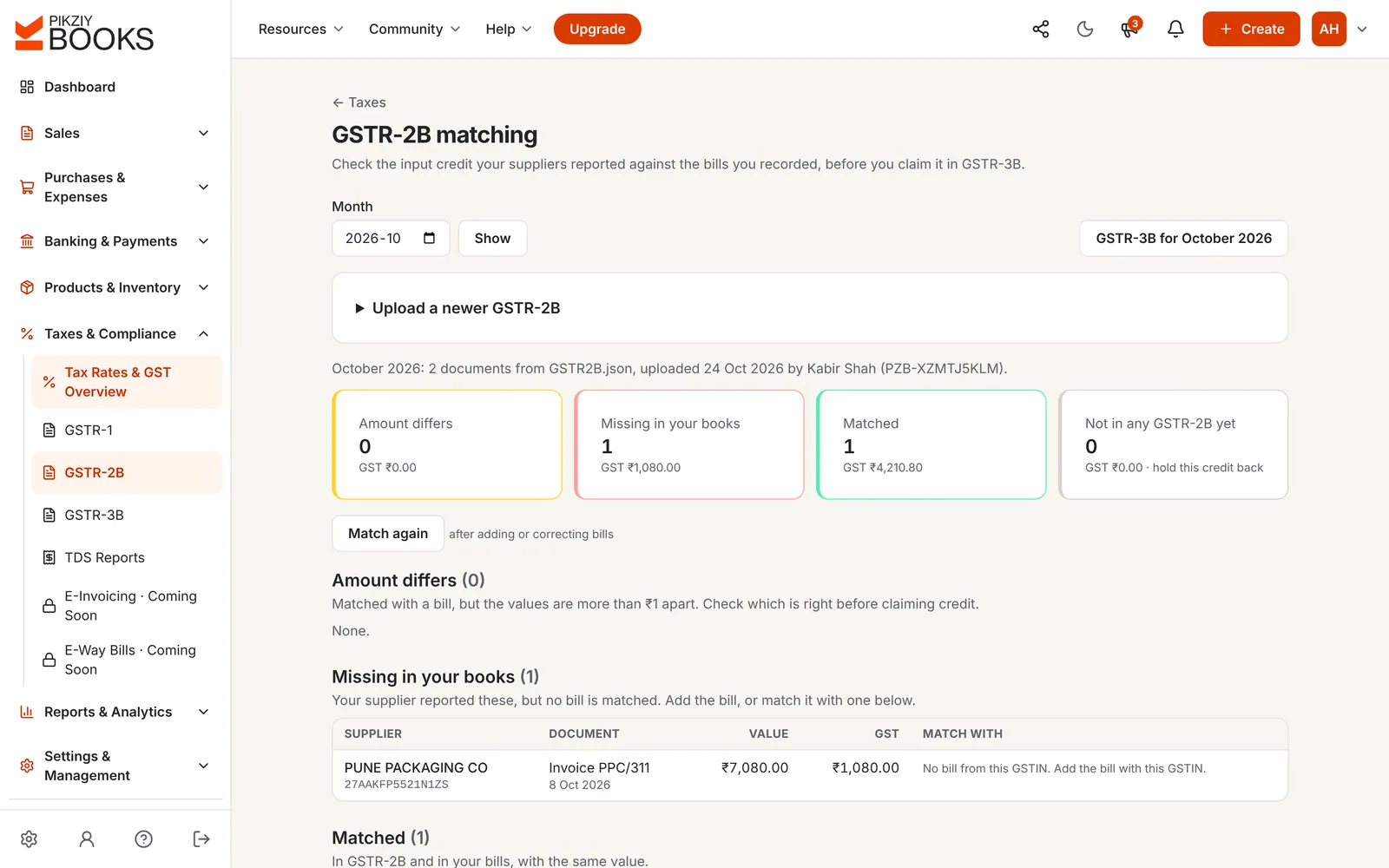
Upload the month's GSTR-2B. Supplier invoices are matched with your bills; differences and invoices missing from your books are listed, and credit not in 2B is held back.
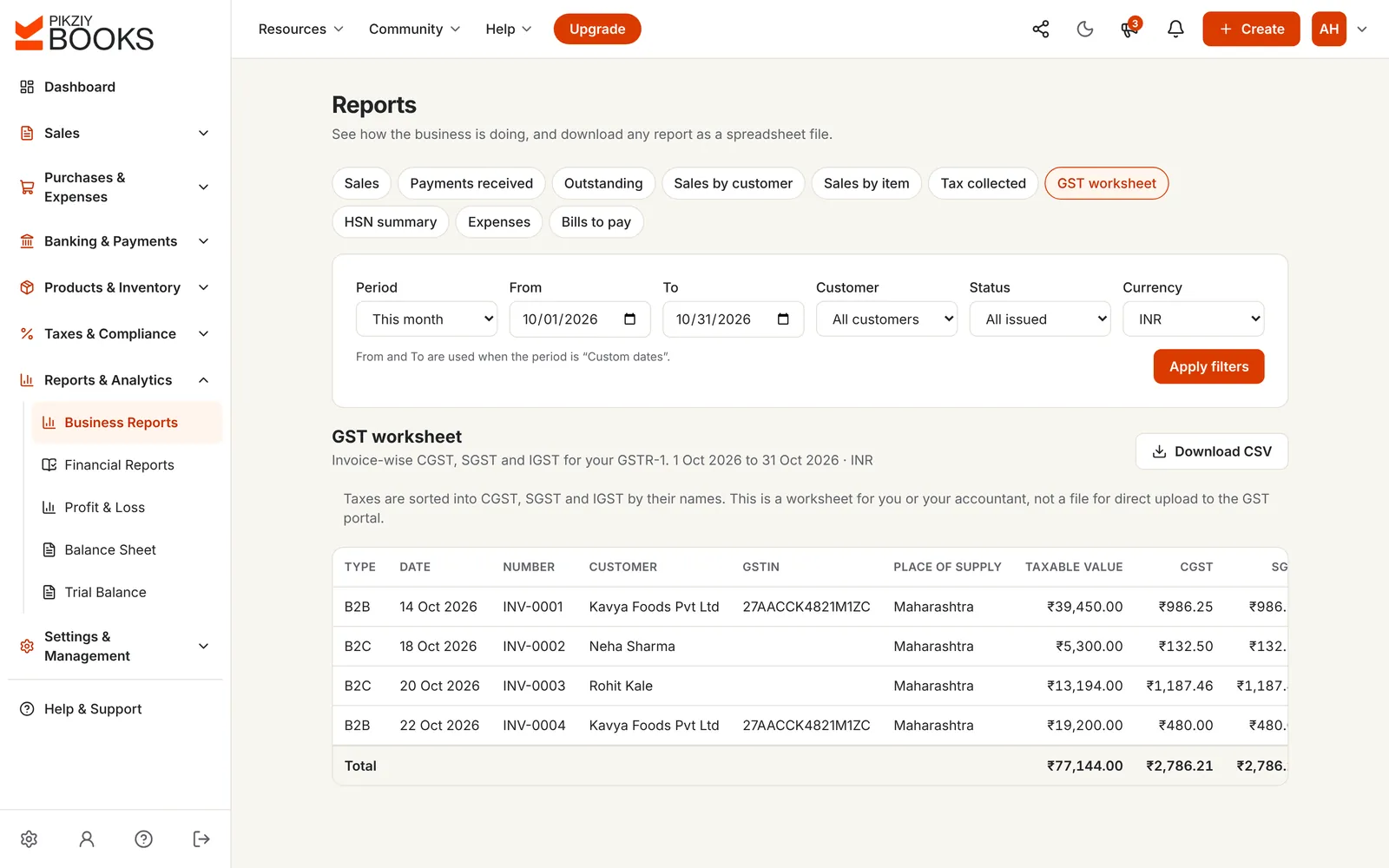
Every invoice in the period as B2B or B2C, with the customer, GSTIN, place of supply, taxable value and CGST, SGST and IGST, for you and your accountant.
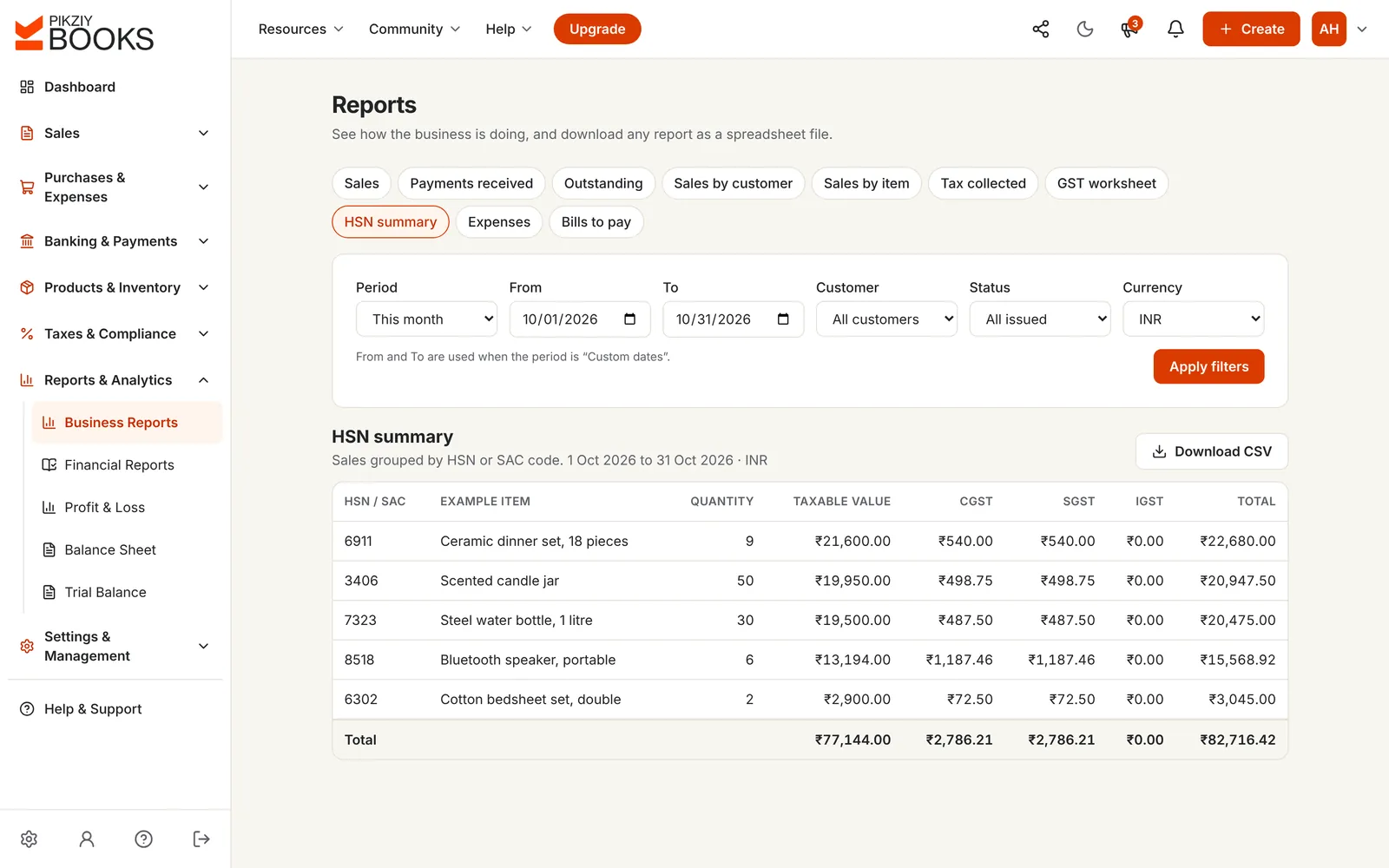
Sales grouped by HSN or SAC code with quantity, taxable value and each tax, so Table 12 adds up to the sales tables.
Pick the month, whether you file monthly or quarterly, and your state. See the due dates for GSTR-1, GSTR-3B, IFF and PMT-06.
The usual due dates under the GST rules. The government sometimes extends them, so check the GST portal near the date. Late filing attracts a late fee, and late payment attracts interest. Nothing you choose is saved.
Before you file: GSTR-1 explained and GST mistakes that disrupt your accounting.
| Spreadsheets and the offline tool | PikZiy Books | |
|---|---|---|
| GSTR-1 sheets | Copied row by row | Built from your invoices, CSV per sheet |
| B2CL or B2CS | Decided by hand | By the rules, by value and state |
| Input credit | From the purchase register | Checked against GSTR-2B |
| GSTR-3B set-off | Worked out on paper | In the legal order, with the cash to pay |
| Mistakes | Found after filing | Checks before you file |
| HSN summary | Filled from memory | Grouped from your invoices |
B2B, B2CL, B2CS, EXP, CDNR, CDNUR, nil, HSN, documents.
Growth plan and above3.1, 3.2, 4 and 6.1, with set-off.
Growth plan and aboveYour bills against your suppliers' filings.
Growth plan and aboveGSTINs, places of supply, tax types, HSN codes.
Growth plan and aboveInvoice-wise CGST, SGST and IGST.
Growth plan and aboveSales by HSN or SAC code.
Growth plan and aboveTax on invoices, less credit notes.
Growth plan and aboveClassify bills and cross-check with 2B.
Business plan and aboveReceivable and payable, by section.
Business plan and aboveEvery report as a spreadsheet file.
Business plan and aboveMonths can't change once filed.
Business plan and aboveComing soon.
GST returns and reports start on Growth. Business adds reverse charge review, the TDS report and CSV downloads.
| Feature | Starter | Growth | Business | Enterprise |
|---|---|---|---|---|
| People who can sign in | 1 | 3 | 10 | 20 |
| GST invoices with checks | Included | Included | Included | Included |
| GSTR-1, GSTR-3B and GSTR-2B matching | Included | Included | Included | Included |
| GST worksheet, HSN summary, tax collected | Not included | Included | Included | Included |
| CSV downloads of reports | Not included | Included | Included | Included |
| TDS report and period locks | Not included | Included | Included | Included |
Every plan has unlimited invoices, customers and items, and starts with a 14-day free trial. Prices are on the plans page, paid monthly or yearly. Businesses that sign up from 1 November 2026 to 30 April 2027 and pay for a year get 18 months for the price of 12. Compare every feature
GST reports software turns your invoices, credit notes and bills into the figures your GST returns need: sales sorted into GSTR-1 tables, the GSTR-3B summary, input tax credit checked against GSTR-2B, the HSN summary and tax collected. It should flag mistakes before you file, and export in a form you or your CA can use.
GSTR-1 sorted into its tables with a CSV for each sheet, the GSTR-3B worksheet with the set-off of input credit, GSTR-2B matching against your bills, the GST worksheet (invoice-wise CGST, SGST and IGST), the HSN summary, and tax collected. On Business, also the TDS report.
No. It prepares the figures and the files; you or your CA file on the GST portal. GSTR-1 sheets download as CSV in the layout of the GST offline tool, and GSTR-3B is laid out box by box to copy into the portal.
GSTR-1, GSTR-3B and GSTR-2B matching work month by month. The GST worksheet, HSN summary and tax collected work for this month, last month, the quarter, the financial year or any dates you choose.
The returns are prepared month by month. A quarterly filer can add the three months together for the quarter's GSTR-1 and GSTR-3B, or use the monthly figures for IFF and PMT-06.
GSTINs, places of supply, whether the tax type fits the states (CGST and SGST or IGST), HSN codes and missing rupee values on foreign-currency invoices, with a link to each record that needs fixing.
For monthly filers, GSTR-1 by the 11th and GSTR-3B by the 20th of the next month. Quarterly (QRMP) filers file GSTR-1 by the 13th and GSTR-3B by the 22nd or 24th of the month after the quarter, depending on the state. The calendar on this page shows the dates for any month.
Yes. Invite your CA as a user with the Accountant role; they see the same returns and download the GSTR-1 sheets. CSV downloads of business reports are on Business.
Not yet; both are coming soon. If your turnover has crossed ₹5 crore, generate e-invoices on the government portal for now. See GST billing software for the e-invoicing rules.
GST returns (GSTR-1, GSTR-3B and GSTR-2B matching) and business reports are on Growth and above.
PikZiy Books opens for sign-ups in November 2026. Join the waitlist and we will tell you the day you can start.
Join the waitlist