Every invoice you have sent, and where it stands: unpaid, partly paid, overdue or paid. A follow-up list for today, notes and promises to pay on each invoice, an ageing report, and a 13-week forecast of the cash on its way.
Sign-ups open November 2026 · 14-day free trial · No card needed to start
The real PikZiy Books app, with sample data
What is invoice management software?
Invoice management software keeps every invoice you send in one place, shows where each one stands, and helps you collect what you are owed, with reminders, follow-ups, ageing and a cash forecast.
Creating and sending the invoice is the first half; invoicing software covers that. This page is about the second half: the weeks between sending an invoice and the money arriving.
WHERE INVOICES GET LOST
Sent is not the same as paid.
01
Invoices in five places
Some in email, some on WhatsApp, a few in last year's spreadsheet. Nobody can say what is still unpaid without opening all of them.
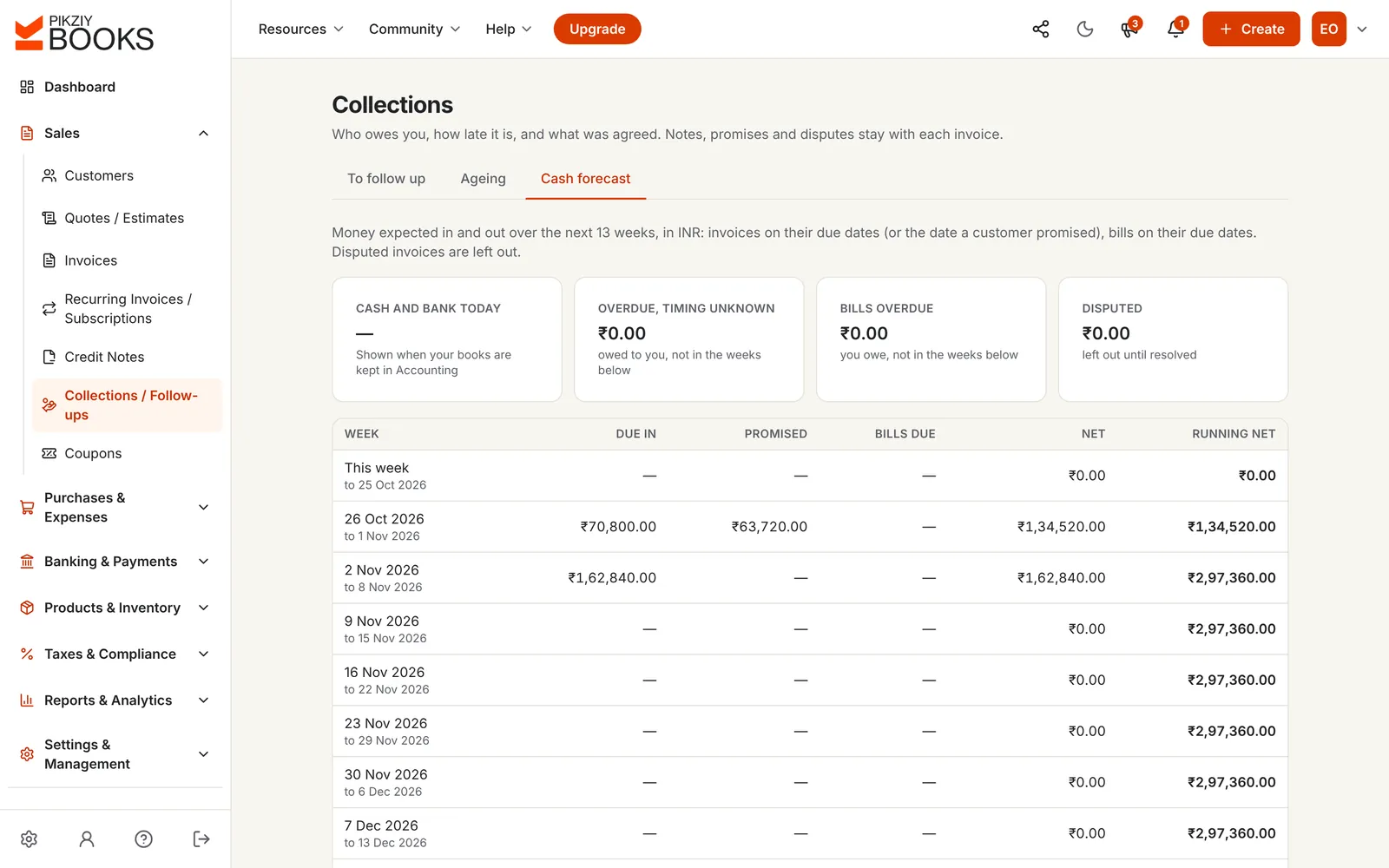
₹2,97,360 is owed across three customers, and the number only appears when your CA asks for it.
02
Follow-ups that live in someone's head
The client promised to pay on Friday. Who took the call, and was it this Friday or last?
A ₹63,720 invoice goes 40 days overdue because the person who agreed the date was on leave.
03
No idea when cash will arrive
Salaries are due on the 1st, and it is unclear which invoices will be paid before then.
₹1,62,840 is due on 2 November, but nobody knows whether to count on it.
STATUSES THAT UPDATE THEMSELVES
Every invoice, one word.
Statuses change when something actually happens: an invoice is issued, a payment is recorded or a due date passes. Nobody has to remember to update them.
Draft
Being written. No number yet, nothing recorded, never sent.
Unpaid
Issued and numbered, and not yet due. An eye icon shows once your customer has opened it.
Partly paid
An advance or part payment is recorded. The balance due is on the invoice and its link.
Overdue
The due date has passed. Reminders go out on your schedule, and it joins the follow-up list.
Paid
Settled in full, including any TDS your customer kept back. Reminders stop.
Void
Cancelled before anything was paid. The number stays used, so the series has no gaps.
HOW IT WORKS
From the list to the bank.
Screenshots of the real app with a sample business, Ember & Oak Studio in Pune.
01
Every invoice in one list
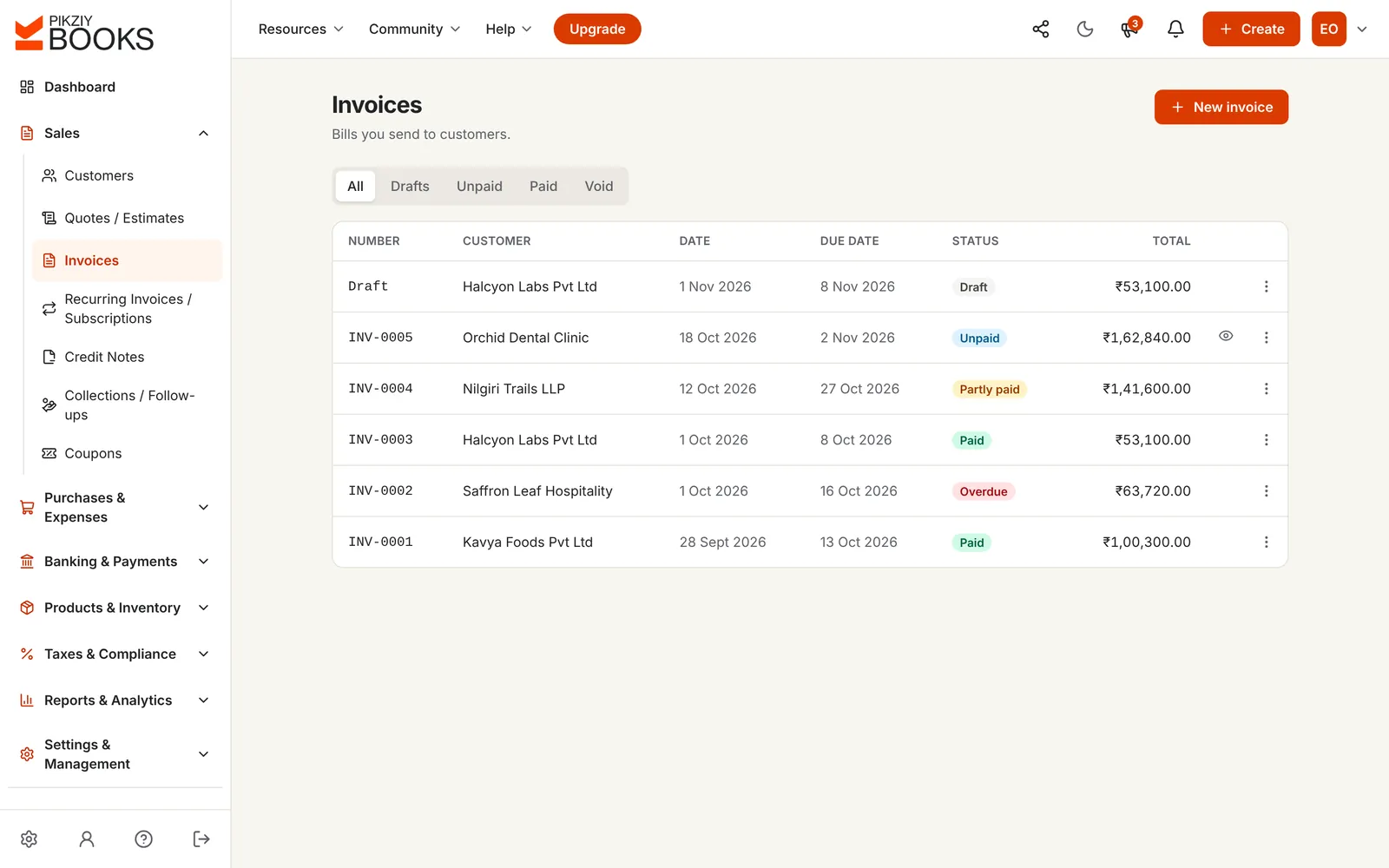
All your invoices with their customer, dates, total and status, filtered to drafts, unpaid, paid or void in one click. Open any one to see its payments, credit notes and when it was last viewed.
Statuses that update themselves
See which invoices your customers have opened
Duplicate an invoice to start the next one
02
A follow-up list for today
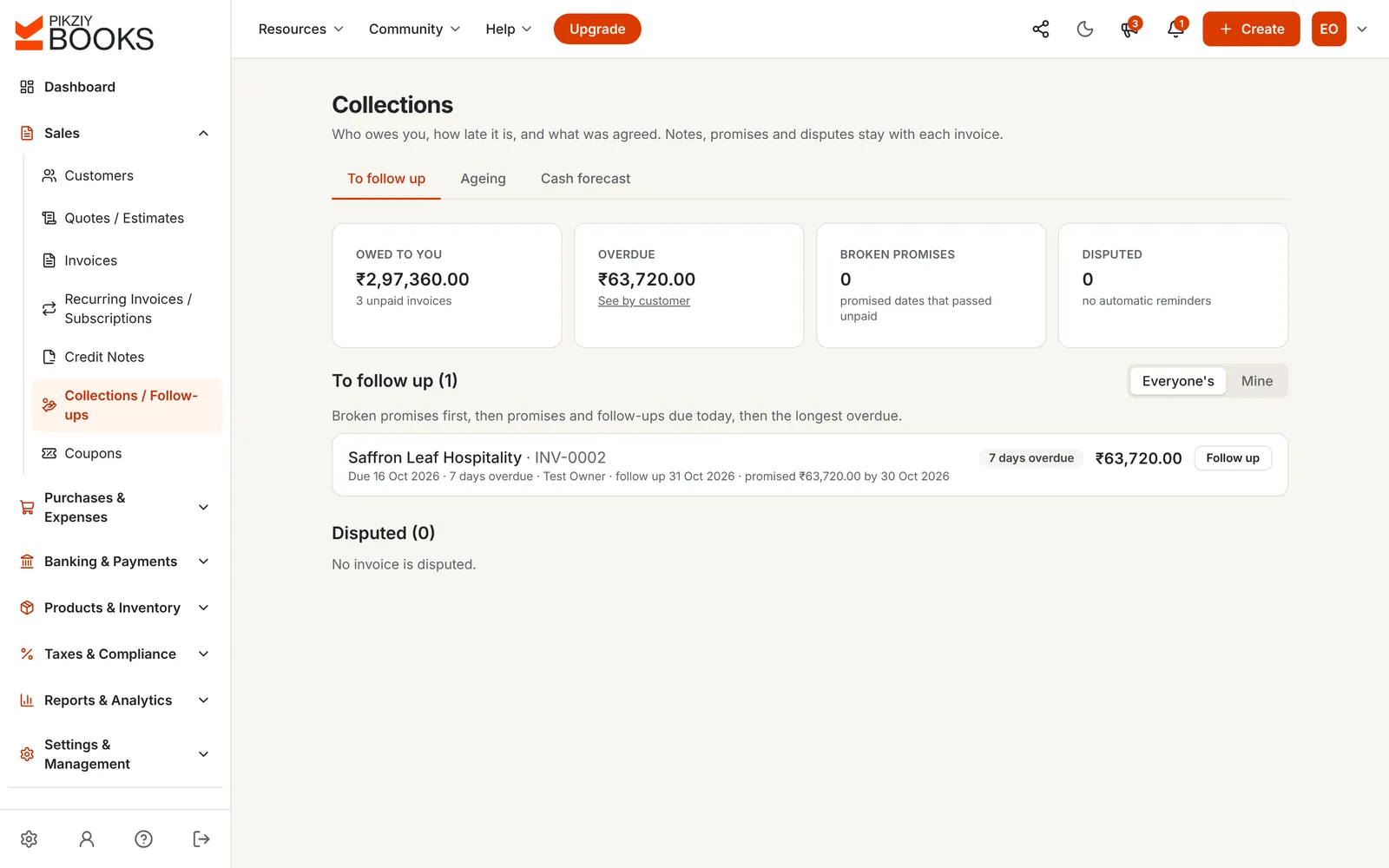
Collections puts the invoices that need you in order: broken promises first, then follow-ups due today, then the longest overdue. Switch between everyone's invoices and only yours.
Owed, overdue, broken promises and disputes at the top
Each invoice's next follow-up date and owner
Reminders paused where a promise or dispute is open
03
The story of each invoice
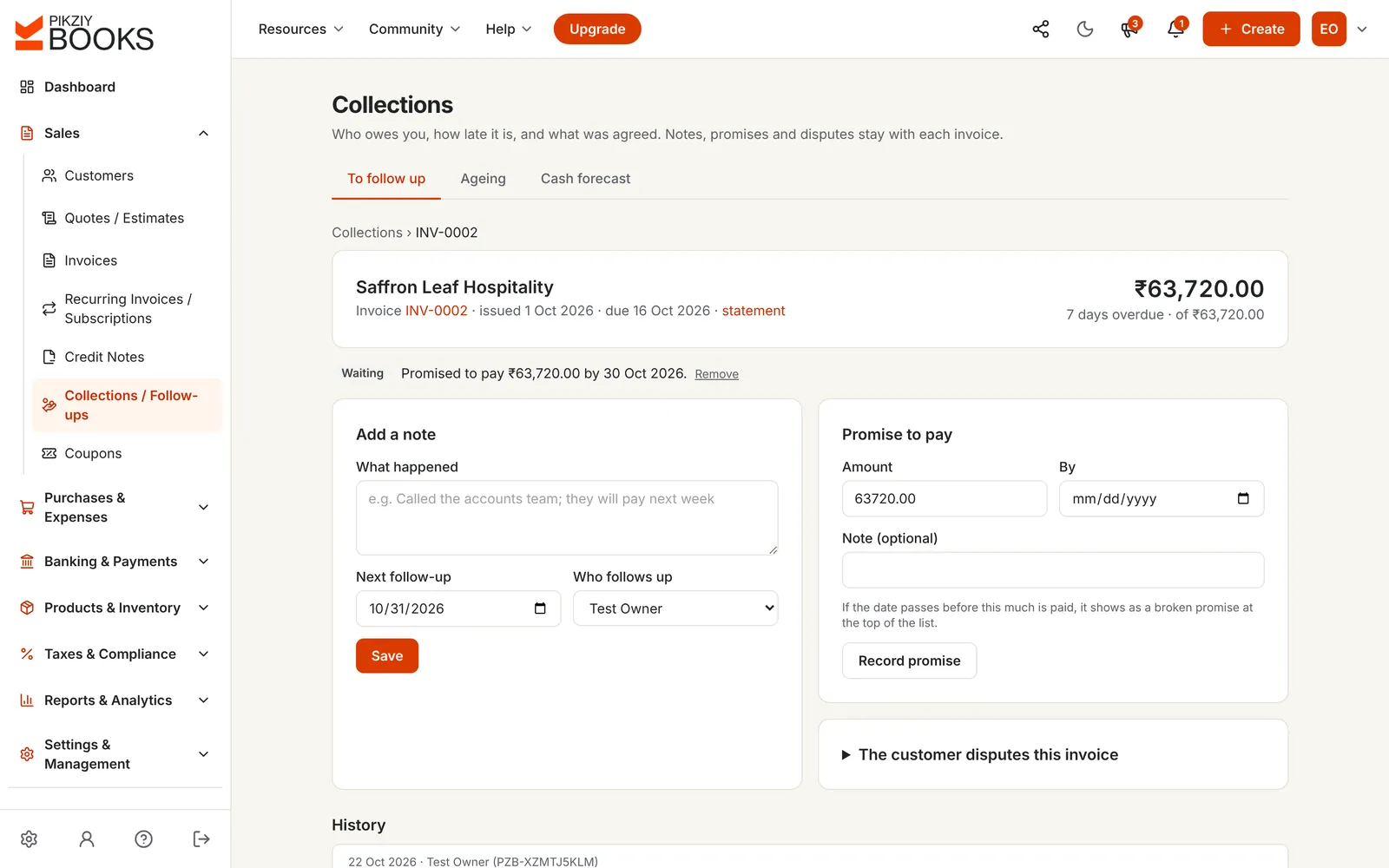
Notes of every call, the next follow-up date and who will make it, promises to pay with an amount and a date, and disputes, all kept with the invoice. Anyone on the team can see what was agreed.
Promises that become broken promises if the date passes
Disputes that stop reminders until resolved
A full history of who did what
04
Ageing by customer
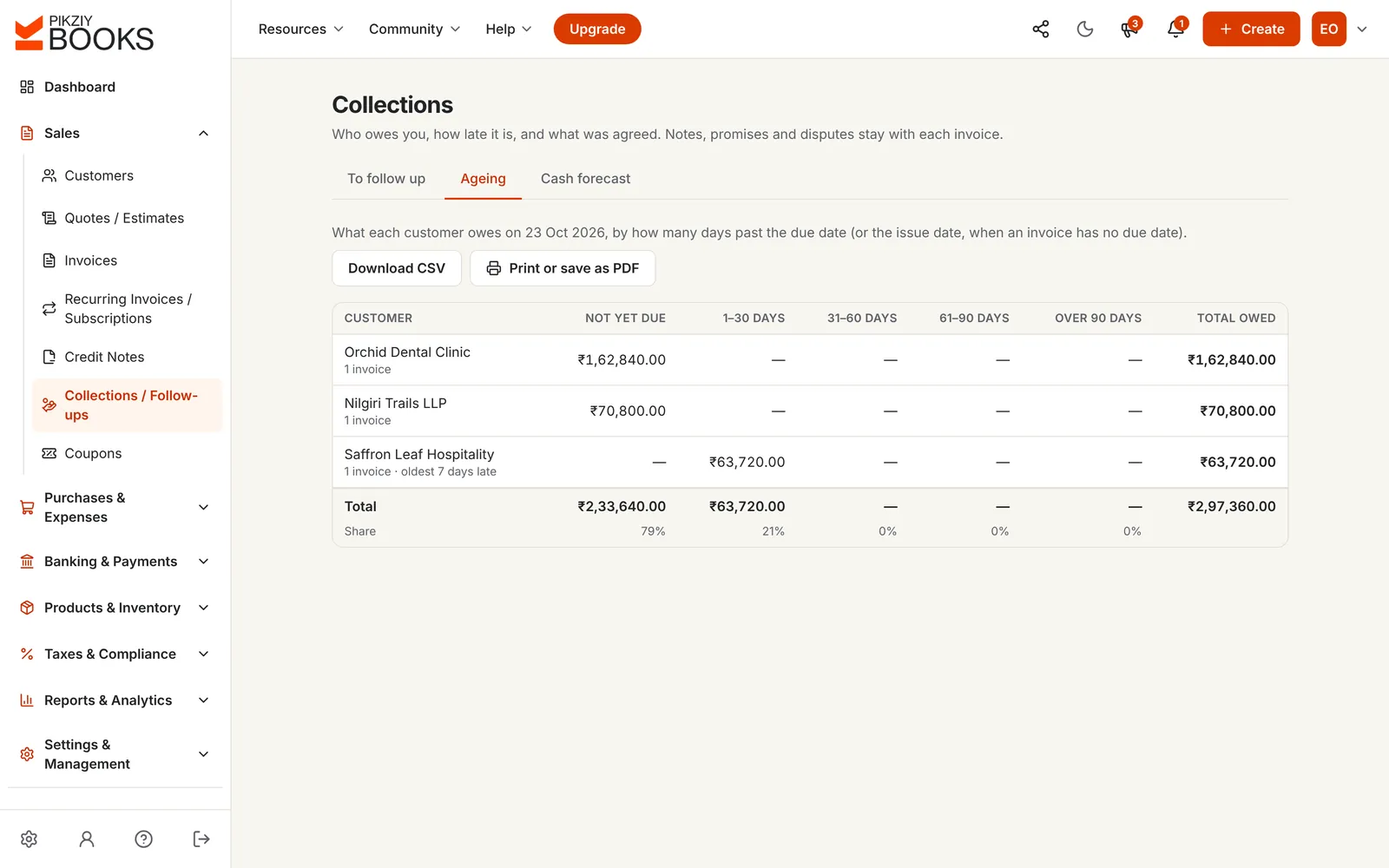
What each customer owes, grouped by how late it is, with the share of your receivables in each bucket. Print it or save it as a PDF for a meeting, or download it as CSV.
Not yet due, 1–30, 31–60, 61–90 and over 90 days
Oldest invoice for each customer
CSV on the Business plan and above
05
When the cash will arrive
A 13-week forecast: invoices on their due dates, promises on the dates customers gave, and supplier bills on theirs. Overdue invoices with no date, and disputed ones, are shown apart, not counted.
Week by week, with a running total
Promises counted on the promised date
Cash in bank shown when you keep your books in PikZiy Books
06
Statements for any period
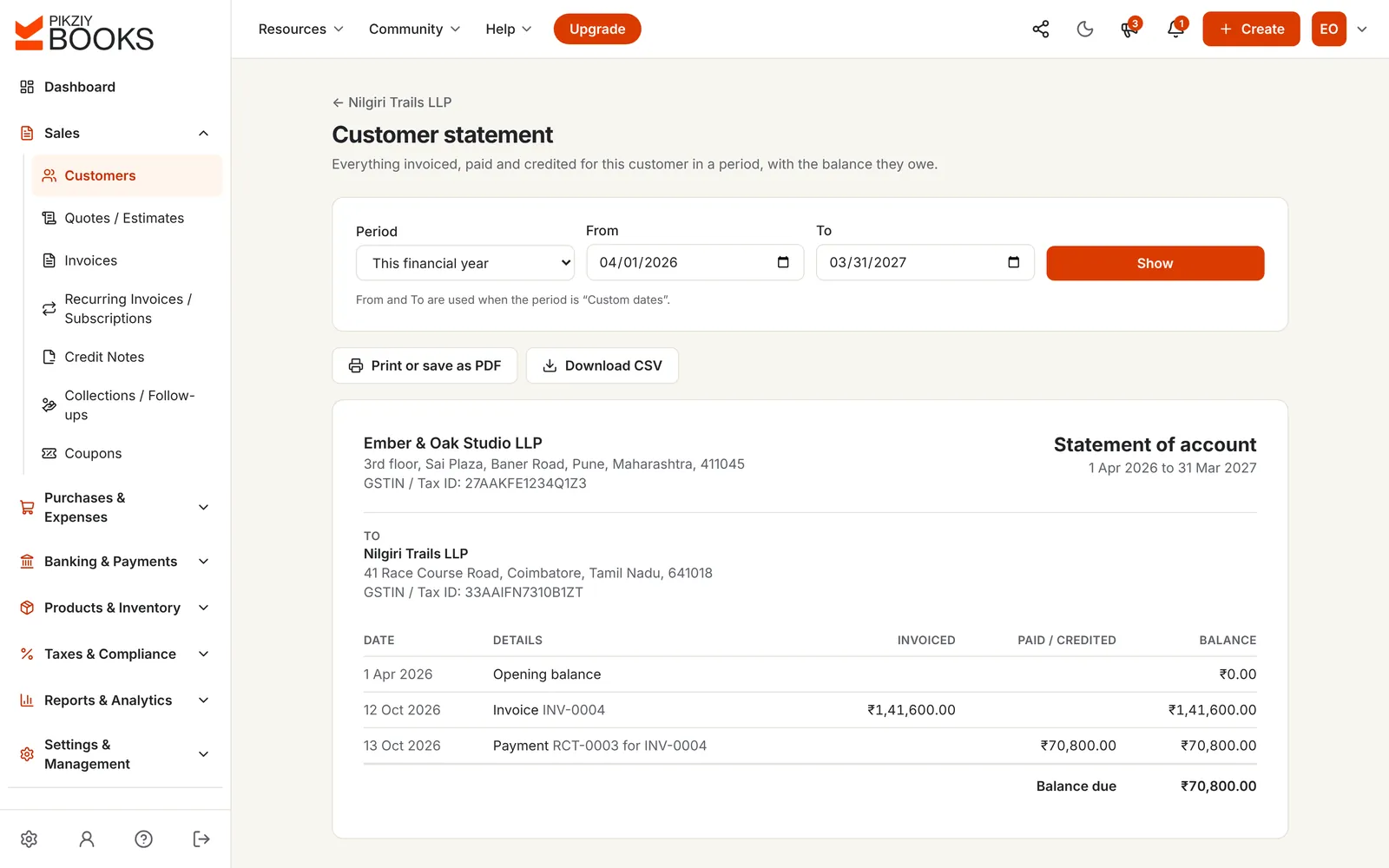
Everything billed to, paid by and credited to one customer, with the opening balance and the balance due. Send it with a reminder, or to settle a disagreement about what is owed.
This financial year, or any dates you choose
Print or save as PDF
CSV on the Business plan and above
FREE CALCULATOR
How long do customers take to pay you?
Days sales outstanding (DSO) is the average time between invoicing and being paid. Enter two numbers from your books to see yours, and how much cash faster payment would free up.
DAYS SALES OUTSTANDING
50 days
On average, customers pay you about 50 days after you invoice, about 35 days later than your terms.
You invoice per day
₹6,000.00
Cash freed at 25 days
₹1,47,360.00
Days sales outstanding = owed to you ÷ invoiced in the period × days in the period. Cash freed is the money that would be in your bank instead of with customers. Nothing you type is saved.
Draft, Unpaid, Partly paid, Overdue, Paid and Void, updated by what happens.
Viewed by your customer
See when an invoice's link was last opened, and how many times.
Payments and receipts
Part payments, advances and TDS, each with a numbered receipt.
Automatic reminders
Up to six emails before and after the due date, stopping when paid.
Credit notes and void
Correct or cancel properly, keeping your number series intact.
PDF of anything
Print or save any invoice, quote, credit note or statement.
Follow-up list
What to chase today, in order, for everyone or just you.
Growth plan and above
Promises and disputes
Recorded on the invoice, with reminders paused while open.
Growth plan and above
Ageing and cash forecast
Who owes what by lateness, and 13 weeks of expected cash.
Growth plan and above
Customer statements
Everything billed, paid and credited for one customer.
Business plan and above
CSV downloads
Reports, ageing and statements as spreadsheet files.
Business plan and above
Activity log
Every change across the business: who did what, and when.
Enterprise plan and above
PLANS
Which plan you need.
Statuses, payments, reminders and PDFs are on every plan. Collections starts on Growth.
Features by plan
Feature
Starter
Growth
Business
Enterprise
People who can sign in
1
3
10
25
Invoice statuses, payments and receipts
Included
Included
Included
Included
Viewed tracking and automatic reminders
Included
Included
Included
Included
Credit notes, void and duplicate
Included
Included
Included
Included
Follow-ups, promises, disputes, ageing and forecast
−Not included
Included
Included
Included
Reports for any period
−Not included
Included
Included
Included
Customer statements
−Not included
−Not included
Included
Included
CSV downloads
−Not included
−Not included
Included
Included
Activity log
−Not included
−Not included
−Not included
Included
Every plan has unlimited invoices, customers and items, and starts with a 14-day free trial. Prices are published when sign-ups open in November 2026. Businesses that sign up from 1 November 2026 to 30 April 2027 and pay for a year get 18 months for the price of 12. Compare every feature
QUESTIONS
Asked, and answered.
What is invoice management software?
+
Invoice management software keeps every invoice you have sent in one place and tells you where each one stands: unpaid, partly paid, overdue or paid. Good invoice management software also helps you collect, with reminders, follow-up notes, promises to pay, an ageing report and a forecast of when cash will arrive.
How do I see which invoices are overdue?
+
The invoice list marks each one Unpaid, Partly paid, Overdue or Paid, and the dashboard shows the overdue total. On the Growth plan and above, Collections lists the invoices to follow up today: broken promises first, then follow-ups that are due, then the longest overdue.
What is an ageing report?
+
A table of what each customer owes, grouped by how late it is: not yet due, 1 to 30 days, 31 to 60, 61 to 90 and over 90 days. It shows at a glance which money is getting harder to collect. Our guide to tracking outstanding payments shows how to read one.
What is days sales outstanding (DSO)?
+
The average number of days your customers take to pay: what they owe you today, divided by what you invoiced in a period, times the days in that period. Use the calculator on this page to work out yours, and to see how much cash would be in your bank if customers paid sooner.
How do promises to pay work?
+
When a customer says they will pay by a date, record the promise on the invoice in Collections. Reminders pause while the promise is open. If the date passes before the amount is paid, the invoice moves to the top of the follow-up list as a broken promise.
What happens when a customer disputes an invoice?
+
Mark it as disputed with what they dispute. Automatic reminders stop for that invoice, it is left out of the cash forecast, and it stays on the disputed list until you mark it resolved, with a note of how. If the dispute ends with a refund or a reduced amount, issue a credit note.
Can my team share the follow-ups?
+
Yes. Each invoice in Collections can have a next follow-up date and a person who follows up, and the list can show everyone's invoices or only yours. Notes keep the history, so anyone can pick up where a colleague left off.
Can I cancel an invoice?
+
An issued invoice with no payments can be voided: it stays in your records with its number, so your series has no gaps. Once something has been paid or credited, correct it with a credit note instead. Read how to number invoices correctly for why gaps matter.
Can I export my invoices and reports?
+
Every invoice and statement can be printed or saved as a PDF on any plan. On the Business plan and above you can also download reports, the ageing report and customer statements as CSV files for a spreadsheet.
How is this different from tracking invoices in Excel?
+
A spreadsheet only knows what you type into it. In PikZiy Books, an invoice's status changes when a payment is recorded or when the due date passes, reminders go out on their own, and the ageing report and forecast are always up to date. See how to switch from Excel.