GSTINs, state codes, place of supply, HSN and SAC codes, and CGST + SGST or IGST on every line, checked as you bill. Then GSTR-1 and GSTR-3B are prepared from the same invoices, so your returns match what you charged.
Sign-ups open November 2026 · 14-day free trial · No card needed to start
The real PikZiy Books app, with sample data
What is GST billing software?
GST billing software creates tax invoices that meet India's GST rules, works out CGST and SGST or IGST, and keeps the records your GST returns are built from.
The test of good GST billing software is what happens at month end. If your invoices already carry the right GSTINs, places of supply and tax types, GSTR-1 is a download, not a week of fixing. That is what PikZiy Books is built for. For billing more generally, see billing software.
WHERE GST GOES WRONG
Small slips, big month ends.
01
The wrong tax for the state
CGST + SGST charged to a customer in another state, or IGST within your own. Both are wrong, and both need a credit note to fix.
A Pune studio bills a Coimbatore client ₹1,20,000 + CGST 9% + SGST 9%. It should have been IGST 18%.
02
A GSTIN typed wrongly
One character off, and your customer's input tax credit does not show in their GSTR-2B. They will ask you to amend the invoice.
27AACCK4821M1Z2 for 27AACCK4821M1ZC: the check character at the end gives it away.
03
Returns rebuilt from scratch
Sales are copied into a spreadsheet, sorted into B2B, B2CL and B2CS by hand, and the HSN summary is guessed.
Two days of every month spent on GSTR-1, and the HSN table still doesn't add up.
FREE CHECKER
What does your GST invoice need?
Enter who is selling to whom. The checker validates GSTINs, works out the place of supply and the tax, tells you which GSTR-1 table the invoice belongs in, and whether you need an e-invoice.
The GSTINs and states line up.
Place of supply
33-Tamil Nadu
Tax to charge
IGST, at the full rate.
In GSTR-1
B2B (table 4A): invoices to registered customers
E-invoice
Not needed: e-invoicing applies once aggregate turnover has crossed ₹5 crore in any year since 2017-18.
The invoice must show
Your name, address and GSTIN
A unique number in one series for the financial year (16 characters at most) and the date
Your customer's name, address and GSTIN
HSN or SAC code, description, quantity and unit of each line
Taxable value after any discount, and the rate and amount of each tax
Place of supply with the state's name: 33-Tamil Nadu
Your signature or digital signature
Nothing you type here is saved or sent. General guidance from the GST rules as of October 2026, not tax advice.
Screenshots of the real app with a sample business, Ember & Oak Studio in Pune, Maharashtra.
01
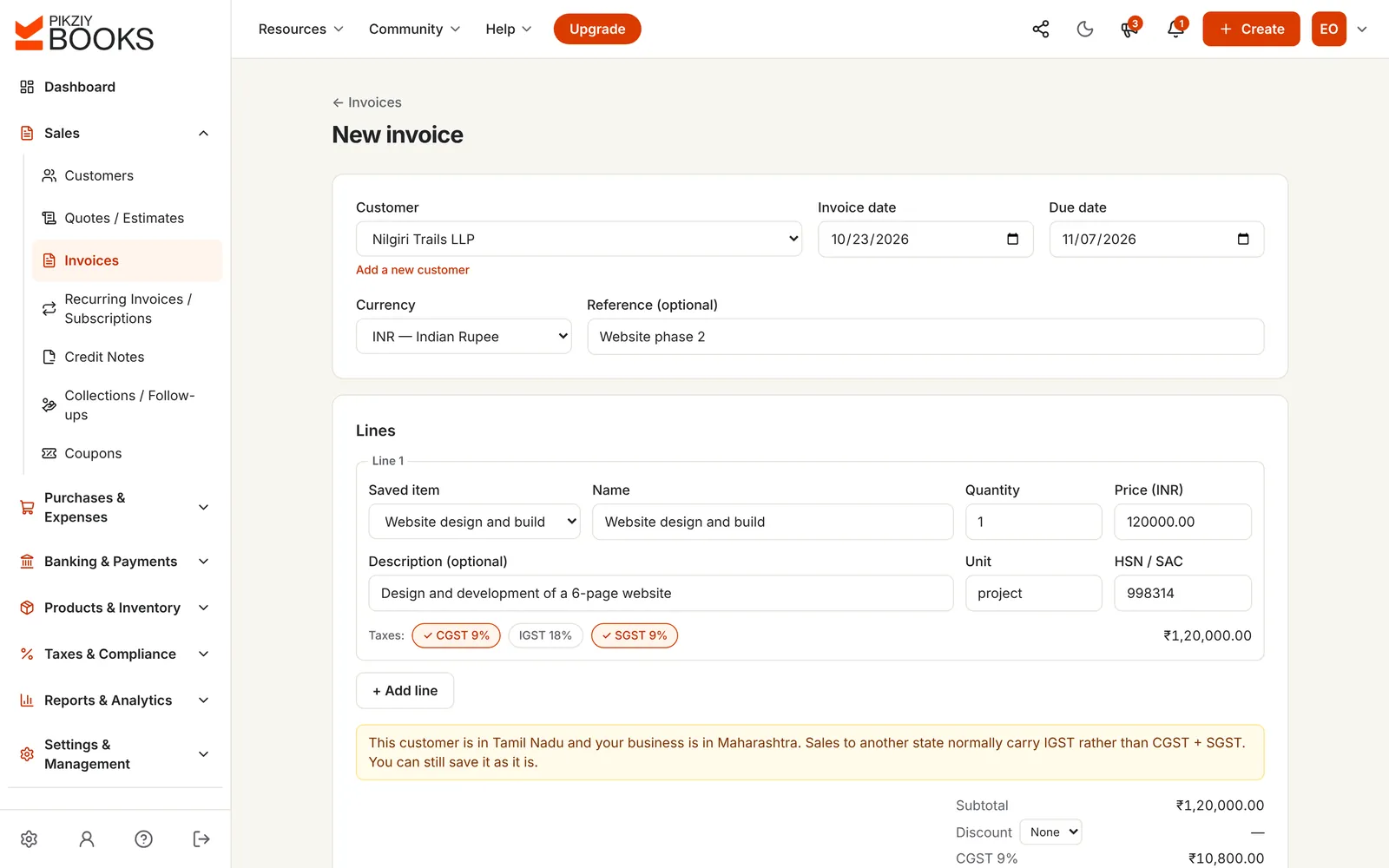
Bill with a GST check on every line
Pick saved items with their HSN or SAC code and tax, or type a line. If the taxes you chose do not fit the customer's state, PikZiy Books says so before you save.
Up to three taxes a line, so cess can sit beside GST
Discounts applied before tax
Your own number series, given when you issue
02
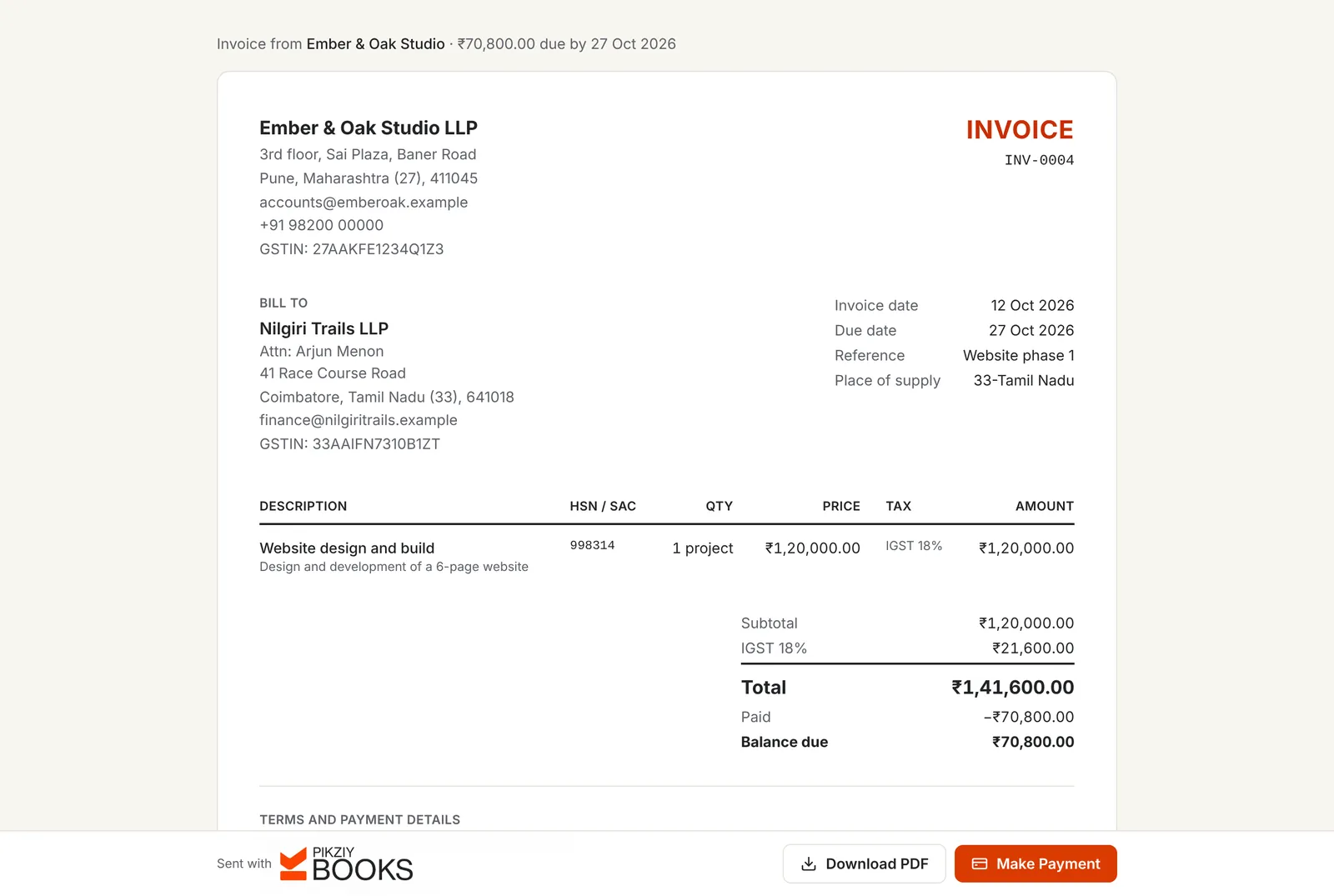
An invoice that shows what GST asks
Both GSTINs, state names with their codes, HSN or SAC on each line, the tax by type and the place of supply. The same layout is the PDF, the print and the page your customer opens.
Place of supply worked out from the GSTIN or state
Ship-to address when goods go elsewhere
Locked once issued; corrected with a credit note
03
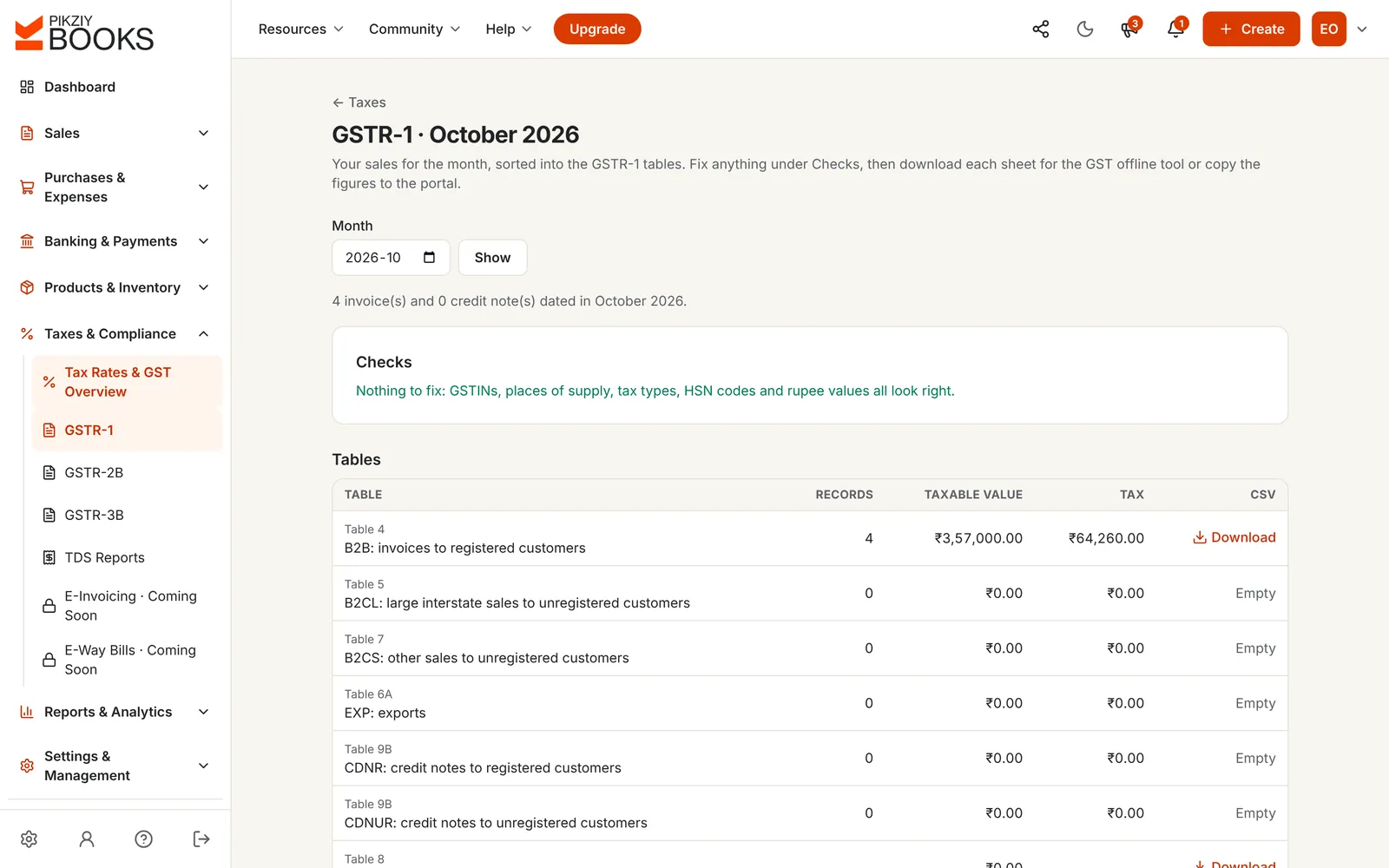
GSTR-1, sorted and checked
Your invoices and credit notes for the month, sorted into the GSTR-1 tables. Checks list anything to fix first: GSTINs, places of supply, tax types, HSN codes and rupee values.
B2B, B2CL, B2CS, EXP, CDNR, CDNUR, nil-rated and exempt
HSN summary and documents issued
CSV for each table, for the GST offline tool
04
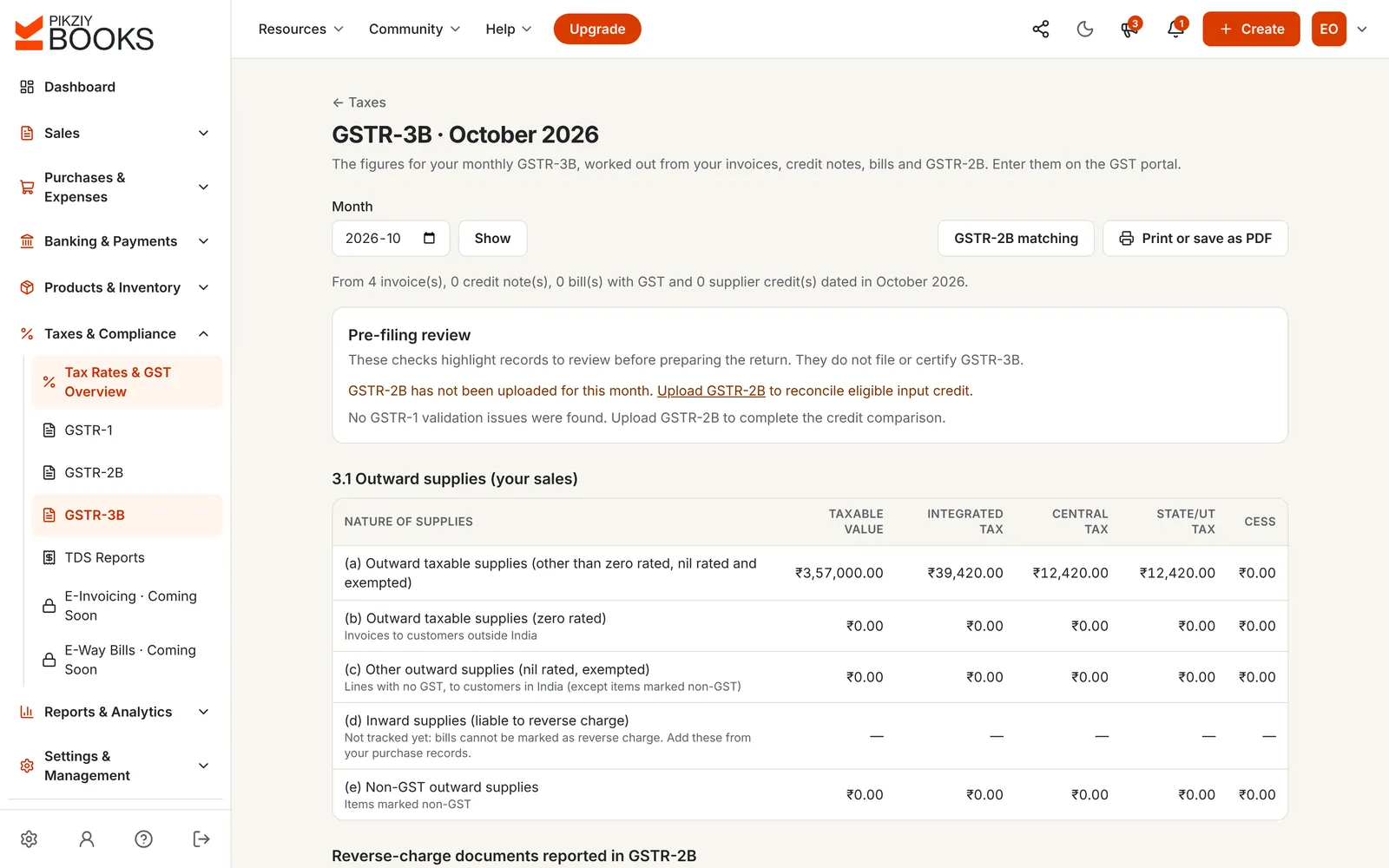
GSTR-3B, with your input credit
The figures for each GSTR-3B table, worked out from your invoices, credit notes and bills. Upload GSTR-2B from the portal and PikZiy Books matches it with your bills before you claim credit.
Outward supplies by tax type
Input tax credit from bills, checked against GSTR-2B
Pre-filing review that flags what to look at
RULE 46 OF THE CGST RULES
What a tax invoice must show, and what we show.
Rule 46 lists what a GST tax invoice must contain. Here is each item, and how PikZiy Books handles it today. We would rather you know the gaps than find them later.
Rule 46 fields and how PikZiy Books handles them
What the rule asks for
In PikZiy Books
Your name, address and GSTIN
Shown on every invoice, labelled GSTIN
A consecutive serial number, unique for the financial year, up to 16 characters
Your own prefix and number series; change the prefix each year, e.g. INV/26-27/
Date of issue
Shown; the number is given on the day you issue
Customer's name, address and GSTIN
Shown, with the state name and code
For unregistered customers from ₹50,000: name, address, state and code
Shown from the customer record
HSN code for goods, SAC for services
On each line, from the item or typed
Description, quantity and unit
On each line
Total and taxable value after discount
Shown, with the discount
Rate and amount of CGST, SGST/UTGST, IGST and cess
On each line and in the totals
Place of supply, with the state's name, for inter-state supplies
Shown on every invoice, e.g. 33-Tamil Nadu
Delivery address, if different
Ship-to address from the customer record
Whether tax is payable under reverse charge
Not yet: sales cannot be marked as reverse charge
Signature or digital signature of the supplier
Not yet: sign the PDF if your customer needs it
WHAT YOU GET
Everything GST asks of a bill, and of a month.
GST invoices and credit notes
CGST, SGST or UTGST, IGST and cess on each line, with HSN or SAC codes.
A check on every line
A warning when the tax type does not fit your customer's state.
Place of supply on the invoice
From the GSTIN or state, the same value GSTR-1 uses.
GSTINs and state codes
Both parties' GSTINs, and each state with its two-digit code.
Exports and foreign currency
Invoices in other currencies; EXP in GSTR-1 with shipping bill details.
Nil-rated, exempt and non-GST lines
Kept apart and reported in their own GSTR-1 table.
GSTR-1, table by table
Checks first, then a CSV for each table for the GST offline tool.
Growth plan and above
GSTR-3B worksheet
Each table's figures from your invoices, credit notes and bills.
Growth plan and above
GSTR-2B matching
Upload the JSON from the portal; see matched, different and missing bills.
Growth plan and above
Purchase bills with GST
Supplier bills with their GSTIN and tax, for input credit.
Business plan and above
Double-entry GST accounts
Output and input CGST, SGST and IGST posted to your books.
Business plan and above
Access for your CA
Invite your accountant to work on the returns with their own login.
Growth plan and above
PLANS
Which plan you need.
GST invoices are on every plan. The returns are on Growth and above; purchase bills and full books on Business.
Features by plan
Feature
Starter
Growth
Business
Enterprise
People who can sign in
1
3
10
25
GST invoices, quotes and credit notes
Included
Included
Included
Included
GSTINs, state codes and place of supply
Included
Included
Included
Included
HSN and SAC codes, cess and exports
Included
Included
Included
Included
GSTR-1, GSTR-3B and GSTR-2B matching
−Not included
Included
Included
Included
Reports for any period
−Not included
Included
Included
Included
Purchase bills with input GST
−Not included
−Not included
Included
Included
Double-entry accounting
−Not included
−Not included
Included
Included
Every plan has unlimited invoices, customers and items, and starts with a 14-day free trial. Prices are published when sign-ups open in November 2026. Businesses that sign up from 1 November 2026 to 30 April 2027 and pay for a year get 18 months for the price of 12. Compare every feature
QUESTIONS
Asked, and answered.
What is GST billing software?
+
GST billing software creates tax invoices that meet India's GST rules: your GSTIN and your customer's, HSN or SAC codes, the place of supply, and CGST and SGST or IGST worked out on each line. Good GST billing software also uses those invoices to prepare your GST returns, so the figures in GSTR-1 and GSTR-3B match what you billed.
Does PikZiy Books decide between CGST + SGST and IGST for me?
+
You choose the taxes on each line, and PikZiy Books checks them. If your customer is in another state and you chose CGST + SGST, or in your state and you chose IGST, it warns you before you save. The GSTR-1 checks then flag any invoice where the tax type and place of supply disagree. For the rules, read CGST, SGST and IGST explained.
How is the place of supply worked out?
+
From your customer's GSTIN, whose first two digits are the state code, or from their state if they are not registered. The invoice shows it as, for example, 33-Tamil Nadu, and the GSTR-1 file uses exactly the same value. Customers outside India are exports, with place of supply 96.
Can PikZiy Books file my GST returns?
+
No. It prepares them: GSTR-1 as CSV files for each table, ready for the GST offline tool, and GSTR-3B as a worksheet with the figures for each table. It also matches your purchase bills with the GSTR-2B file you download from the portal. You or your CA then file on the GST portal. See GSTR-1 explained and GSTR-3B explained.
Does it support e-invoicing and e-way bills?
+
Not yet. Both are coming soon. If your aggregate turnover has crossed ₹5 crore in any year since 2017-18, your B2B invoices must be reported to the Invoice Registration Portal for an IRN and QR code, and PikZiy Books cannot do that for you yet.
Can I add HSN or SAC codes and cess?
+
Yes. Save the HSN or SAC code with each item and it comes onto every invoice line, where you can change it. A line can carry up to three taxes, so cess can sit beside GST. GSTR-1 builds the HSN summary from the same codes. Unsure of a code? Read HSN vs SAC codes.
What about sales to customers who are not registered?
+
Choose their state on the customer. Within your state they pay CGST + SGST; in another state, IGST. GSTR-1 puts inter-state invoices above ₹1 lakh in B2CL and the rest in B2CS, by state and rate, as the rules ask.
Can I invoice exports?
+
Yes. Invoice customers abroad in their currency. In GSTR-1 they go to the EXP table, with or without IGST, and you add the shipping bill number and date where there is one, and the rupee rate.
How do I correct a GST invoice after issuing it?
+
Issue a credit note against it. Issued invoices are locked so your copy always matches your customer's, and credit notes go into GSTR-1 as CDNR or CDNUR. See common GST mistakes.
Is PikZiy Books GST compliant?
+
Invoices carry the details Rule 46 of the CGST Rules asks for, with two gaps listed on this page: there is no signature line yet, and sales under reverse charge are not marked. The returns are prepared from your invoices and checked, but filing and the final review stay with you or your CA.