Bills built in Excel or Word
Last month's file is copied and edited. Numbers repeat or skip, and a GST rate gets typed wrong.
INV-118 is missing, INV-119 appears twice, and your CA asks why when the return is due.

Create GST bills, send a link your customer can pay by UPI or card, and see at a glance who has paid, who has paid part and who is late. Every bill also updates what that customer owes, and feeds your GST returns and books on higher plans, so nothing is typed twice.
Sign-ups open November 2026 · 14-day free trial · No card needed to start
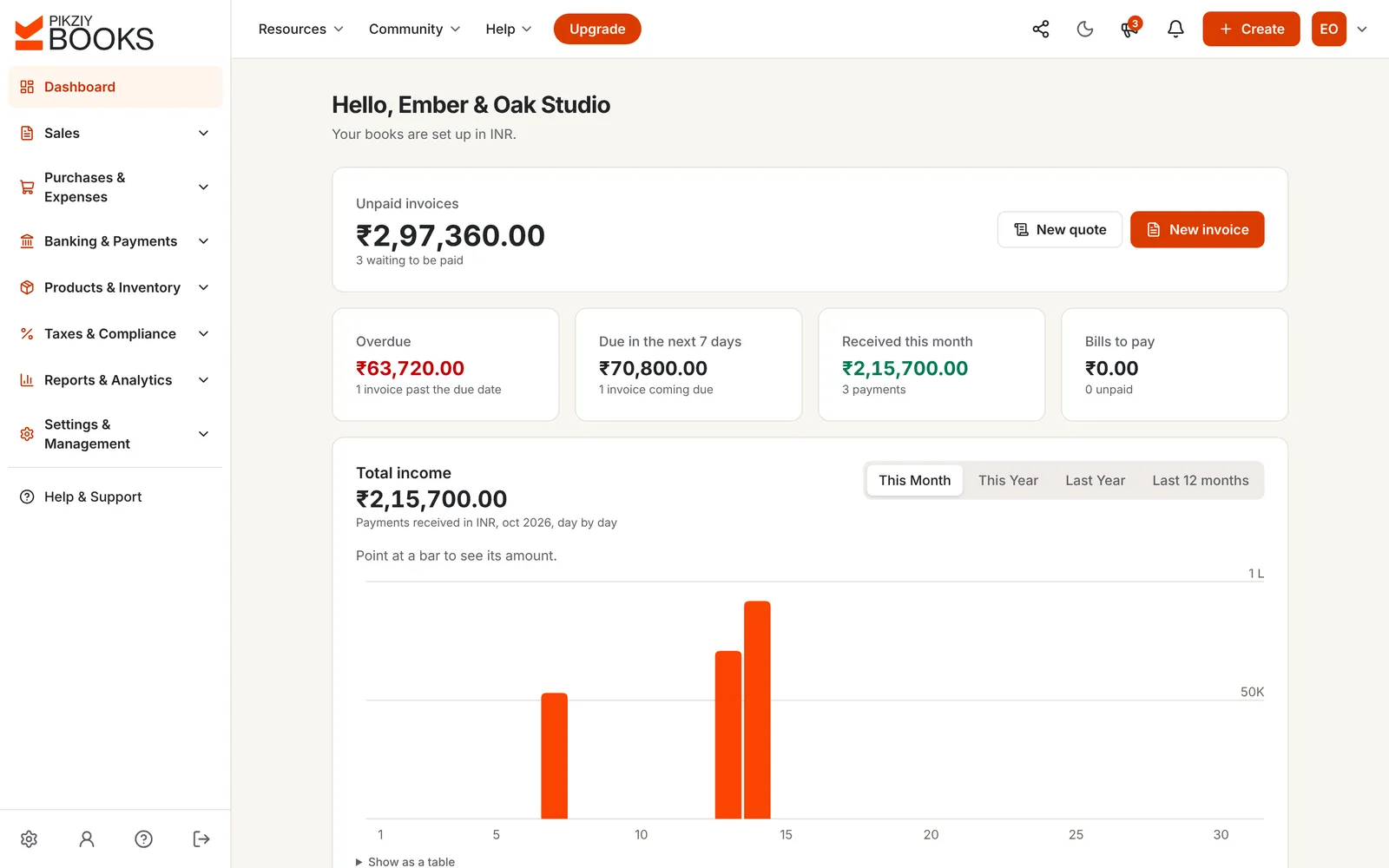
Billing software creates bills for what you sell, works out the tax, sends them to your customers and keeps track of what has been paid. Good billing software also numbers every bill in sequence, records payments and part payments, and reminds customers when a bill is due.
In PikZiy Books, billing is connected to everything else. A bill updates your customer's balance on its own, and feeds your GST returns (Growth plan and above) and your double-entry books (Business plan and above).
Last month's file is copied and edited. Numbers repeat or skip, and a GST rate gets typed wrong.
INV-118 is missing, INV-119 appears twice, and your CA asks why when the return is due.
Money arrives by UPI, bank transfer and cheque, sometimes in parts, and none of it is matched to a bill.
A client pays ₹40,000 of a ₹59,000 bill. Three weeks later, nobody remembers the ₹19,000.
Sales are collected from three places and rates checked by hand before GSTR-1 can be filed.
One inter-state bill was charged CGST + SGST instead of IGST, and has to be corrected with a credit note.
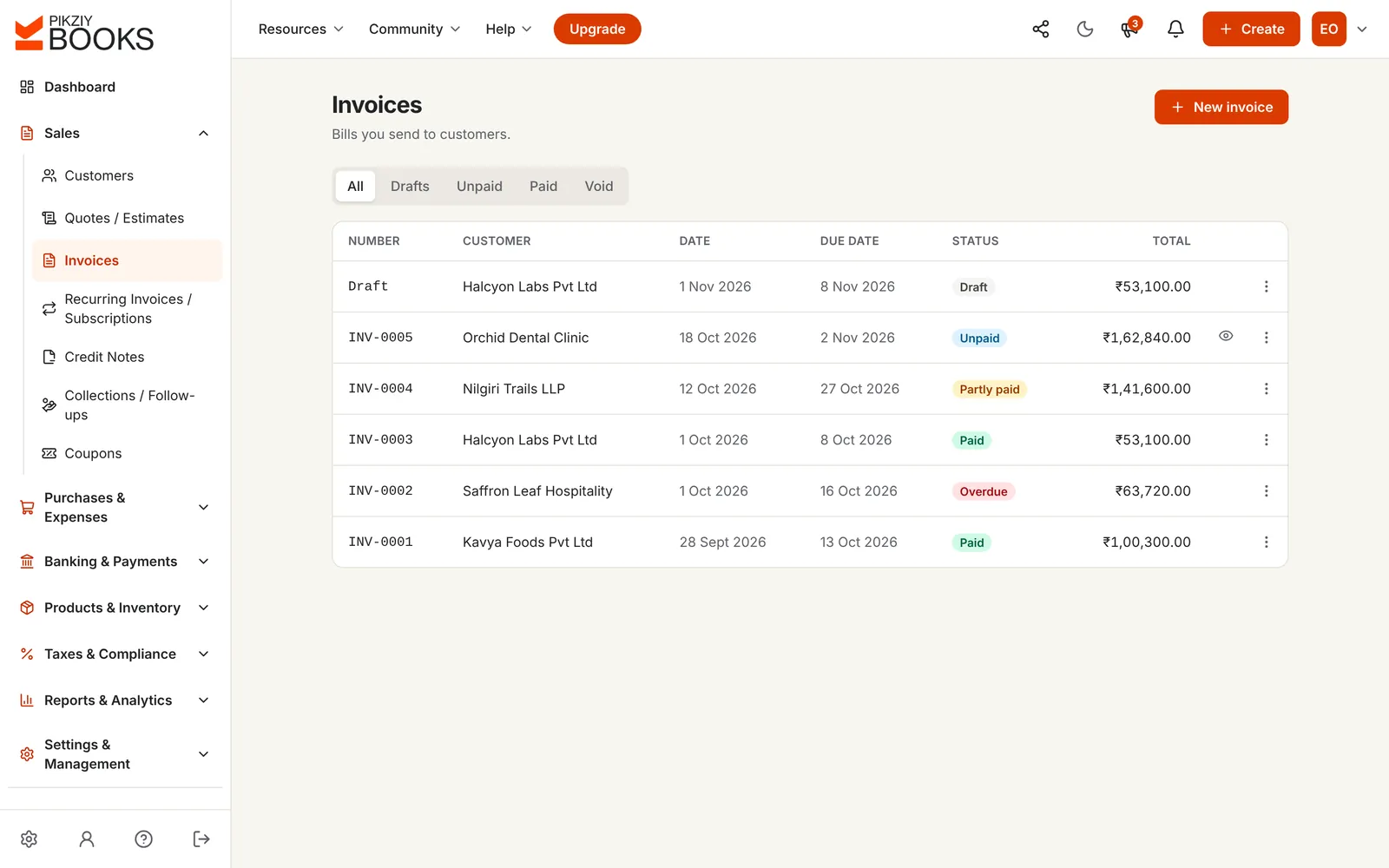
These are screenshots of the real app with a sample business, Ember & Oak Studio in Pune.
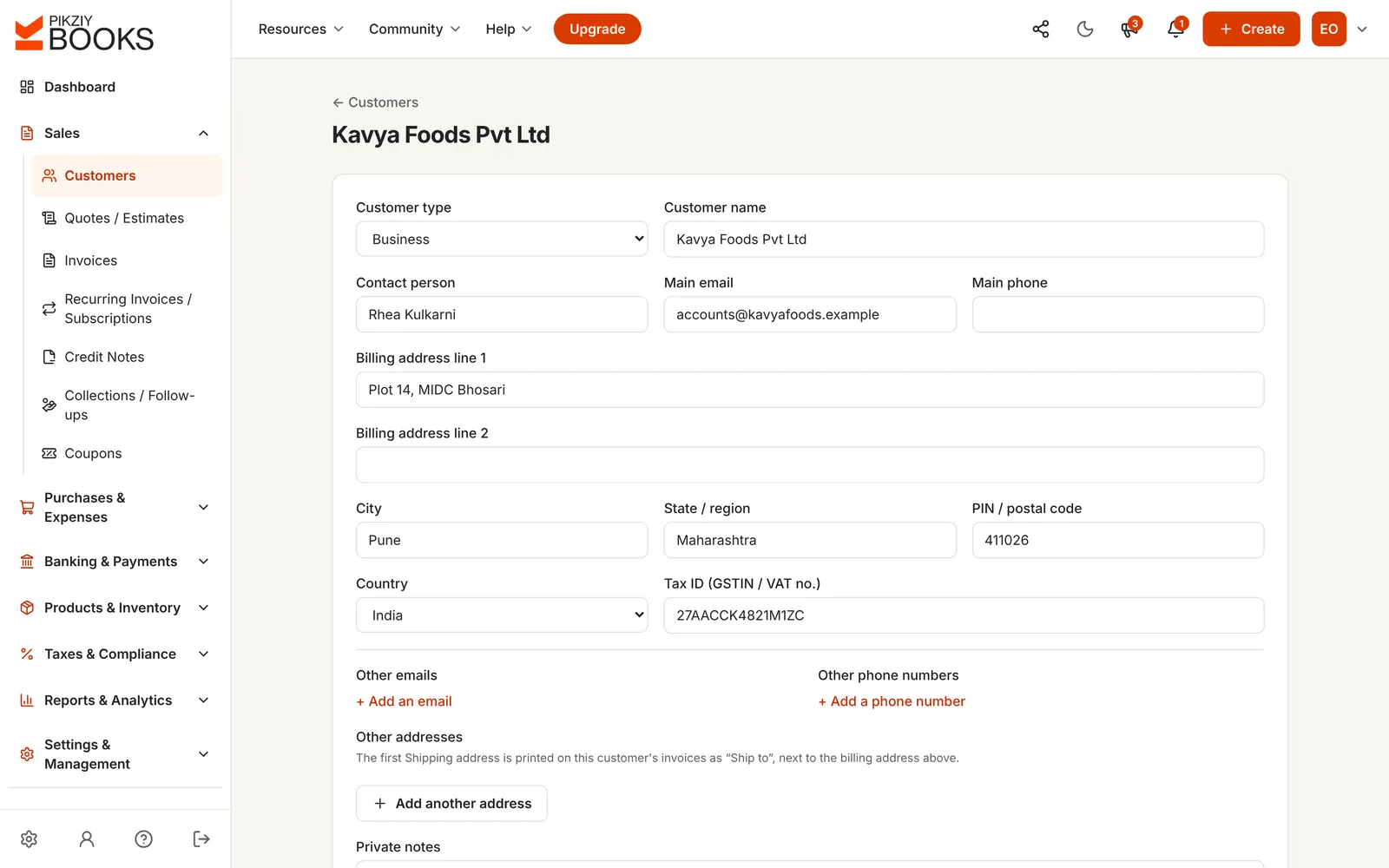
Save each customer with their GSTIN, state, billing and shipping addresses and contacts. Every bill, payment and reminder for them is then in one place.
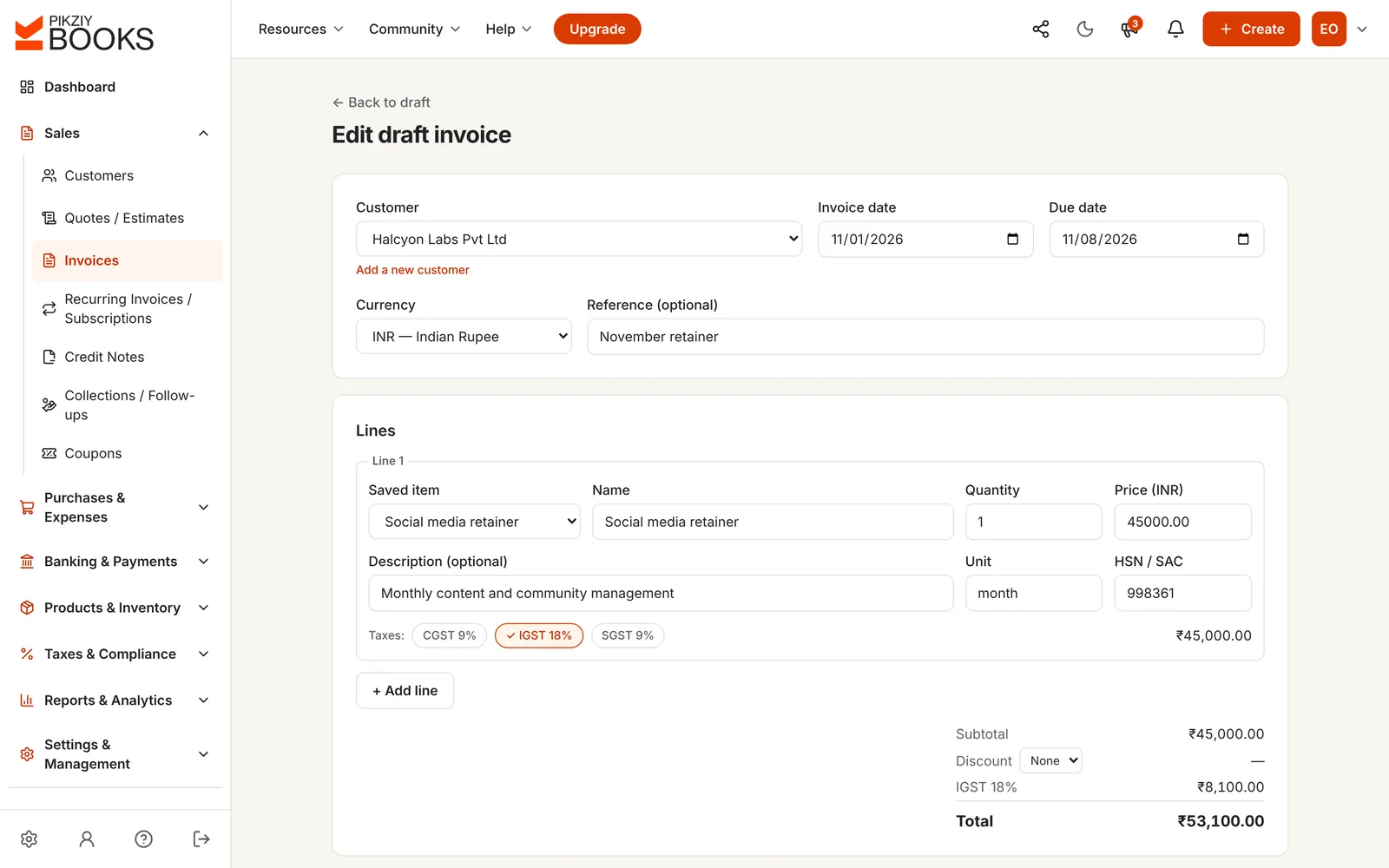
Pick saved items with their HSN or SAC code and price, or type a new line. Choose the tax on each line, add a discount, notes and your bank or UPI details.
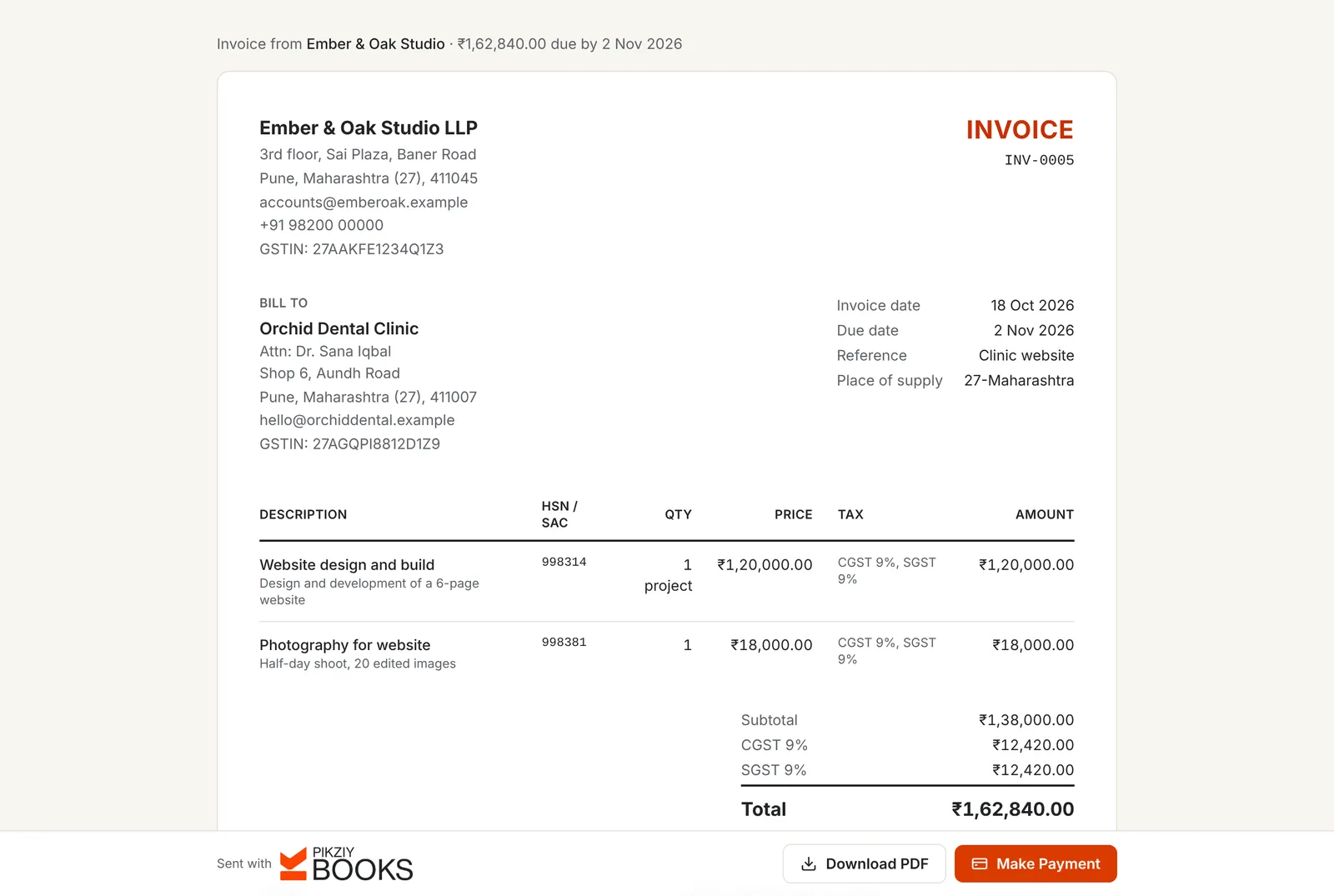
Email it from PikZiy Books, share its private link on WhatsApp, or download the PDF. Your customer opens it without an account and can pay online.
Record full or part payments, with a numbered receipt for each. Every bill shows where it stands, and reminders go out by email on the schedule you choose.
Choose where you and your customer are, add a few lines and see how the tax is split. Within a state it is CGST and SGST; between states it is IGST.
Maharashtra to Karnataka: IGST
| Item | Taxable value |
|---|---|
| Website design1 × ₹60,000.00 · GST 18% | ₹60,000.00 |
| Printed brochures500 × ₹24.00 · GST 18% | ₹12,000.00 |
A sample only: nothing you type here is saved or sent. Tax is worked out on each line and rounded to the paisa, as PikZiy Books does on a real bill.
To learn the rules behind the numbers, read CGST, SGST and IGST explained and how to calculate GST on an invoice.
CGST, SGST, IGST and cess on each line, with HSN or SAC codes, discounts and notes.
Prefixes such as INV- or QT-. Drafts have no number; each bill takes the next one when you issue it.
Your customer views, downloads and pays without signing up, and you see when they have opened it.
Money goes straight to your own Razorpay, Cashfree or Easebuzz account. We never hold it.
Full or part payments by any method, TDS kept back, and a numbered receipt for every payment.
Polite emails before and after the due date, on a schedule you set, from your own templates.
Items with stock levels and low-stock alerts, so you know what you can still sell.
Bill clients abroad in dollars, euros, pounds and more. Your books record the rupee value at the rate you enter.
Everything billed to and paid by one customer, for any period.
Business plan and aboveBills that go out on their own every week, month, quarter or year.
Business plan and aboveGSTR-1 download and a GSTR-3B worksheet, prepared from the bills you already made.
Growth plan and aboveWho owes you, how late it is, promises to pay and a 13-week cash forecast.
Growth plan and aboveMany billing apps stop at the bill. In PikZiy Books, issuing a bill and recording its payment also posts balanced double-entry entries to your books, from a start date you choose, on the Business plan and above.
Your profit and loss, balance sheet, customer ledgers and GST worksheets are built from the same records, so your CA starts from clean books instead of a spreadsheet. See every feature.
| Spreadsheet | Desktop billing software | PikZiy Books | |
|---|---|---|---|
| Bill numbers in sequence | By hand | Yes | Yes, given when you issue |
| Tax worked out for you | With formulas | Yes | Yes, with a state check |
| Customer can pay from the bill | No | Varies | Yes, through your gateway |
| Paid, part paid, overdue | By hand | Yes | Yes, with email reminders |
| Use it from anywhere | If shared | Usually one computer | Any browser |
| Books and GST from the same bills | No | Varies | Yes |
Billing itself is on every plan. Higher plans add GST returns, collections and full accounting.
| Feature | Starter | Growth | Business | Enterprise |
|---|---|---|---|---|
| People who can sign in | 1 | 3 | 10 | 25 |
| GST bills, quotes and credit notes | Included | Included | Included | Included |
| Private links, online payments and receipts | Included | Included | Included | Included |
| Automatic email reminders | Included | Included | Included | Included |
| Items and stock levels | Included | Included | Included | Included |
| Expenses | Not included | Included | Included | Included |
| GST returns: GSTR-1, GSTR-3B, GSTR-2B | Not included | Included | Included | Included |
| Collections and ageing | Not included | Included | Included | Included |
| Subscriptions and customer statements | Not included | Not included | Included | Included |
| Double-entry accounting | Not included | Not included | Included | Included |
| Activity log | Not included | Not included | Not included | Included |
Every plan has unlimited invoices, customers and items, and starts with a 14-day free trial. Prices are published when sign-ups open in November 2026. Businesses that sign up from 1 November 2026 to 30 April 2027 and pay for a year get 18 months for the price of 12. Compare every feature
Billing software creates bills (invoices) for what you sell, works out the tax, sends them to your customers and keeps track of what has been paid. Online billing software does this in your browser, so your bills are the same on every device and you can share access with your team or your CA.
The one that fits your kind of business. Service businesses need quotes, payment tracking and reminders; shops and traders need fast billing and stock; growing teams need roles and an audit trail. Our guide to choosing accounting software compares the main options fairly, and what billing software costs in India sets out real prices.
Yes. Bills show your GSTIN and your customer's, HSN or SAC codes, and CGST and SGST, or IGST, on each line, with cess where it applies. They are numbered in sequence with your own prefix. You choose the tax on each line, and PikZiy Books warns you if CGST + SGST or IGST does not match the state your customer is in. Our GST invoice format guide lists the fields the rules ask for.
Yes. Leave GST off the lines and the bill carries no tax. See how to invoice without GST registration for what such a bill should say.
Each bill has a private link your customer can open without an account. If you connect Razorpay, Cashfree or Easebuzz, they can pay online by UPI, card or net banking, and the money goes straight to your own account. They can also pay you directly by bank transfer or UPI, and tell you they have paid with proof of payment, which you then record.
No. We never hold your money and add no fee. Your payment provider charges its own fees and pays out to your bank account.
Yes. Record any amount by bank transfer, UPI, cash, card or cheque, each with a numbered receipt. If your customer keeps back TDS, record it with the payment and the bill is settled, with the TDS kept aside to claim against your income tax.
Yes. Items can be goods or services, with stock levels and low-stock alerts on every plan. Purchase orders, goods received notes and supplier bills are on the Business plan and above.
Yes. Invite people as owners, admins, accountants, staff or viewers; each sees and changes only what their role allows. Your CA can work directly in your books as a team member. See PikZiy Books for accountants.
Yes. PikZiy Books runs in the web browser on a phone, tablet or computer, so there is nothing to install. Your customers open their bills in their own browser too.
There are four plans, from Starter for one person to Enterprise for teams of 25. Plans differ by features and team size, never by how many bills you send, and every plan starts with a 14-day free trial. Prices are published when sign-ups open in November 2026. Businesses that sign up from 1 November 2026 to 30 April 2027 and pay for a year get 18 months for the price of 12. See plans.
PikZiy Books opens for sign-ups in November 2026. Join the waitlist and we will tell you the day you can start.
Join the waitlist