Everything entered twice
Invoices go out from one tool; your accountant types them into Tally at the end of the quarter, with the payments and the bills.
Three months of entries, a week of work, and a bill for it.

Every invoice, payment, bill and expense posts a balanced double-entry on its own, into an Indian chart of accounts with GST and TDS in their place. Reconcile the bank from a CSV, lock months once they're filed, and get the trial balance, profit and loss and balance sheet any day of the year.
Sign-ups open November 2026 · 14-day free trial · No card needed to start · Accounting is on the Business plan and above.
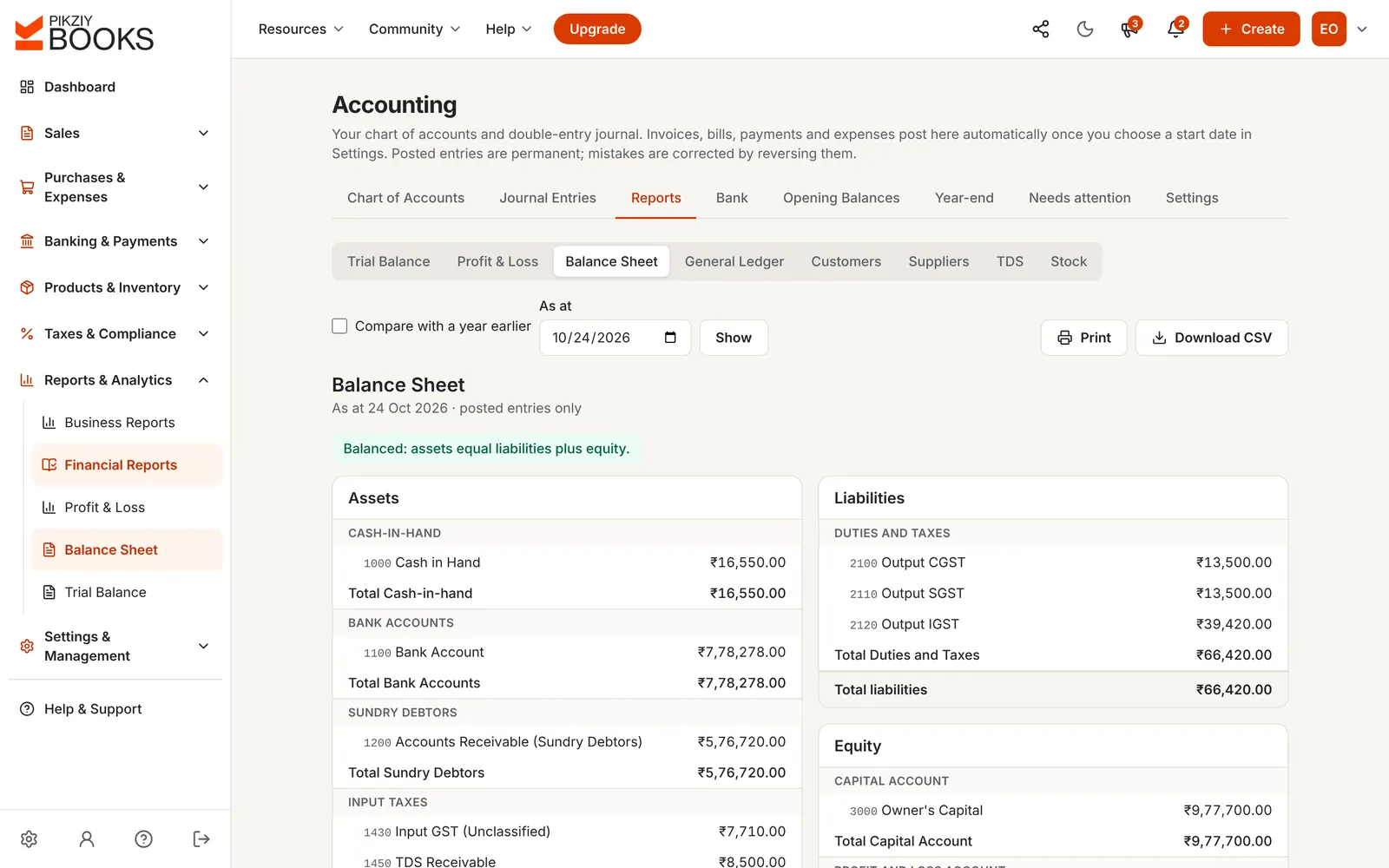
Accounting software keeps the books by double entry: every transaction is recorded as equal debits and credits across a chart of accounts, so the trial balance, profit and loss and balance sheet always agree. Good small business accounting software builds those books from the work you already do.
In PikZiy Books, the books come from your invoices, payments, bills and expenses. Your CA reviews them; nobody types them twice.
Invoices go out from one tool; your accountant types them into Tally at the end of the quarter, with the payments and the bills.
Three months of entries, a week of work, and a bill for it.
One entry is missed, one is entered twice, and the difference hides somewhere in hundreds of lines.
₹7,710 of GST on expenses sitting in the wrong account.
Profit is a guess until March. The balance sheet arrives with the tax return, too late to change anything.
A good quarter spent as if it were a good year.
Screenshots of the real app with a sample business, Ember & Oak Studio in Pune.
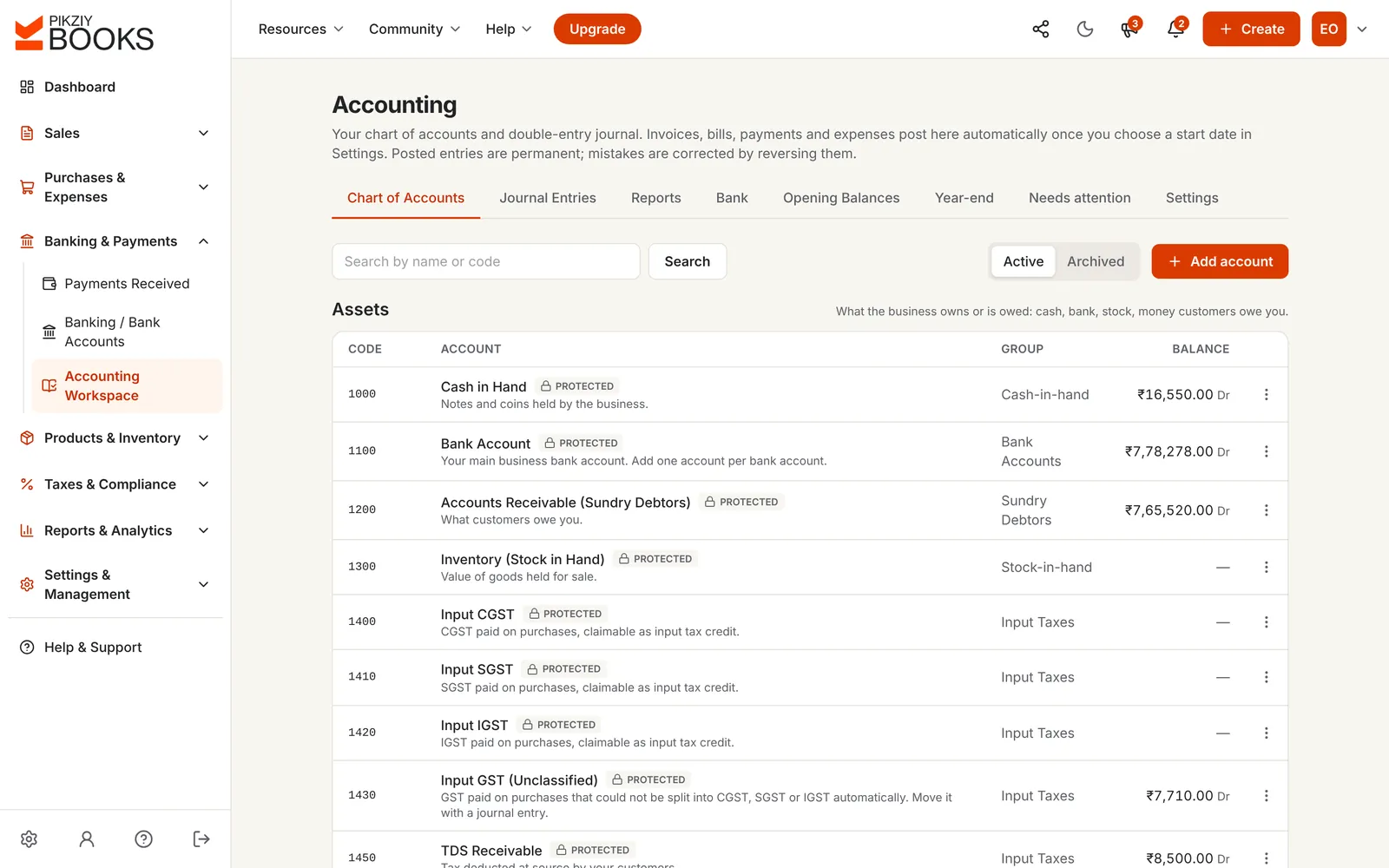
Start from a standard chart of about 50 accounts in five types and Tally-style groups, with cash, bank, debtors, creditors, GST and TDS accounts protected. Add your own accounts and sub-accounts.
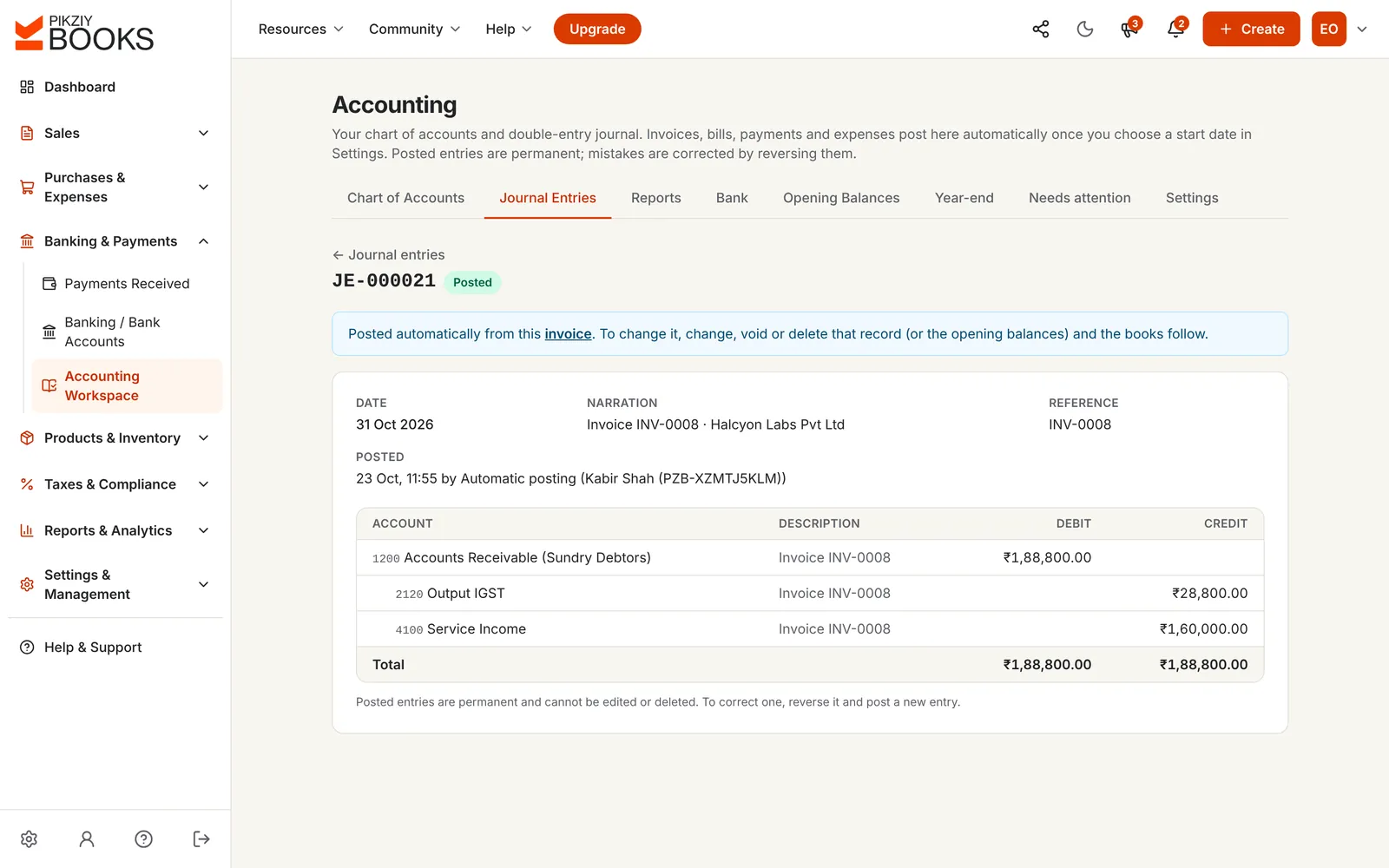
Choose a start date. From then on, each invoice, payment, bill, expense and credit note posts a balanced entry, numbered without gaps, and updates if the record changes.
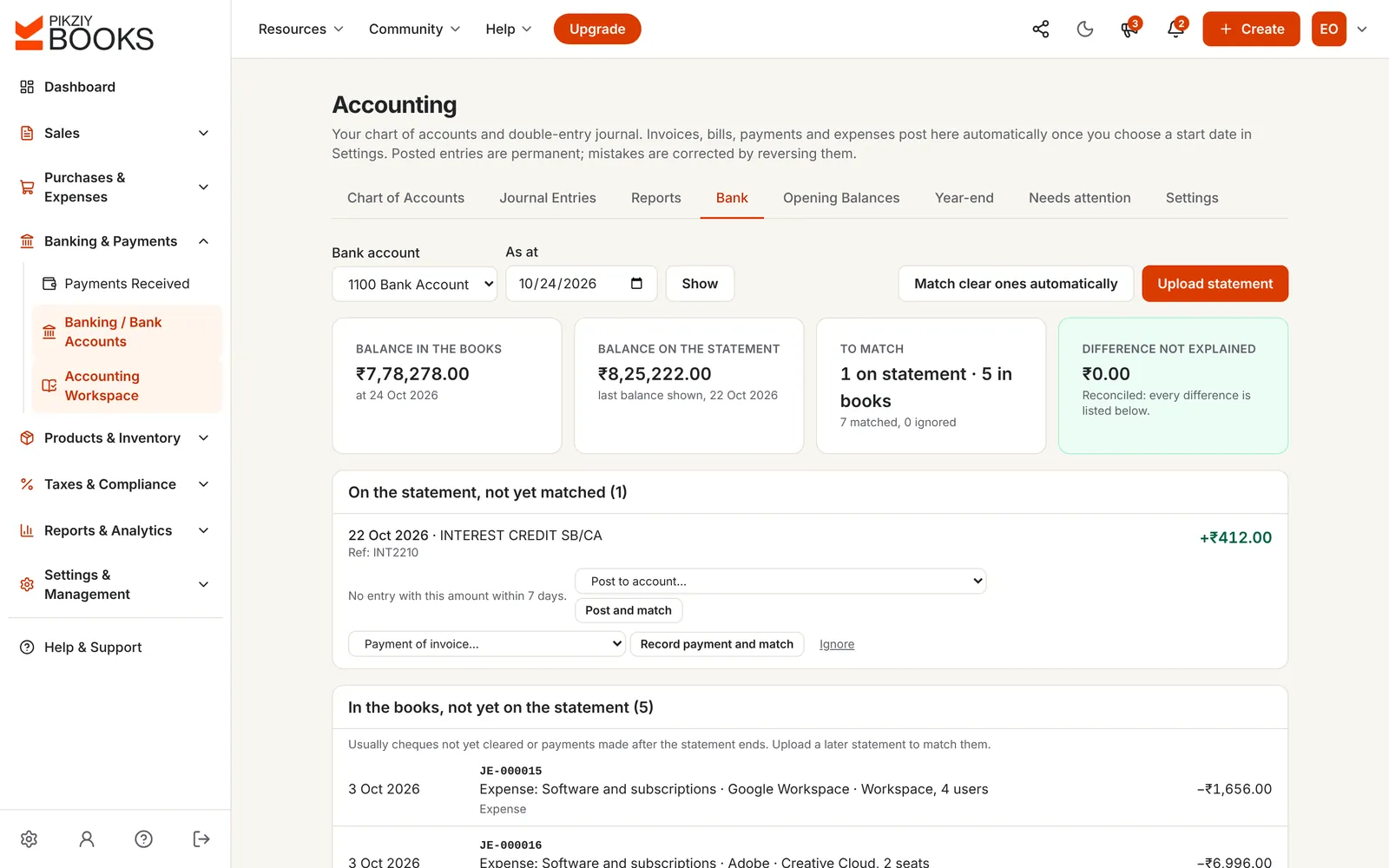
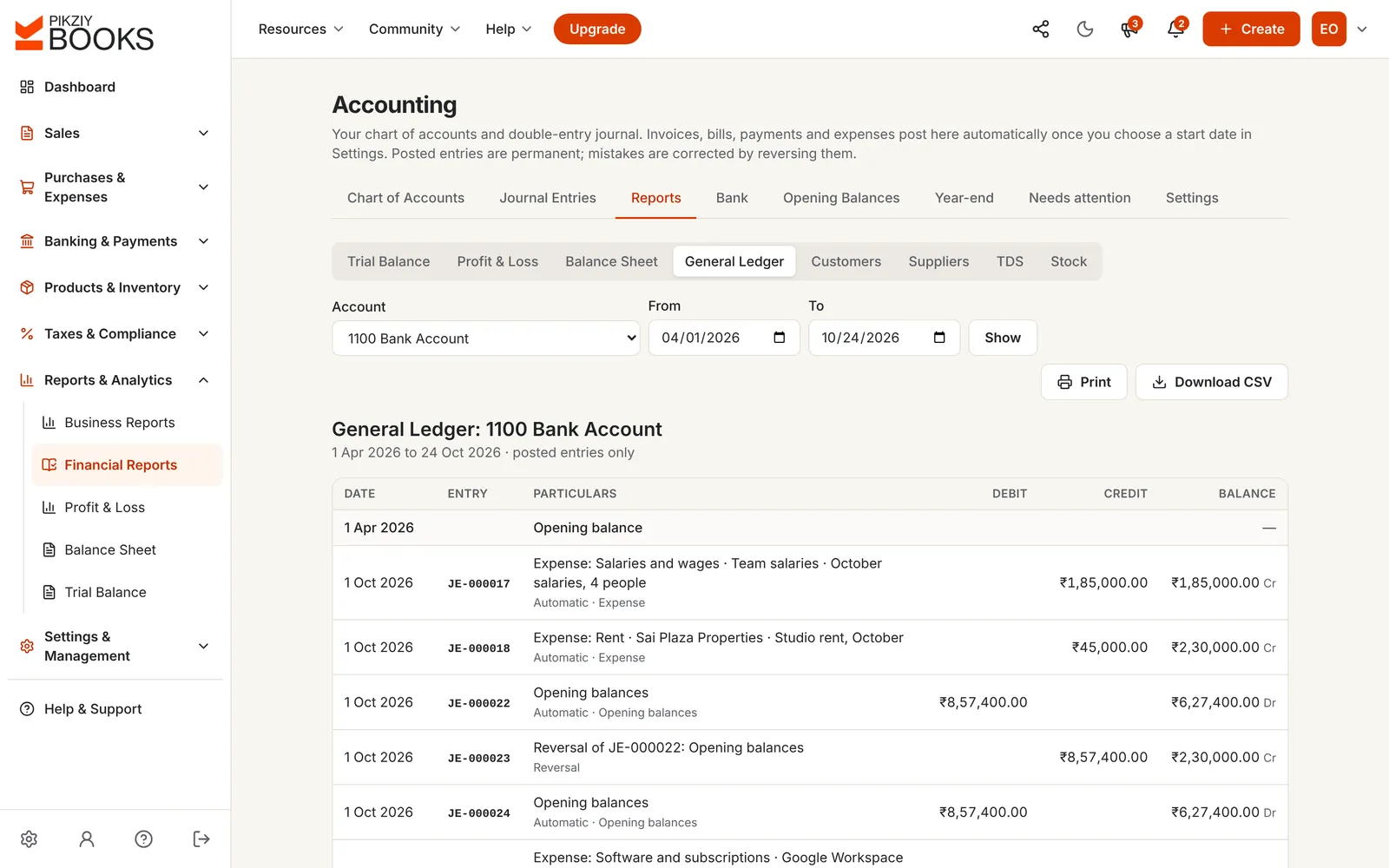
Upload your bank's CSV statement. Clear matches are made automatically; post the rest, such as interest or charges, to an account, and see the difference left to explain.
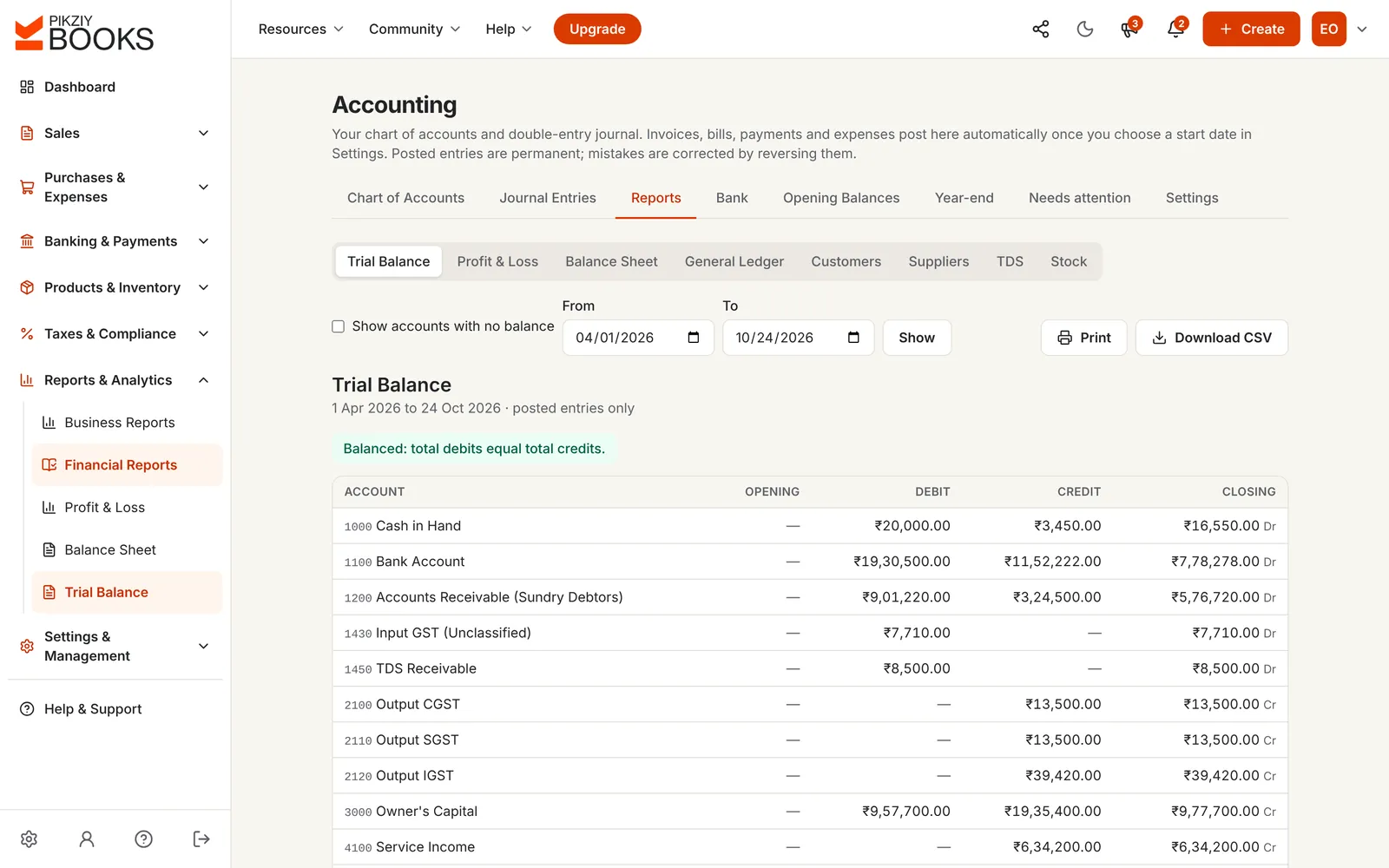
Trial balance, profit and loss and balance sheet from posted entries, with a check that debits equal credits and assets equal liabilities plus equity. Compare with the year before.
Lock a month once its GST return is filed. At the end of the year, close it into Retained Earnings with one entry; balances carry on into the next year.
Pick an everyday transaction, the amount and the GST. See the double entry it makes, with the accounts PikZiy Books would post to.
| Account | Debit | Credit |
|---|---|---|
| 1200 Accounts Receivable (Sundry Debtors) | ₹1,18,000.00 | |
| 4100 Service Income | ₹1,00,000.00 | |
| 2100 Output CGST | ₹9,000.00 | |
| 2110 Output SGST | ₹9,000.00 | |
| Total | ₹1,18,000.00 | ₹1,18,000.00 |
Account names from PikZiy Books' standard Indian chart of accounts. In the app these entries are posted for you when you issue the invoice, record the payment, bill or expense. Nothing you type is saved.
The basics: what a balance sheet is and building a profit and loss statement.
| Billing tool + desktop accounting | PikZiy Books | |
|---|---|---|
| Sales and purchases | Entered again by the accountant | Posted from your invoices and bills |
| GST and TDS accounts | Mapped by hand | Posted to their own accounts |
| When the books are ready | After month-end or year-end | Every day |
| Bank reconciliation | Ticked off against a printout | Matched from a CSV statement |
| Corrections | Edited, sometimes silently | Reversed, with a full history |
| Your CA | Needs your files | Works in your books |
Standard Indian chart, your own accounts, one level of sub-accounts.
Business plan and aboveFrom invoices, payments, bills, expenses and credit notes.
Business plan and aboveDrafts, posting, gapless numbers and reversals.
Business plan and aboveStart on any date with what you had and owed.
Business plan and aboveCSV statements, automatic and manual matching.
Business plan and aboveWith comparisons and CSV downloads.
Business plan and aboveGeneral ledger, customer and supplier ledgers.
Business plan and aboveReceivable from customers, payable on suppliers.
Business plan and aboveWeighted average cost, with cost of goods sold.
Business plan and aboveClose months once they're filed.
Business plan and aboveInto Retained Earnings, with checks and reopening.
Business plan and aboveWho changed what, and when.
Enterprise plan and aboveBilling, payments and reports are on every plan from Growth. Double-entry accounting starts on Business.
| Feature | Starter | Growth | Business | Enterprise |
|---|---|---|---|---|
| People who can sign in | 1 | 3 | 10 | 20 |
| Invoices, payments and expenses | Included | Included | Included | Included |
| Business reports and GST returns | Not included | Included | Included | Included |
| Double-entry books, bank reconciliation | Not included | Included | Included | Included |
| Supplier bills and purchase orders | Not included | Included | Included | Included |
| Activity log | Not included | Included | Included | Included |
Every plan has unlimited invoices, customers and items, and starts with a 14-day free trial. Prices are on the plans page, paid monthly or yearly. Businesses that sign up from 1 November 2026 to 30 April 2027 and pay for a year get 18 months for the price of 12. Compare every feature
Accounting software keeps a business's books by double entry: every transaction is recorded as equal debits and credits in a chart of accounts, so the trial balance, profit and loss and balance sheet always add up. For a small business, the best kind builds the books from the invoices, payments and bills you already record, instead of asking you to type every entry twice.
No. From the start date you choose, every invoice, credit note, customer payment, supplier bill, bill payment and expense posts a balanced entry on its own, and is reversed and posted again if it changes. You or your CA can still add manual journal entries for things like depreciation or loans.
Trial balance, profit and loss (with a comparison to the year before), balance sheet (with a comparison to a year earlier), general ledger, customer and supplier ledgers, the TDS report and stock valuation. Each can be printed or downloaded as a CSV.
It starts from a standard Indian chart of about 50 accounts in five types and Tally-style groups: cash, bank, sundry debtors and creditors, input and output CGST, SGST and IGST, TDS receivable and payable, capital, sales, purchases and common expenses. GST and TDS post to their own accounts. Have your CA review the chart for your business.
Yes. Upload your bank's CSV statement, and lines are matched with the payments, receipts and entries in your books. Clear matches are made automatically; the rest you match, post to an account or ignore, and the screen shows any difference left unexplained. See bank reconciliation for small businesses.
Posted entries are permanent, as accounting rules expect: a mistake is corrected by reversing the entry and posting a new one, and both stay in the history. Entries made from invoices and bills follow those records automatically when you change them.
Yes. An owner or admin can lock the books up to a date, for example once that month's GST return is filed. Nothing dated on or before the lock date can then change the books.
Yes. Year-end moves the year's income and expenses into Retained Earnings with one closing entry dated 31 March, after checks for anything unfinished. A closed year can be reopened by an owner or admin, with a reason, and the history is kept.
Yes. Choose a start date and enter what the business had and owed on that date as opening balances: bank, cash, debtors, creditors, stock, loans and capital. They post as one entry.
Business and Enterprise. Starter and Growth keep invoices, payments, expenses and reports without double-entry books; you can move up when you need them, and your records come with you.
PikZiy Books opens for sign-ups in November 2026. Join the waitlist and we will tell you the day you can start.
Join the waitlist