TDS that never gets matched
Five clients each keep back 10%. By March, nobody knows which TDS is in your Form 168 and which is missing.
₹72,000 a year from one ₹60,000-a-month client, to be checked quarter by quarter.

Invoice each engagement, let monthly fees invoice themselves, record the TDS every client keeps back, and watch the books keep themselves: profit and loss, TDS receivable and every client's ledger, ready for your CA.
Sign-ups open November 2026 · 14-day free trial · No card needed to start
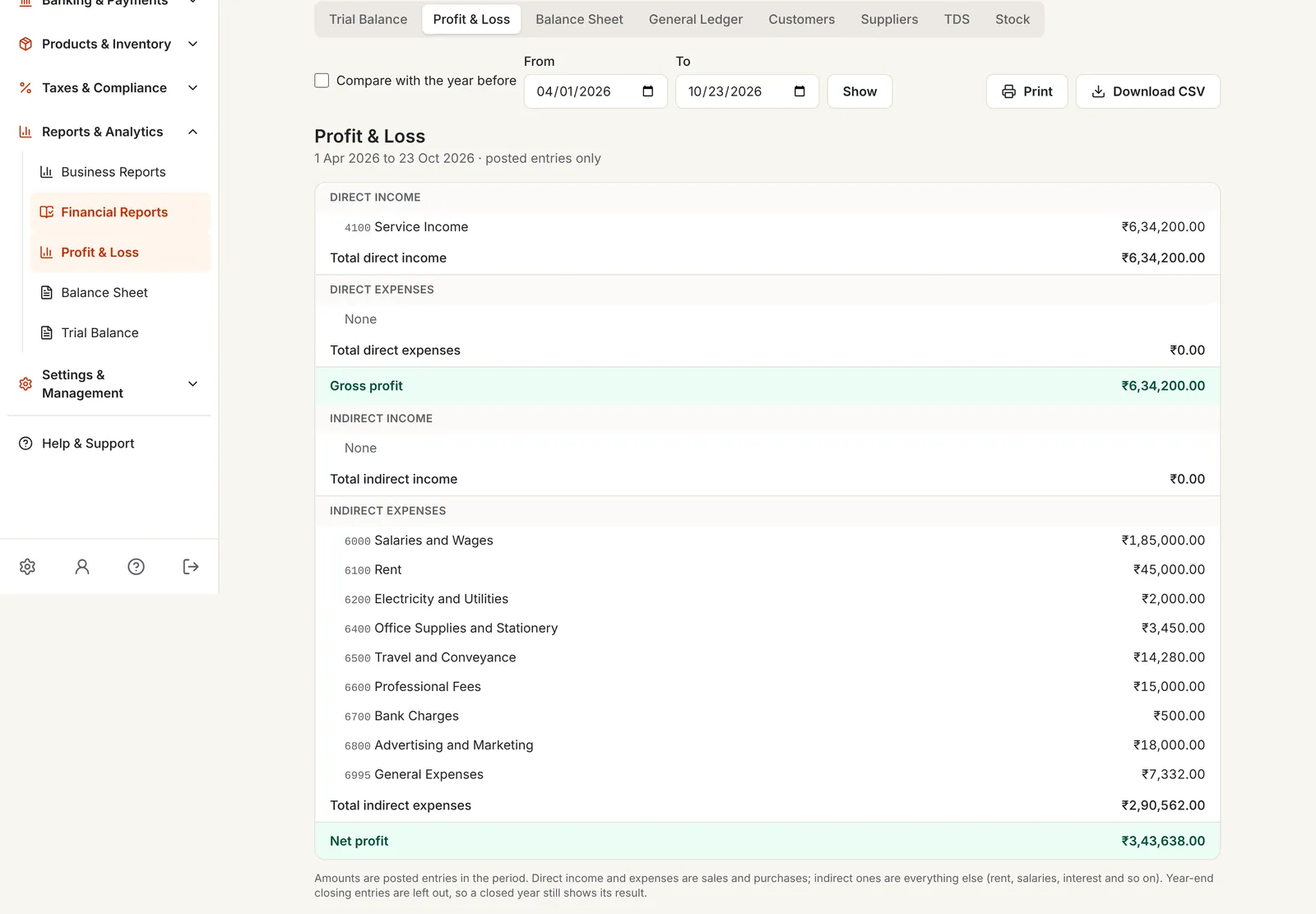
Accounting software for consultants keeps the money side of an advisory practice in order: engagements quoted and invoiced, payments and TDS recorded, expenses kept, and all of it posted to double-entry books that show your profit and what clients owe.
In PikZiy Books the books come from the work you already do: the invoices you send, the payments you receive and the expenses you record.
Five clients each keep back 10%. By March, nobody knows which TDS is in your Form 168 and which is missing.
₹72,000 a year from one ₹60,000-a-month client, to be checked quarter by quarter.
The engagement letter says the 1st of every month. The invoice goes out when you remember to send it.
Two months' fees billed together, and paid in three months.
Invoices in one place, bank statements in another, expenses in a notebook. Your CA starts from scratch in April.
A week of work for your CA, and a bigger bill for you.
Screenshots of the real app with a sample business, Ember & Oak Studio in Pune.
Bill fixed fees, stages, or hours and days at your rate, with the SAC code and CGST and SGST, or IGST, worked out for each line and checked against the client's state.
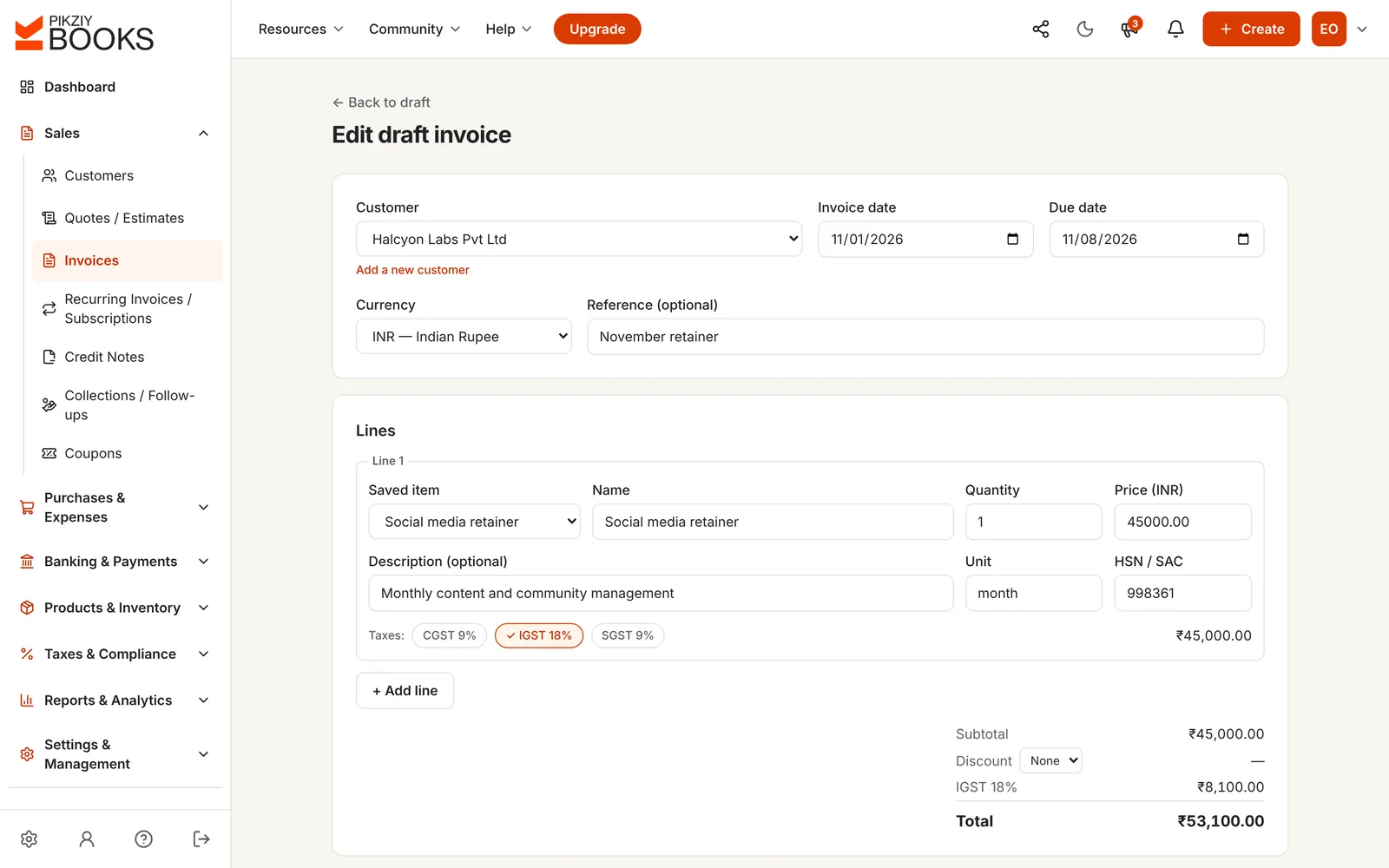
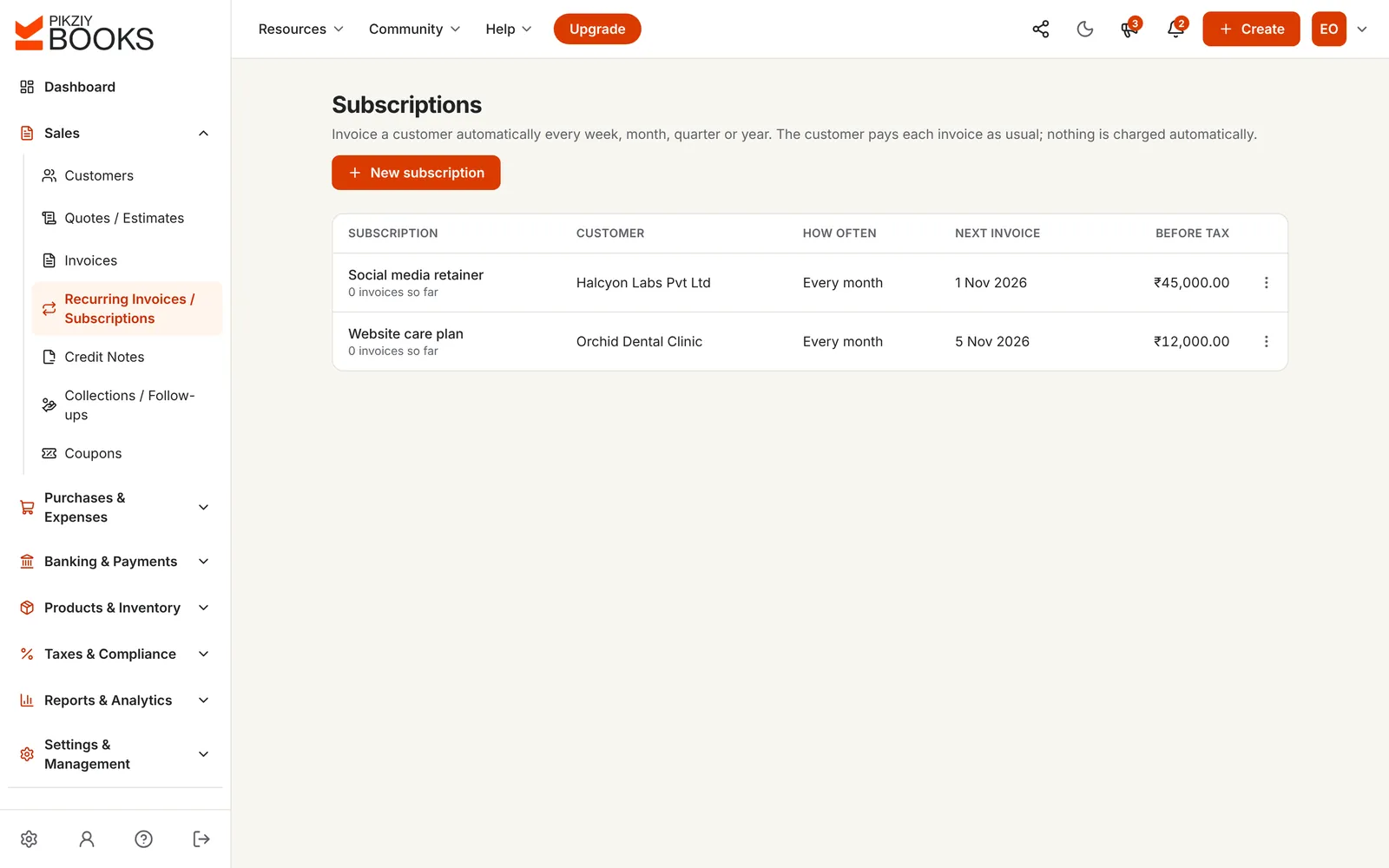
Turn a monthly fee into a subscription. Each invoice is issued and emailed on its date, or created as a draft for you to check, until the engagement ends.
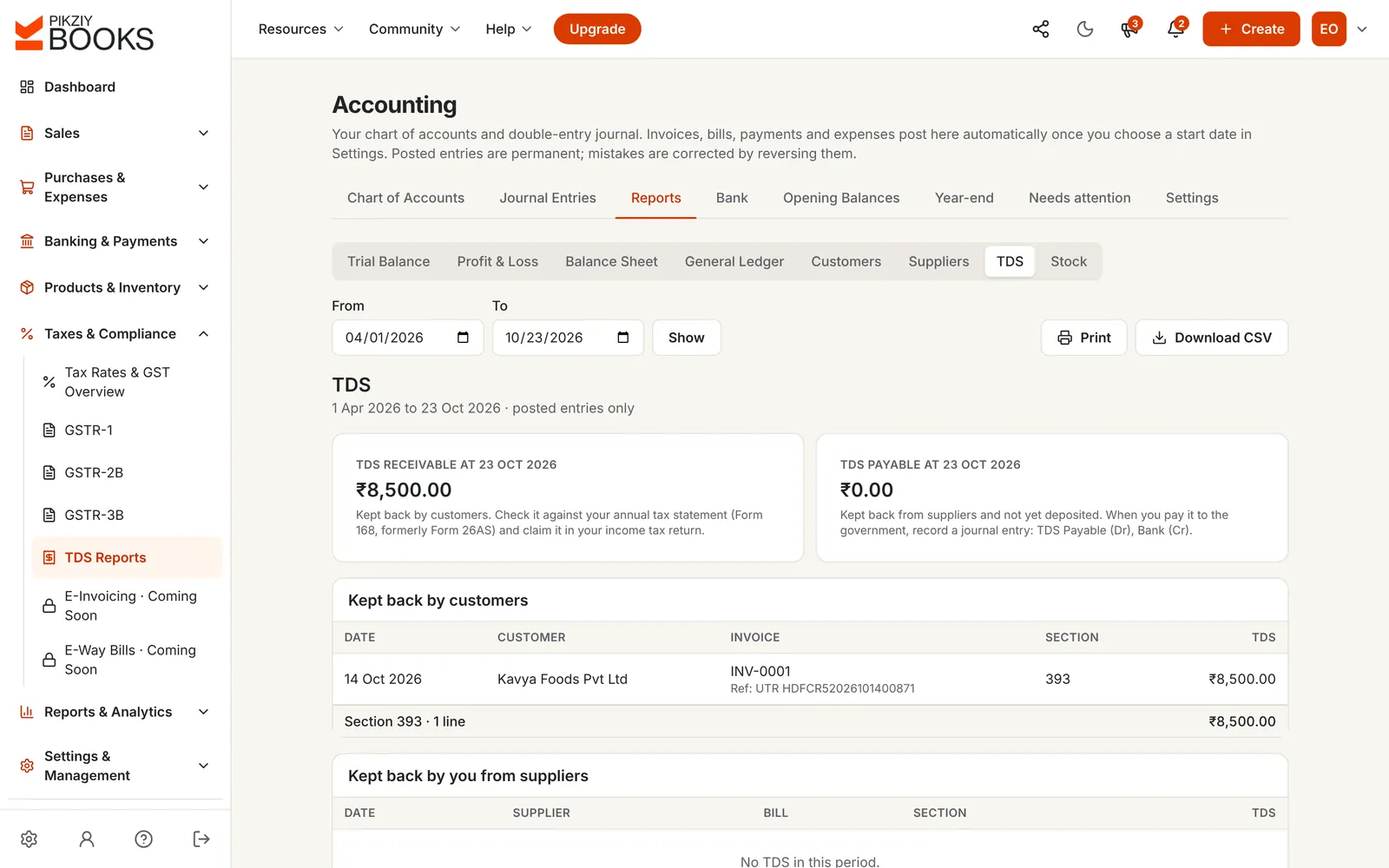
Record what each client paid and what they kept back. On Business it posts to TDS Receivable, and the TDS report lists it by client, invoice and section.
From the start date you choose, invoices, payments, expenses and bills post balanced entries on their own. Profit and loss, balance sheet and ledgers are always current.
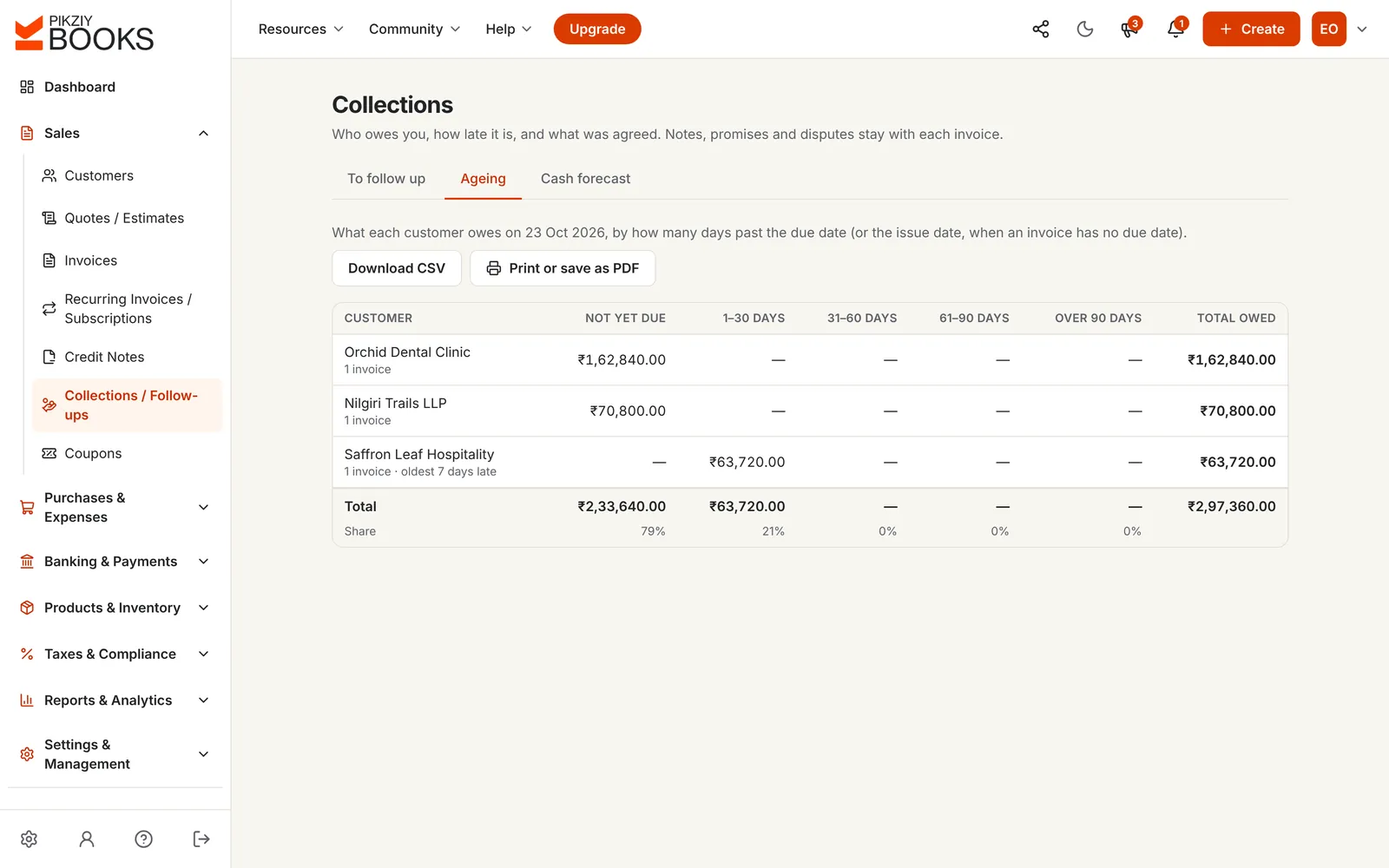
See what each client owes and how late it is, from not yet due to over 90 days, and follow up with promises to pay and notes.
Enter a monthly fee and how GST and TDS apply. See each month's invoice, the GST you collect and pay over, the TDS you claim back, and what actually reaches your bank.
Check your Form 168 (formerly 26AS) each quarter to see that each client's TDS has been deposited against your PAN. General guidance, not tax advice. Nothing you type is saved.
For your records: TDS on professional fees under section 393 and a monthly bookkeeping checklist.
| Spreadsheets, then entries at year-end | PikZiy Books | |
|---|---|---|
| Monthly fee invoices | Made by hand each month | Issued on schedule |
| TDS kept back | A column, if anyone fills it | Recorded with the payment, reported by section |
| Expenses | Receipts in a folder | Recorded by category as you go |
| Profit and loss | Built by your CA after March | Current every day |
| Who owes you | Searched in the inbox | Ageing by client |
| Your CA | Sent files to rebuild | Works in your books |
Accepted online, turned into invoices.
SAC codes, GST on each line, your own numbering.
What each client kept back, by section.
Your own gateway, and emails that chase for you.
Travel, software and professional fees by category.
Growth plan and aboveGSTR-1 download and the GSTR-3B worksheet.
Growth plan and aboveAgeing, promises to pay and a cash forecast.
Growth plan and aboveRecurring invoices, issued and emailed for you.
Business plan and aboveEvery invoice, payment and expense posted for you.
Business plan and aboveTDS receivable by client, invoice and section.
Business plan and aboveYour bank's CSV statement matched with your books.
Business plan and aboveLock the books once a return is filed.
Business plan and aboveBilling with TDS is on every plan. Business turns it into double-entry books.
| Feature | Starter | Growth | Business | Enterprise |
|---|---|---|---|---|
| People who can sign in | 1 | 3 | 10 | 25 |
| Quotes, invoices, payments with TDS and reminders | Included | Included | Included | Included |
| Expenses and reports | Not included | Included | Included | Included |
| Receivables, ageing and cash forecast | Not included | Included | Included | Included |
| Monthly fee invoices that send themselves | Not included | Not included | Included | Included |
| Double-entry books, TDS report and bank reconciliation | Not included | Not included | Included | Included |
| Client statements | Not included | Not included | Included | Included |
Every plan has unlimited invoices, customers and items, and starts with a 14-day free trial. Prices are published when sign-ups open in November 2026. Businesses that sign up from 1 November 2026 to 30 April 2027 and pay for a year get 18 months for the price of 12. Compare every feature
Accounting software for consultants records the fees you bill, the money clients pay and the TDS they keep back, what you spend, and turns all of it into books: profit and loss, balance sheet and ledgers. For a consultant it should start with invoicing, because that is where most of the records begin.
Invoice the first month, then turn the invoice into a subscription on Business. It invoices the client every month, quarter or year, and can issue and email each invoice on its date. Clients pay each invoice as usual.
Yes, as invoice lines: the number of hours or days as the quantity, “hours” or “days” as the unit, and your rate as the price. There is no timer or timesheet, so keep your hours where you track them now.
When you record a payment, enter what reached your bank and the TDS kept back, with its section: 393 under the Income-tax Act, 2025 (194J before April 2026). Together they settle the invoice. On Business the TDS posts to TDS Receivable, and the TDS report lists it by customer and section, to check against your Form 168 (formerly 26AS).
Usually 10% on professional fees and 2% on technical fees, once a client's payments to you cross ₹50,000 in the tax year, worked out on the fee before GST. Individuals not under audit generally don't deduct it. Our TDS guide has the details.
Yes, on Business. From the start date you choose, every invoice, payment, expense, supplier bill and credit note posts balanced entries on its own. You get the trial balance, profit and loss, balance sheet, general ledger, customer and supplier ledgers, and bank reconciliation from your bank's CSV statement.
Yes. Invite your CA with the Accountant role. On Business they can add journal entries, enter opening balances, reconcile the bank and download reports, without asking you for files. Locking a month once your GST return is filed is kept for owners and admins.
Every invoice shows Unpaid, Partly paid, Paid or Overdue. On Growth, Collections ages what each client owes into not yet due, 1–30, 31–60, 61–90 and over 90 days, with promises to pay and follow-ups. See tracking outstanding payments.
No. It keeps your billing and books, and gives your CA the profit and loss, TDS and ledgers they need. Income tax returns and presumptive income are worked out by you or your CA.
Starter for quotes, invoices, payments with TDS, receipts and reminders. Growth adds expenses, reports, GST returns and collections. Business adds automatic books, the TDS report, monthly fee invoices that send themselves, and client statements.
PikZiy Books opens for sign-ups in November 2026. Join the waitlist and we will tell you the day you can start.
Join the waitlist