Receipts in five places
A bill in an email, a UPI screenshot on a phone, a printed slip in a drawer, a card statement next month. Some never make it to the books.
₹14,280 of client travel is never recorded, so it's never claimed as a business cost.

Record what your business spends in seconds, by category and by who you paid. Rent, salaries and subscriptions repeat on their own, and the month adds itself up: by category, with the tax included, ready for your accountant.
Sign-ups open November 2026 · 14-day free trial · No card needed to start · Expenses are on the Growth plan and above.
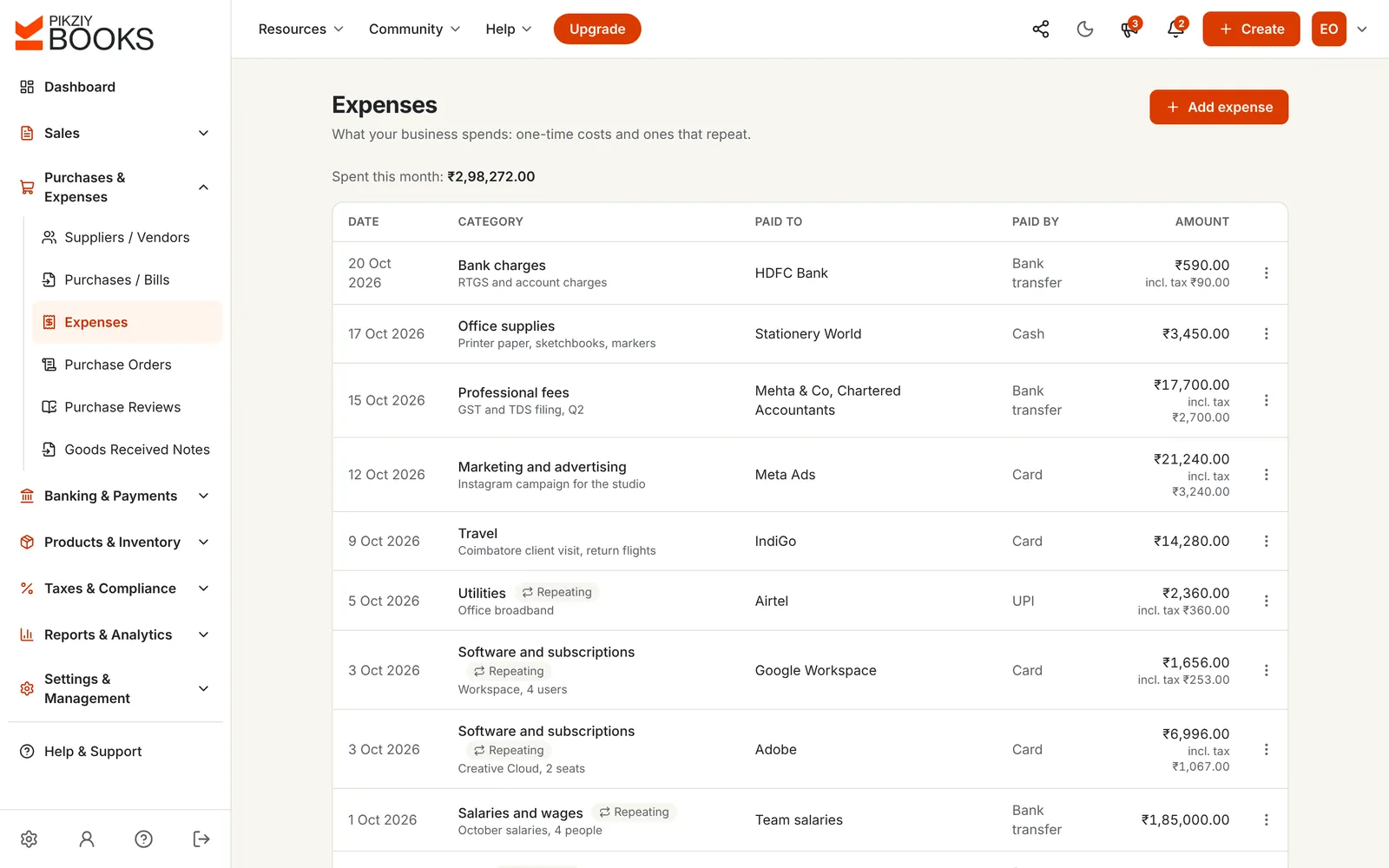
Expense tracking software keeps a record of everything your business spends: the date, who was paid, the category, the amount, the tax in it and how it was paid. It shows where the money goes each month, and it saves your accountant from rebuilding the year from bank statements.
In PikZiy Books, expenses sit beside your invoices and payments, so the money in and the money out are in one place.
A bill in an email, a UPI screenshot on a phone, a printed slip in a drawer, a card statement next month. Some never make it to the books.
₹14,280 of client travel is never recorded, so it's never claimed as a business cost.
Software, broadband and tools renew every month on a card. Each one is small; together they are not.
₹8,652 a month in software is ₹1,03,824 a year.
Your CA asks for every expense, by category, for the year. Someone spends a weekend with bank statements and a spreadsheet.
Rent for two months is entered twice, and a quarter's bank charges are missing.
Screenshots of the real app with a sample business, Ember & Oak Studio in Pune.
Enter the date, choose a category, type who you paid and the amount, and pick how you paid. Add the tax included if the bill shows GST, and a bill number or UTR to find it again.
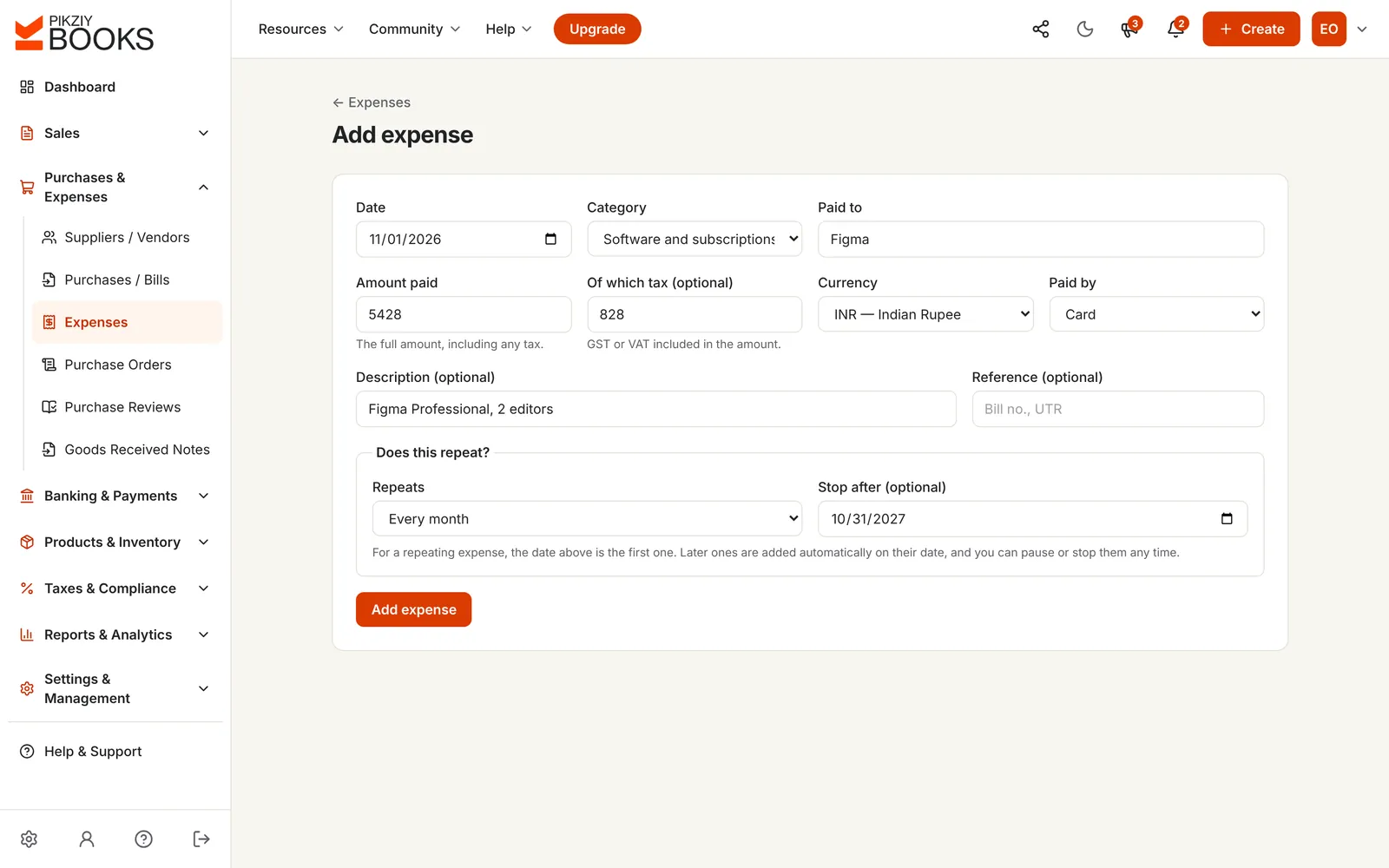
Set rent, salaries, software and utilities to repeat weekly, monthly, quarterly or yearly, with an optional date to stop. Each one is added on its date, so the month is complete without anyone remembering.
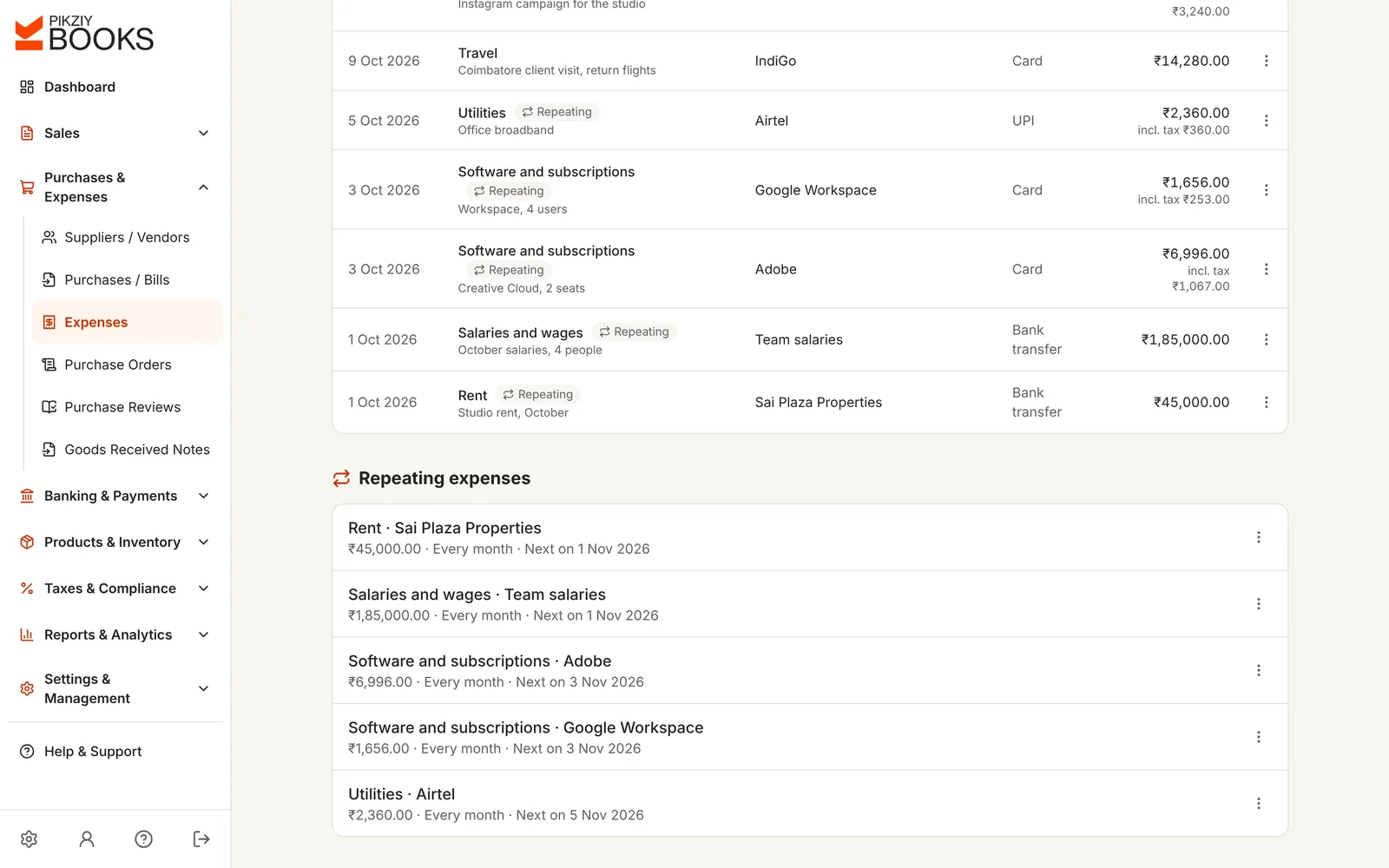
The Expenses list shows what was spent this month, and every expense with its category, who was paid, how and how much, including any tax.
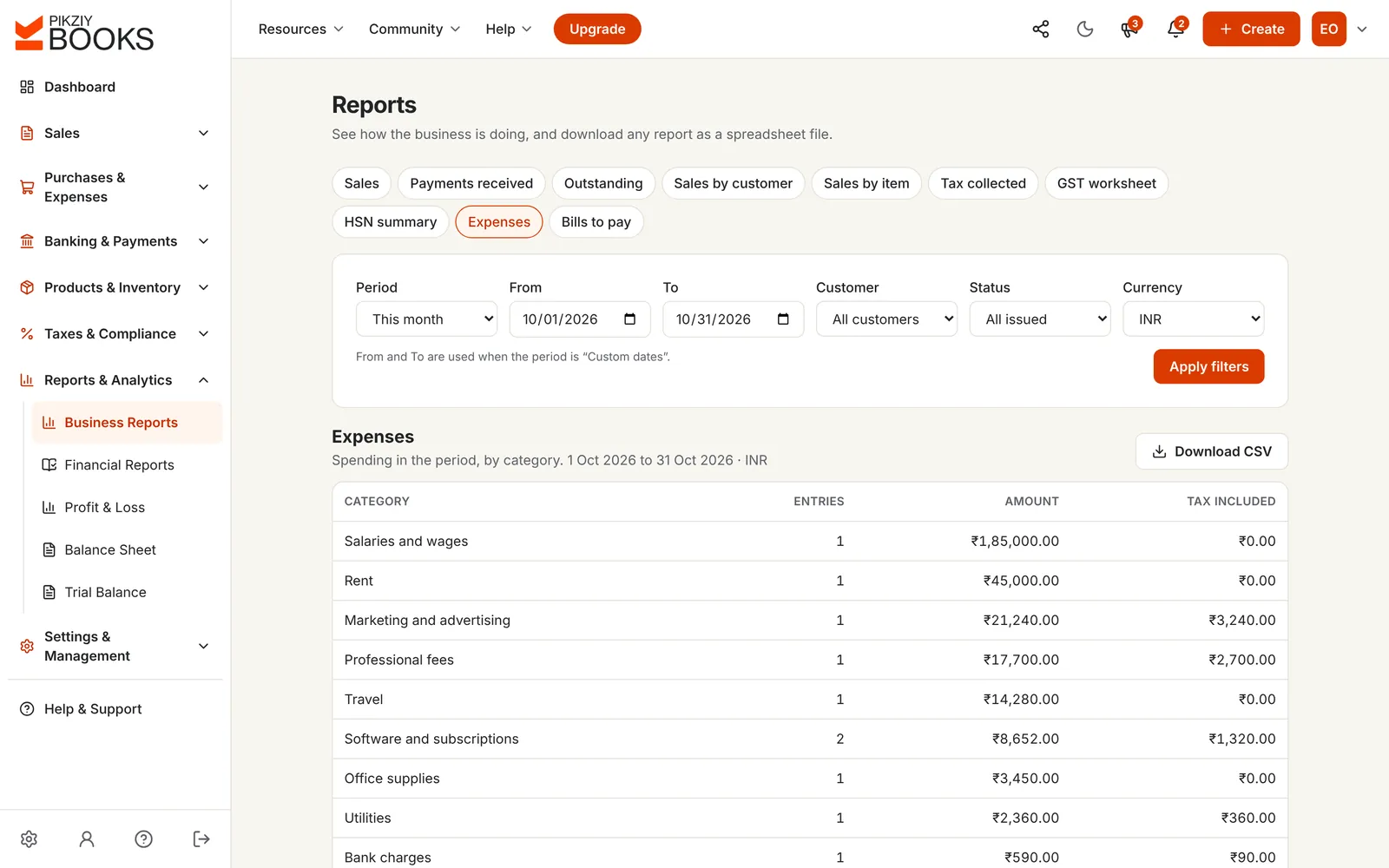
The Expenses report adds up each category for this month, last month, the quarter, the financial year or any dates: the number of entries, the amount and the tax included.
Enter this month's sales and what you spent in each category. See what is left, the share each category takes, and how much your repeating costs add up to over a year.
₹2,48,128.00
You spent ₹2,91,872.00, 54% of sales, leaving a margin of 45.9%.
A rough monthly picture: amounts as paid, so GST you can claim back is not separated out, and nothing is spread over months. Nothing you type is saved.
Know your numbers: gross profit and net profit, with margin formulas and cash flow vs profit.
| Spreadsheet | PikZiy Books | |
|---|---|---|
| Rent, salaries and subscriptions | Typed in again each month | Repeat on their own |
| Categories | Whatever each person types | One list for everyone |
| Monthly totals by category | A pivot table to rebuild | The Expenses report, any period |
| Tax in each expense | Another column, often empty | Recorded and totalled |
| Your team | One file, many versions | Everyone in the same books |
| Your books | Copied in by your accountant | Posted for you on Business |
Date, category, who you paid, amount and method.
Growth plan and aboveWeekly, monthly, quarterly or yearly, with a stop date.
Growth plan and aboveFrom rent and salaries to bank charges and licences.
Growth plan and aboveRecord the GST or VAT in each expense.
Growth plan and aboveBy category, for any period.
Growth plan and aboveSoftware billed in dollars, travel in euros.
Growth plan and aboveThree users on Growth, ten on Business, each with a role.
Growth plan and aboveEvery expense posts to the journal, with a profit and loss statement.
Business plan and aboveBills with the supplier's GSTIN, for input tax credit and GSTR-2B matching.
Business plan and aboveOrder, receive and match before you pay.
Business plan and aboveExpenses and every other report as a spreadsheet file.
Business plan and aboveLock a month once it is filed so nothing changes.
Business plan and aboveExpense tracking starts on Growth. Business turns your expenses into double-entry books.
| Feature | Starter | Growth | Business | Enterprise |
|---|---|---|---|---|
| People who can sign in | 1 | 3 | 10 | 25 |
| Expenses and repeating expenses | Not included | Included | Included | Included |
| Expenses report by category | Not included | Included | Included | Included |
| Supplier bills with input tax credit | Not included | Not included | Included | Included |
| Automatic books and profit and loss | Not included | Not included | Included | Included |
| CSV downloads | Not included | Not included | Included | Included |
Every plan has unlimited invoices, customers and items, and starts with a 14-day free trial. Prices are published when sign-ups open in November 2026. Businesses that sign up from 1 November 2026 to 30 April 2027 and pay for a year get 18 months for the price of 12. Compare every feature
Expense tracking software records what your business spends, with the date, who was paid, the category, the amount and how it was paid, so you can see where the money goes each month. Good expense tracking software also handles costs that repeat, like rent and subscriptions, and turns your expenses into reports your accountant can use.
Open Expenses and choose Add expense. Enter the date, choose a category, type who you paid and the amount, add the tax included if there is any, and pick how you paid. A description and a reference such as a bill number or UTR are optional.
Yes. Choose how often an expense repeats, weekly, monthly, quarterly or yearly, and optionally a date to stop. Each one is added on its date, and you can pause, resume or stop it any time. Rent, salaries, software and broadband are typical.
Rent, salaries and wages, software and subscriptions, travel, marketing and advertising, utilities, office supplies, professional fees, bank charges, taxes and licences, repairs and maintenance, and other. Our guide to categorising business expenses explains what goes where.
Yes. The Expenses report shows the number of entries, the amount and the tax included for each category, for this month, last month, the quarter, the financial year or any dates you choose. On Business you can download it as a CSV for your accountant.
Not yet. Note the bill number or payment reference on the expense, and keep the receipt itself in your own folder or email for now.
Expenses record the tax included in what you paid, so you can see it, but they don't carry the supplier's GSTIN, so they are not counted as input tax credit. For purchases where you want to claim ITC, record them as supplier bills on Business, which go into GSTR-3B and are matched with GSTR-2B. See input tax credit.
On Business, every expense posts to your double-entry books on its own, with your invoices, bills and payments, so the profit and loss statement, trial balance and balance sheet are always up to date. On Growth, the Sales and Expenses reports give you both sides for any period.
Expenses and reports are on Growth and above. Business adds automatic double-entry books, supplier bills and purchase orders, and CSV downloads.
Yes. Invite your CA or accountant as a team member with the accountant role. They count as one user and work in the same books, so nothing has to be emailed back and forth.
PikZiy Books opens for sign-ups in November 2026. Join the waitlist and we will tell you the day you can start.
Join the waitlist