Every invoice shows Unpaid, Partly paid, Paid or Overdue. Customers pay online into your own gateway, or tell you they have paid by UPI or bank transfer with a screenshot as proof. Reminders go out on their own, and every payment gets a receipt.
Sign-ups open November 2026 · 14-day free trial · No card needed to start
The real PikZiy Books app, with sample data
What is payment tracking software?
Payment tracking software matches the money you receive with the invoices it pays, so you can see at a glance what is paid, what is partly paid and what is late. The useful kind also helps the money arrive: a way to pay online, reminders that go out on time, and a receipt for every payment.
In PikZiy Books, payments live on the same invoices your team already sends, so the status is never a guess and never a separate spreadsheet.
WHERE PAYMENTS GET LOST
Money arrives. Nobody knows what for.
01
A UPI credit with no name
₹63,720 lands in the bank with a reference number and nothing else. Which invoice was it? Someone spends an afternoon matching it.
Two customers owe similar amounts; the wrong invoice is marked paid and the right one gets a reminder.
02
Part payments that vanish
An advance came in, then TDS was kept back, then a balance. The invoice still says unpaid, or worse, paid.
₹1,49,040 received and ₹13,800 TDS held back on a ₹1,62,840 invoice: settled, but it doesn't look it.
03
Reminders sent too late, or to the wrong person
Chasing depends on someone remembering. Customers who already paid get a stern email; customers who didn't, get nothing.
An invoice is 40 days overdue before anyone notices.
HOW IT WORKS
From invoice sent to money matched.
Screenshots of the real app with a sample business, Ember & Oak Studio in Pune.
01
Your customer chooses how to pay
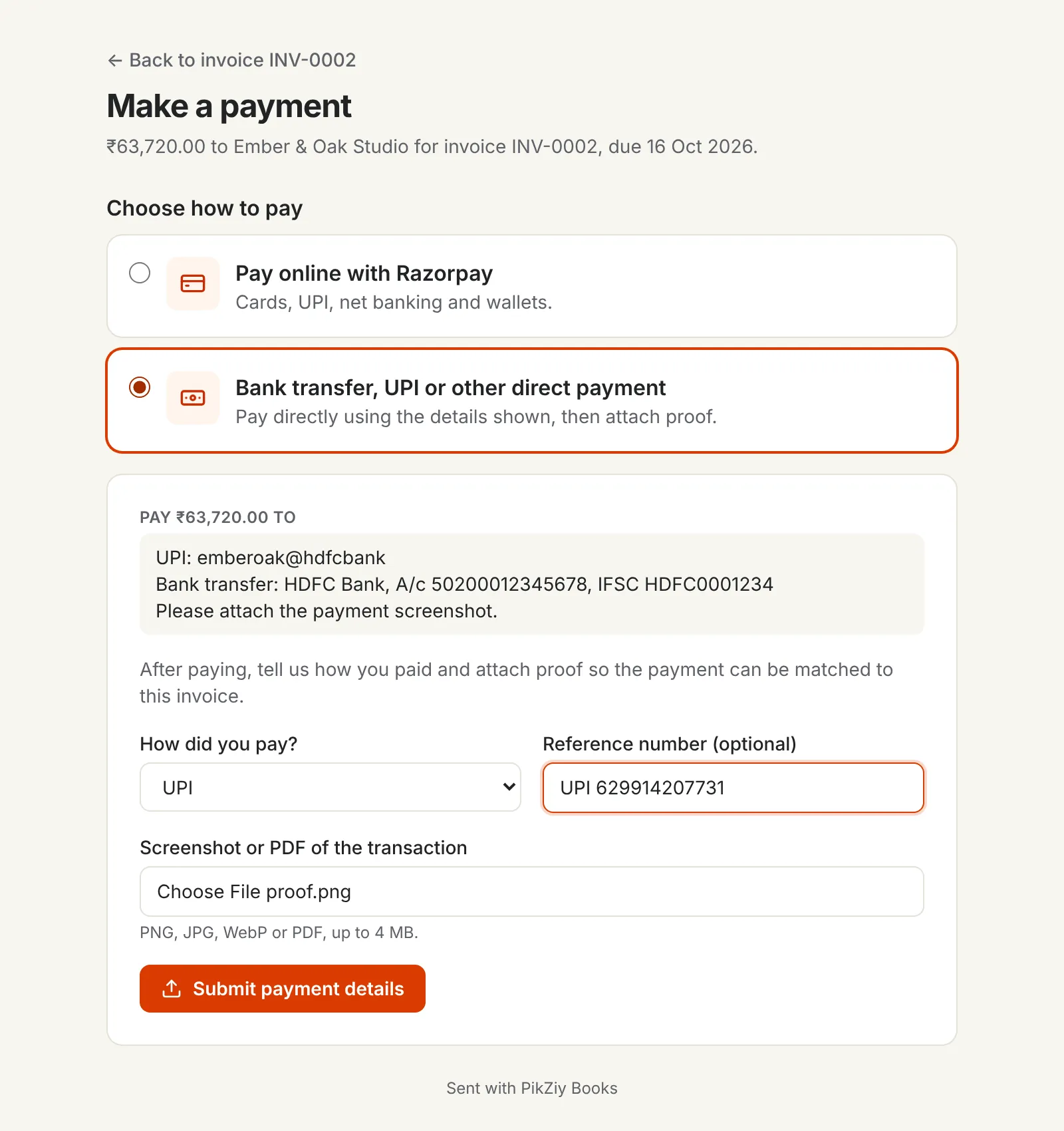
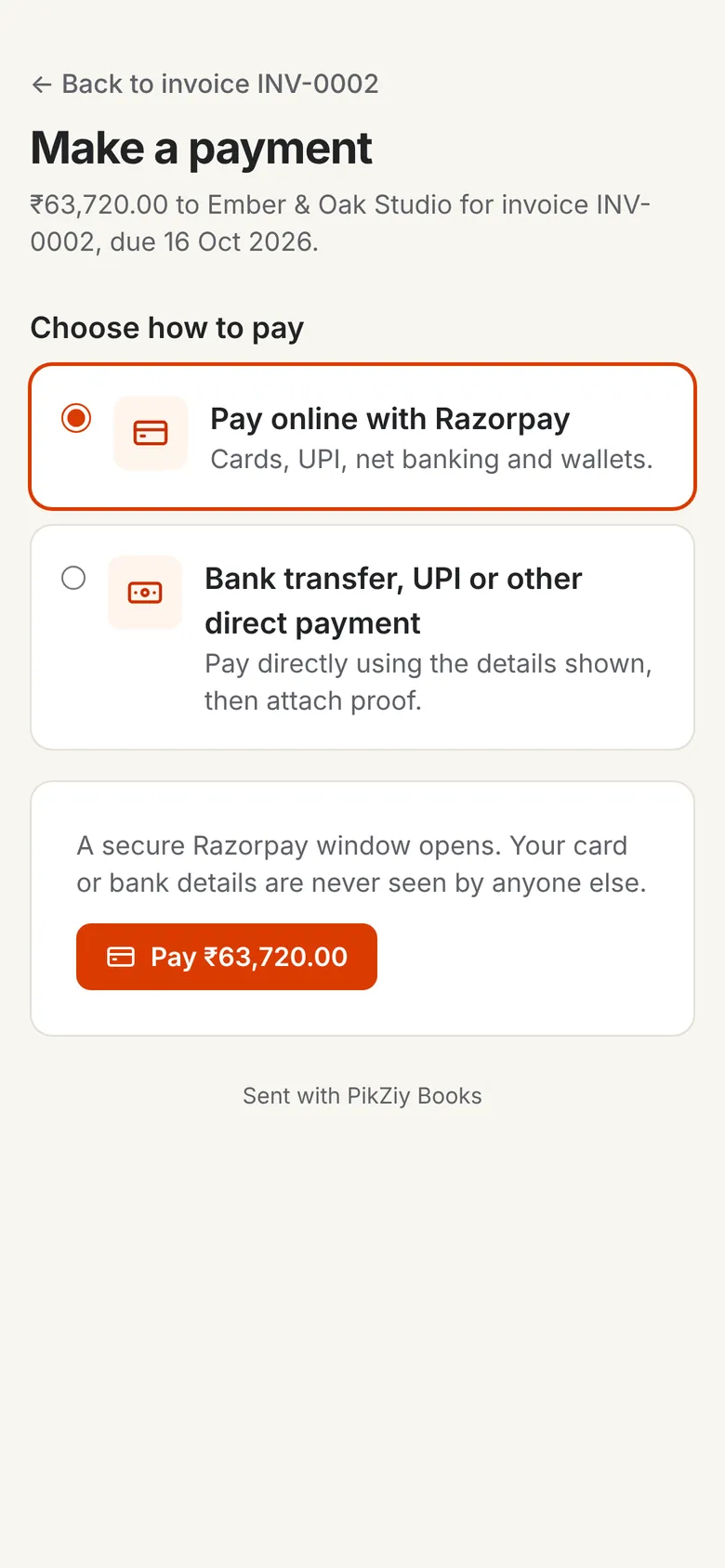
The invoice link has a Make Payment button. Customers pay online through your own Razorpay, Cashfree or Easebuzz account, or pay you directly by bank transfer or UPI using the details you give, then say how they paid and attach proof.
Online payments go straight to your gateway account
Bank, UPI and cheque details shown on the page
A screenshot or PDF as proof, up to 4 MB
02
Online payments record themselves
When a gateway payment goes through, it is recorded against the invoice for you, with a receipt. The invoice moves to Partly paid or Paid, and the dashboard updates.
No matching by hand
Checked with the gateway before it is recorded
A thank-you email, if you switch it on
03
Confirm what customers report
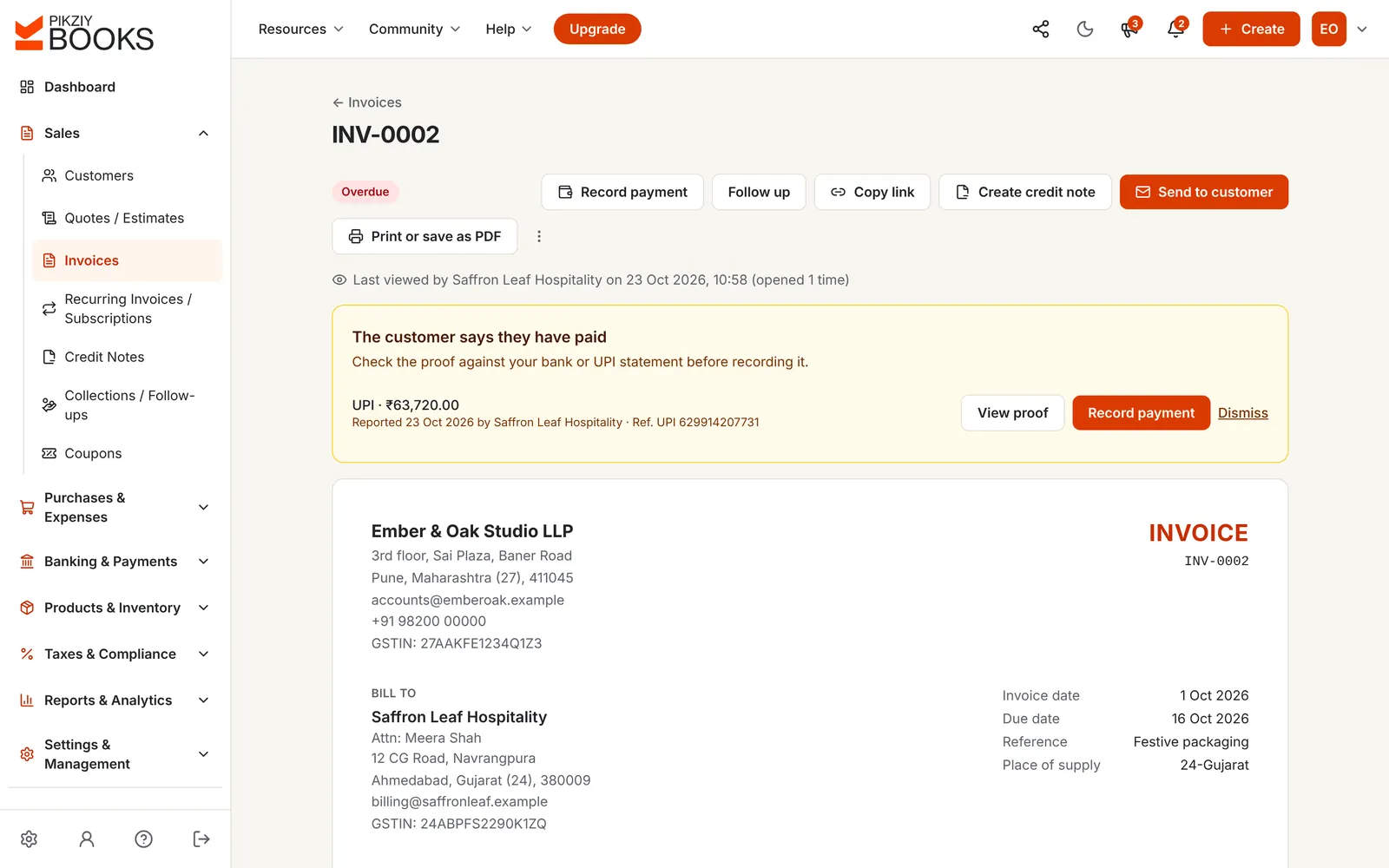
When a customer says they have paid, you get an email and the invoice shows their method, reference and proof. Check it against your bank or UPI statement, then record the payment or dismiss it.
View the proof in one click
Record payment with the details filled in
Nothing is marked paid until you confirm
04
Record any payment in seconds
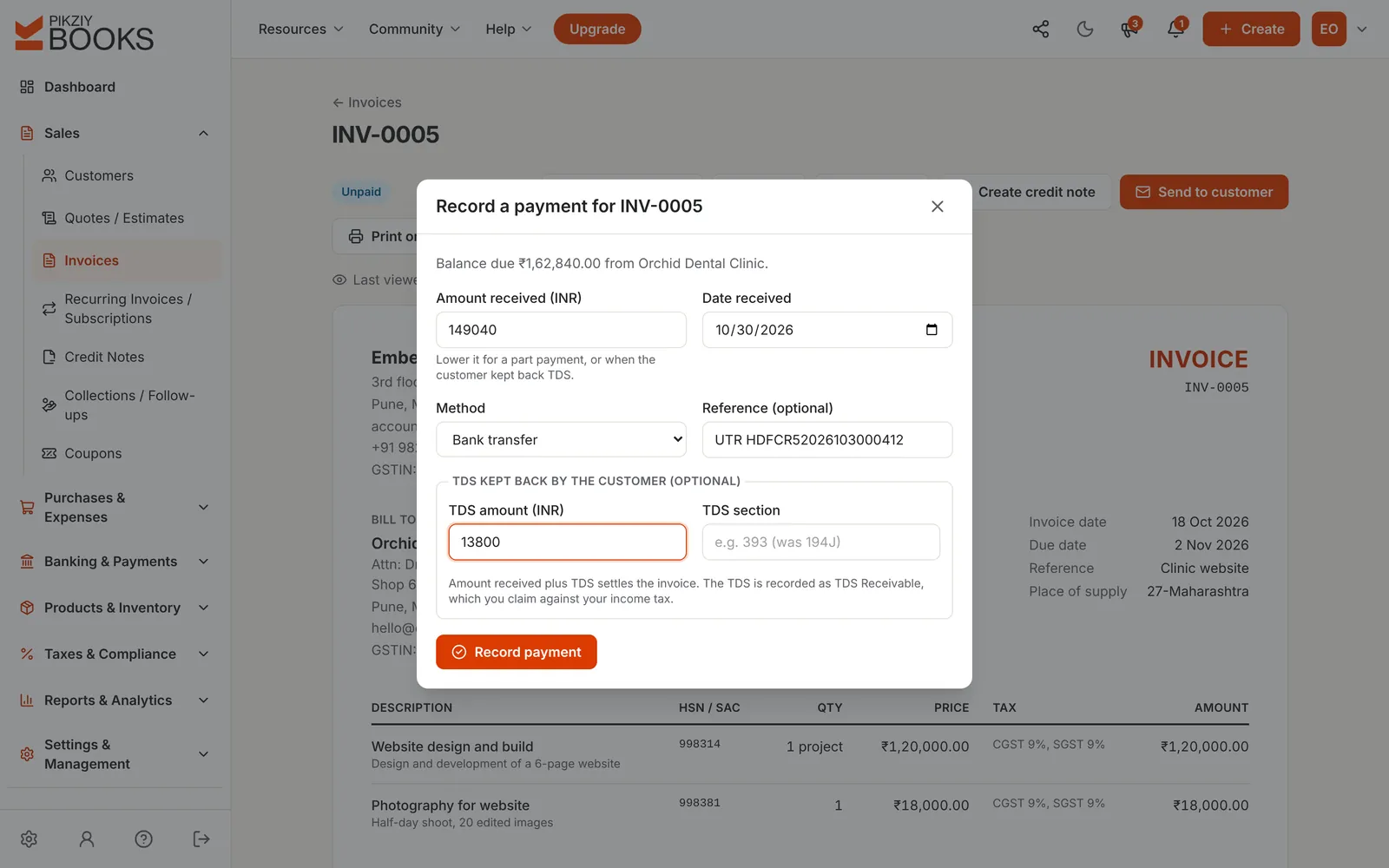
For cash, cheques or a transfer nobody reported, choose Record payment. Lower the amount for a part payment, and enter the TDS your customer kept back with its section.
Full or part payments
Amount received plus TDS settles the invoice
Bank transfer, UPI, cheque, cash, card or other
05
A receipt for every payment
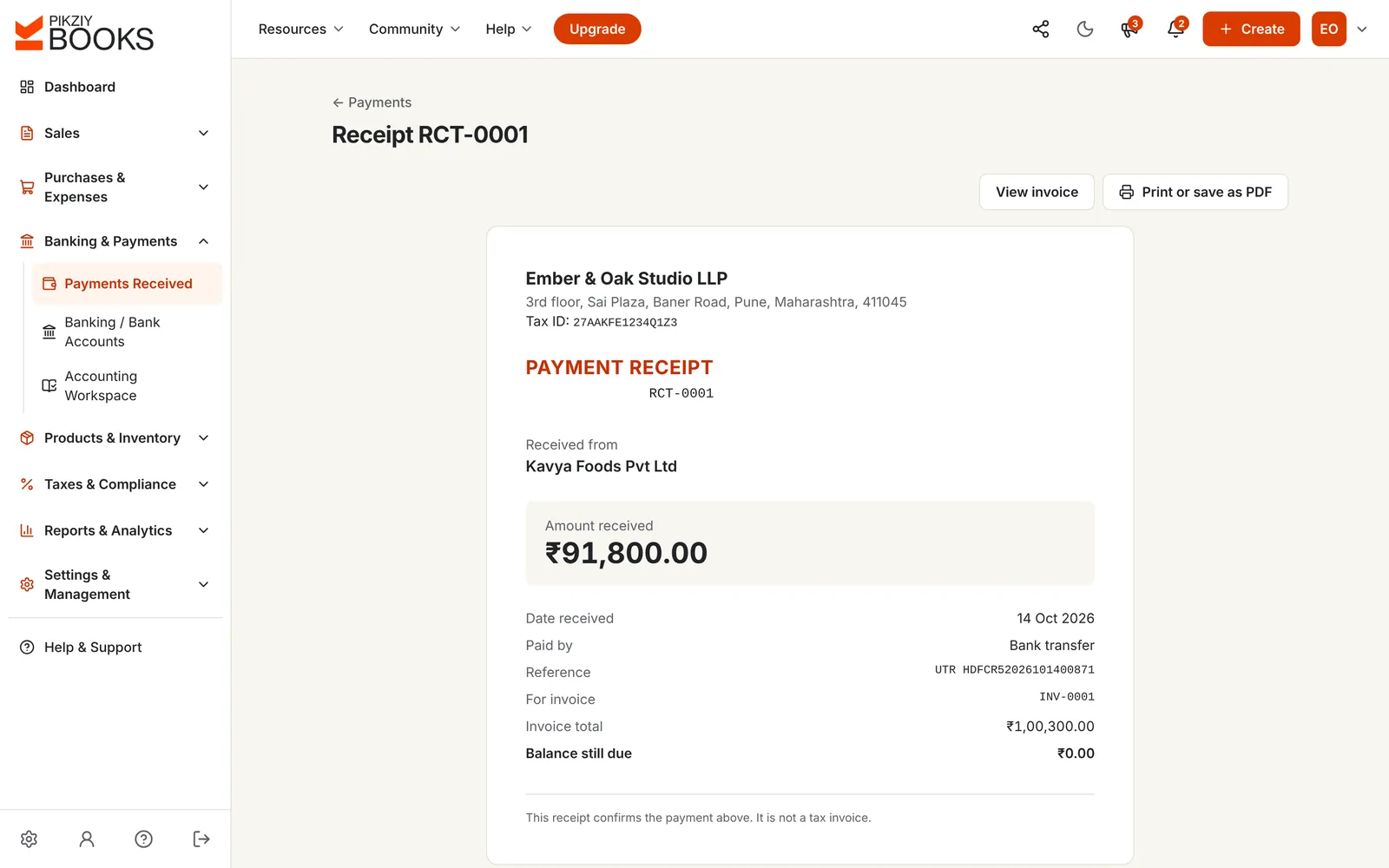
Each payment gets a numbered receipt with the date, method, reference, the invoice it pays and the balance still due. Print it or save it as a PDF.
Your own receipt series
Shows the balance still due
Clear that it is not a tax invoice
06
See every payment in one place
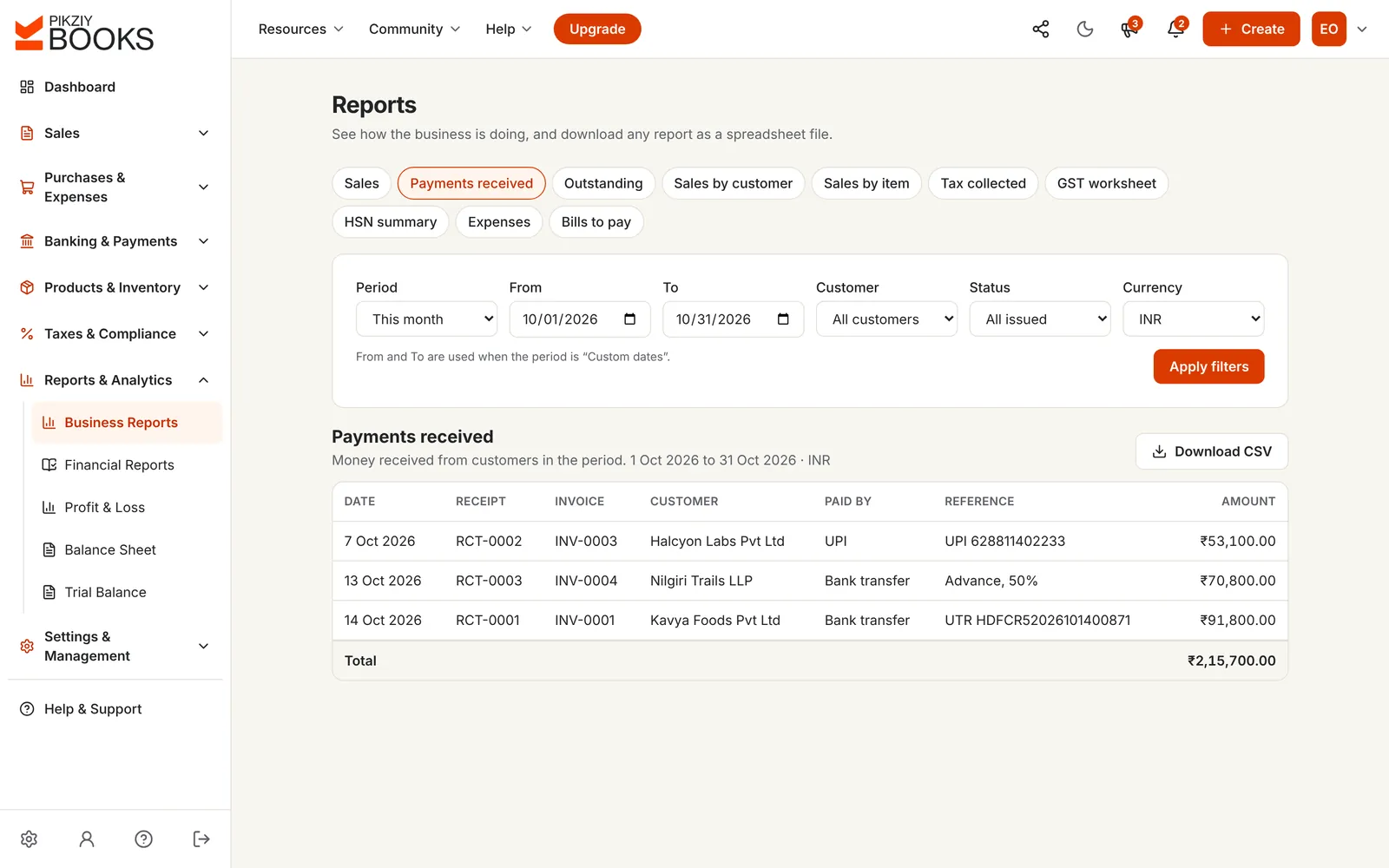
The Payments page lists everything received. On Growth and above, the Payments received report covers any period, for one customer or all, with a total.
Filter by period and customer
Receipt, invoice and reference on each line
CSV download on Business
FREE CALCULATOR
What a late payment really costs.
Enter the unpaid amount, the invoice date and your terms. See how late it is, what the wait costs you at your own borrowing rate, and, for micro and small enterprises, the interest the buyer owes under the MSMED Act.
DAYS LATE
90 days
Due by 25 Jul 2026. Every day it stays unpaid, your own money costs you.
What the delay costs you at 12%
₹4,846.68
Interest the buyer owes you by law (17.25% a year, compounded monthly)
₹6,973.41
Under sections 15 and 16 of the MSMED Act, 2006, a buyer must pay a micro or small supplier by the agreed date, no more than 45 days after accepting the goods or services (15 days if nothing was agreed), or pay compound interest at three times the RBI Bank Rate. The invoice date is used as the date of acceptance. Nothing you type is saved. General guidance, not legal advice.
Issued and not yet due, with nothing received. Reminders before the due date go out on your schedule.
Partly paid
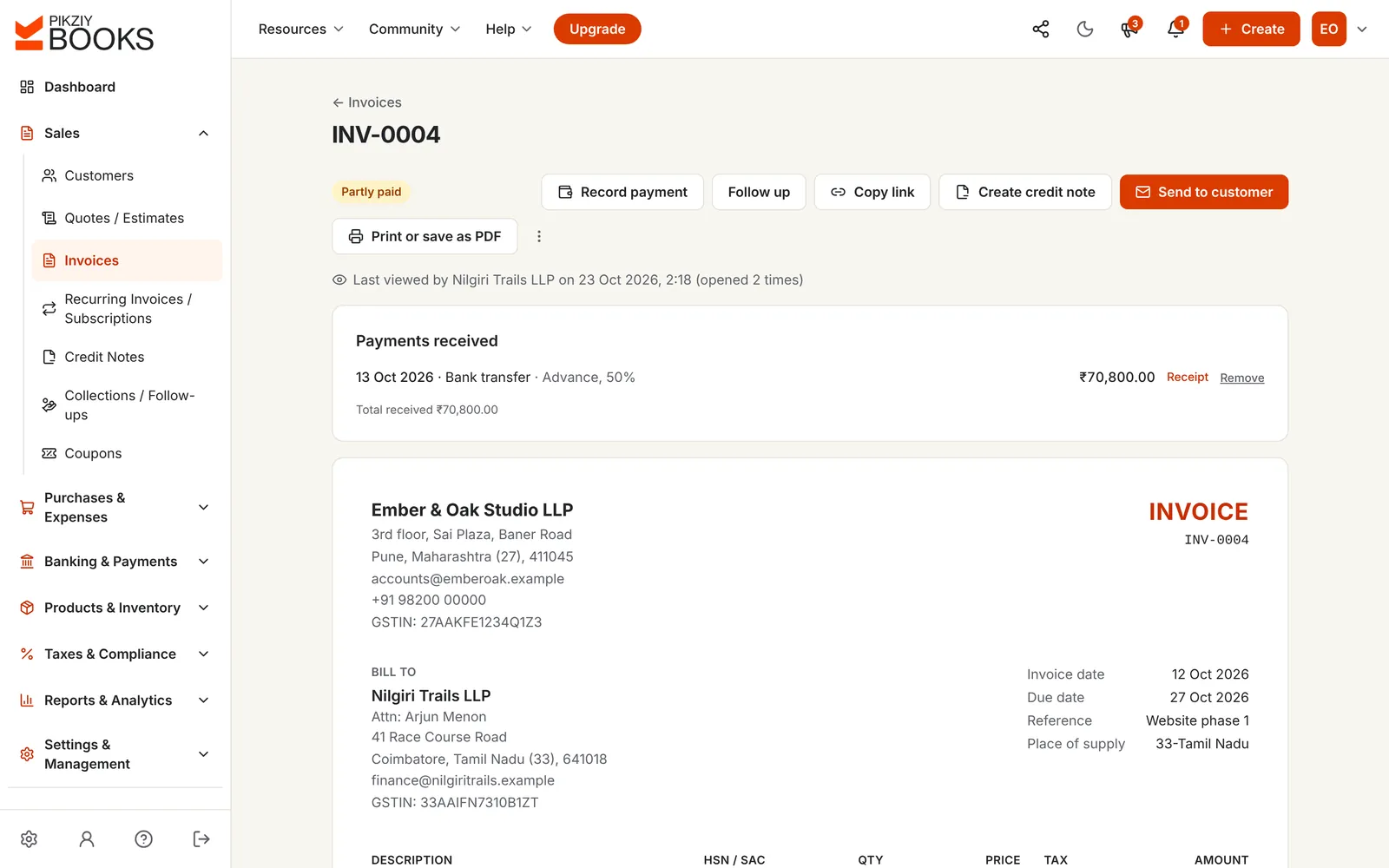
Some money has come in. The invoice shows what was received and the balance still due.
Paid
Payments and any TDS kept back cover the total. Reminders stop on their own.
Overdue
The due date has passed with a balance left. It counts in overdue on the dashboard and in Collections.
ON YOUR CUSTOMER'S PHONE
Paid from the reminder.
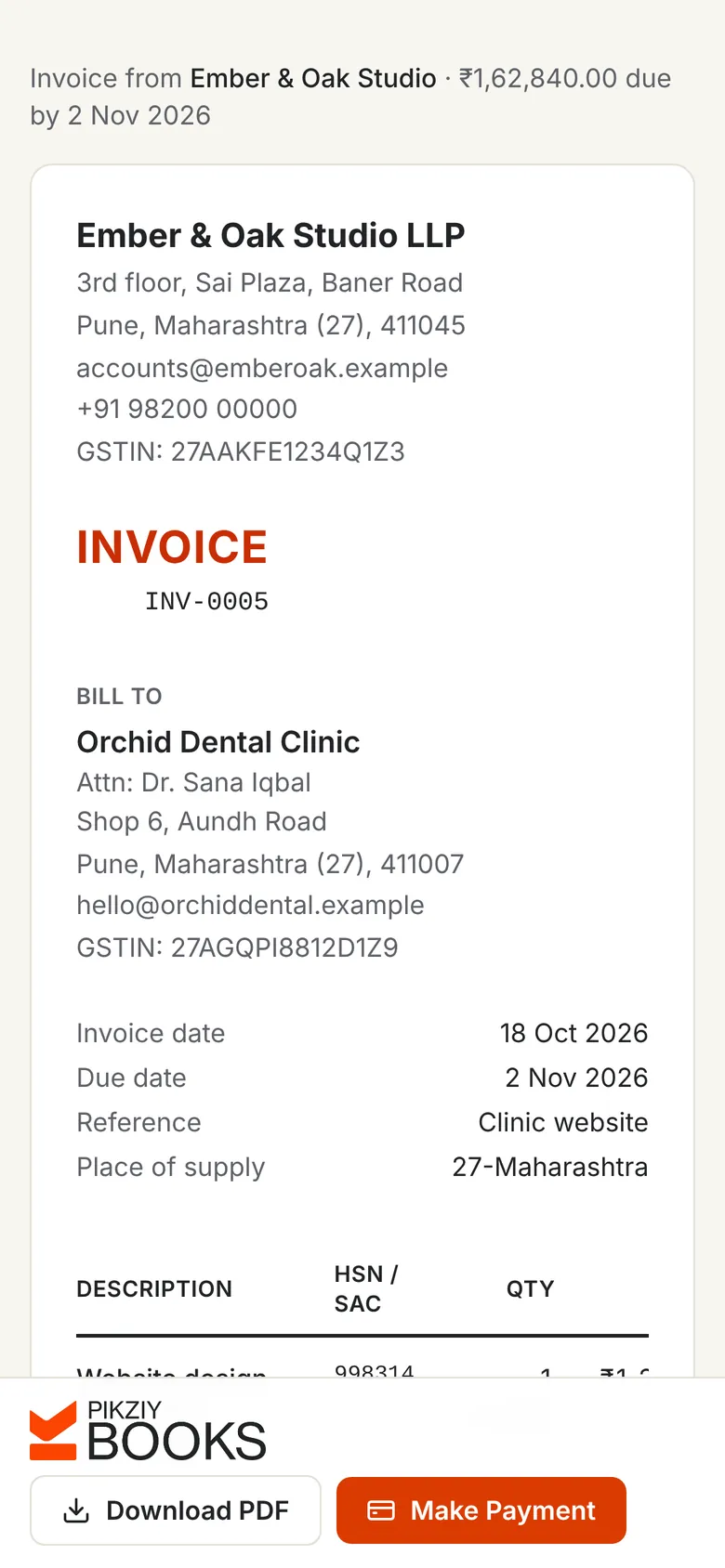
Reminders and invoices open on a phone with the amount, the due date and a button to pay. Your customer chooses card, UPI or net banking through your gateway, or pays you directly and attaches the screenshot.
No login, no app, and no “please share your account details” on WhatsApp.
SPREADSHEET OR SOFTWARE?
Why a payments sheet falls behind.
Tracking payments in a spreadsheet compared with PikZiy Books
Spreadsheet
PikZiy Books
Online payments
Copied in from the gateway
Recorded for you
Bank and UPI payments
Matched by guesswork
Reported by the customer, with proof
Part payments and TDS
Extra columns, easy to miss
Balance and status worked out
Overdue invoices
A formula, if someone keeps it
Shown from the day after the due date
Reminders
Written and sent by hand
Sent on your schedule, with a pay button
Receipts
Made separately, if at all
Numbered, for every payment
WHAT YOU GET
Everything between “sent” and “paid”.
Payment status on every invoice
Unpaid, Partly paid, Paid or Overdue, worked out for you.
Online payments
Razorpay, Cashfree or Easebuzz, into your own account, with no fee from us.
Payments with proof
Customers report bank and UPI payments with a screenshot; you confirm.
Part payments and TDS
Record what arrived and what was kept back; the balance updates.
Numbered receipts
Print or save each one as a PDF.
Automatic reminders
Before, on and after the due date, by email, with quiet days.
Thank-you emails
Sent when a payment is recorded, with the amount still to pay.
Dashboard
Owed, overdue, due this week and received this month.
Payments received report
Any period, any customer, with totals.
Growth plan and above
Collections and promises to pay
Follow-ups, notes, disputes and ageing by customer.
Growth plan and above
13-week cash forecast
Money due in each week from invoices and promises.
Growth plan and above
Bank reconciliation
Match your bank's CSV statement with the payments in your books.
Business plan and above
PLANS
Which plan you need.
Payment status, online payments, receipts and reminders are on every plan. Reports and collections start on Growth.
Features by plan
Feature
Starter
Growth
Business
Enterprise
People who can sign in
1
3
10
25
Payment status, part payments and TDS
Included
Included
Included
Included
Online payments and payments with proof
Included
Included
Included
Included
Numbered receipts and reminders
Included
Included
Included
Included
Payments received report
−Not included
Included
Included
Included
Collections, ageing and cash forecast
−Not included
Included
Included
Included
Bank reconciliation
−Not included
−Not included
Included
Included
Every plan has unlimited invoices, customers and items, and starts with a 14-day free trial. Prices are published when sign-ups open in November 2026. Businesses that sign up from 1 November 2026 to 30 April 2027 and pay for a year get 18 months for the price of 12. Compare every feature
QUESTIONS
Asked, and answered.
What is payment tracking software?
+
Payment tracking software records the money your customers pay against each invoice, so you always know what is paid, what is partly paid and what is overdue. Good payment tracking software also lets customers pay online, sends reminders before and after the due date, and gives each payment a receipt.
How do I track customer payments in PikZiy Books?
+
Every invoice shows Unpaid, Partly paid, Paid or Overdue, worked out from the payments recorded against it. Payments made online through your gateway are recorded for you; bank transfers, UPI, cheques and cash you record yourself in a few seconds, or confirm when the customer reports them. The dashboard shows what is owed, what is overdue and what came in this month.
Can customers pay an invoice online?
+
Yes. Connect your own Razorpay, Cashfree or Easebuzz account and the invoice link gets a Make Payment button for cards, UPI, net banking and wallets. The money goes straight to your gateway account; PikZiy Books never holds it and adds no fee of its own. Your gateway's usual charges apply.
What if a customer pays by bank transfer or UPI instead?
+
Switch on manual payments and add your bank or UPI details. Your customer pays directly, then tells you from the invoice link how they paid, with the reference and a screenshot or PDF as proof. You get an email, check it against your bank statement and record the payment in one click, or dismiss it.
How do I record a part payment?
+
Open the invoice and choose Record payment, then lower the amount to what was received. The invoice shows Partly paid and the balance still due. Record the rest the same way when it arrives; each payment gets its own numbered receipt. See advance and partial payments.
My customer deducted TDS. How do I record that?
+
Enter the amount that reached your bank and, separately, the TDS kept back and its section, such as 393 (194J under the old Act). Together they settle the invoice, and the TDS is kept as TDS receivable for your income tax. Our guide to TDS on professional invoices explains the 2025 Act.
Does PikZiy Books send payment reminders?
+
Yes, by email, on a schedule you set: before the due date, on it and after it, up to six steps, each gentle, firm or final, with quiet days when nothing is sent. Each reminder has a button to pay. Reminders stop once the invoice is paid. WhatsApp and SMS reminders are coming soon.
Do customers get a receipt?
+
Every payment gets a numbered receipt, such as RCT-0001, that you can print or save as a PDF, and you can switch on a thank-you email that is sent to the customer when a payment is recorded, with the amount still to pay.
Can I see all payments received in a month?
+
The Payments page lists every payment with its invoice, customer, method and reference. On Growth and above, the Payments received report covers any period, by customer if you like, and Business adds a CSV download for your accountant.
What happens to a late invoice?
+
From the day after its due date the invoice shows Overdue and the dashboard counts it. On Growth and above, Collections lists overdue invoices with promises to pay, notes and the next follow-up date, ages what each customer owes, and forecasts the cash due in over the next 13 weeks.
Can a micro or small business charge interest on late payments?
+
Under the MSMED Act, 2006, a buyer must pay a micro or small supplier within the agreed time, which can't exceed 45 days, or pay compound interest at three times the RBI Bank Rate. The calculator on this page works it out. PikZiy Books does not add this interest to invoices for you.